Exchange | Exchange Server | Management
The administration and maintenance of Microsoft Exchange Server to ensure secure, reliable, and efficient email and collaboration services across an organization.
This browser is no longer supported.
Upgrade to Microsoft Edge to take advantage of the latest features, security updates, and technical support.
' cx='32' cy='32' r='32' /%3E%3Ctext x='50%25' y='55%25' dominant-baseline='middle' text-anchor='middle' fill='%23FFF' %3EMR%3C/text%3E%3C/svg%3E)
Hi
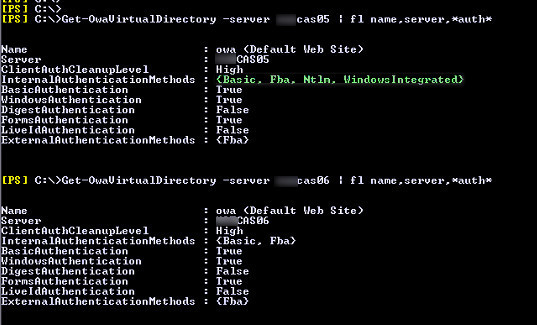
I am in a situation in which Get-OwaVirtualDirectory shows me different values for "InternalAuthenticationMethods" parameter between servers (I have 2010 & 2013 CAS servers).
How can I change the value for "InternalAuthenticationMethods"?
Resetting IIS, or making authentication changes in GUI doesn't help.
Set-OwaVirtualDirectory does not give me that option.
I want to change it to "Basic, Fba"
Would you please help?
Login in to ECP Console
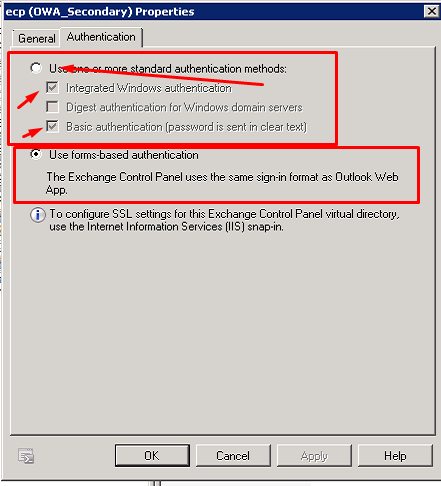
Navigate to the virtual directory - Change from forms to intergrated and Basic settings - Apply the settings
Reset IIS
Change back to Use forms-based Authentication
' cx='32' cy='32' r='32' /%3E%3Ctext x='50%25' y='55%25' dominant-baseline='middle' text-anchor='middle' fill='%23FFF' %3EJS%3C/text%3E%3C/svg%3E)
Yes, looks like you have found the method to your issue. We could simply change the authentication method for virtual directories in ECP or EAC.
If you want to apply Basic and Fba, like you shared above, just select the option Use form-based authentication.
For Exchange server later than 2013, the operation is similar as well. In EAC => servers=> virtual directories
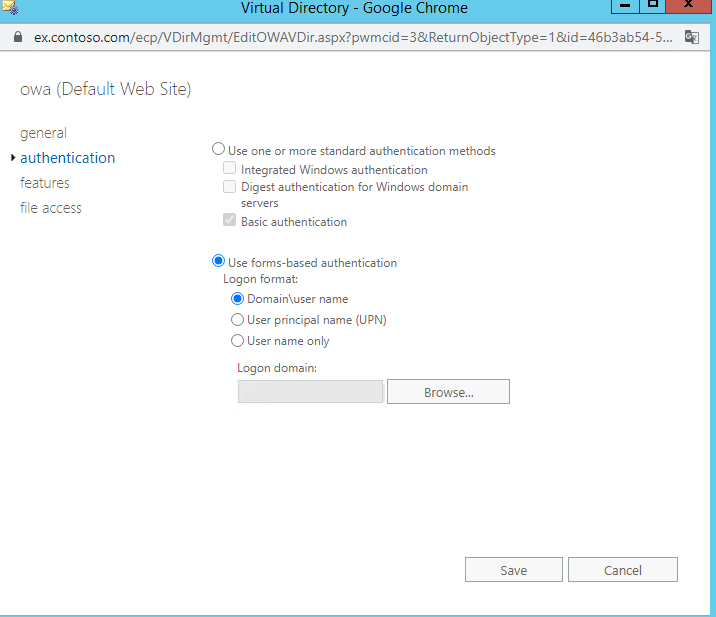
After you change the method, don't forget to restart IIS by running iisreset

You could also refer to this link to get more information about Exchange Server 2010 Outlook Web App Authentication Settings
Please Note: Since the web site is not hosted by Microsoft, the link may change without notice. Microsoft does not guarantee the accuracy of this information.
If an Answer is helpful, please click "Accept Answer" and upvote it.
Note: Please follow the steps in our documentation to enable e-mail notifications if you want to receive the related email notification for this thread.