Developer technologies | .NET | Xamarin
A Microsoft framework for building cross-platform mobile apps using .NET and C# with native performance and user interfaces.
This browser is no longer supported.
Upgrade to Microsoft Edge to take advantage of the latest features, security updates, and technical support.
' cx='32' cy='32' r='32' /%3E%3Ctext x='50%25' y='55%25' dominant-baseline='middle' text-anchor='middle' fill='%23FFF' %3EQR%3C/text%3E%3C/svg%3E)
Hello,
I will summarize my app for you:
I have a collection of type Activity which contains all of my activities.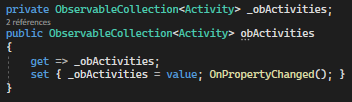
I would like to show on my page every activities. Each activities contains a title (string) and positions (GeoPoint). For every activites I would like to show a map with polyline of my positions and a label (not on the map) with the title.
To do it, I created a collection of Map that contains every map (with polyline) of every activities.
Here is my code :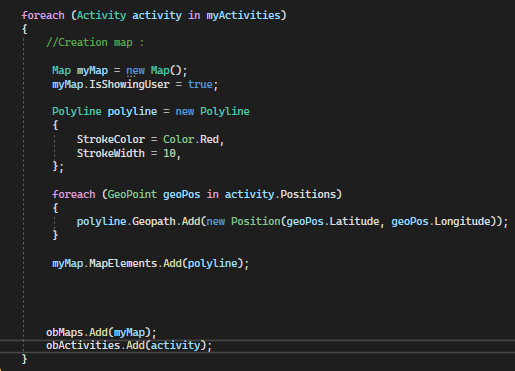
Here is my XAML : 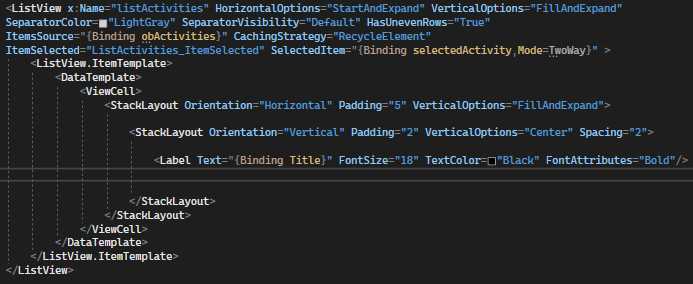
The title is well display. But I don't know how to show my maps. I tried several things but nothing works. May be you can help me ? Thanksss :)
' cx='32' cy='32' r='32' /%3E%3Ctext x='50%25' y='55%25' dominant-baseline='middle' text-anchor='middle' fill='%23FFF' %3EA%3C/text%3E%3C/svg%3E)
Hello,
Welcome to our Microsoft Q&A platform!
I need to use polyline to show few positions ...I did this but I don't know where I have to put {binding Positions} this is my problem.
Native Xamarin.Forms.Maps do not have this property to bind it. But you can create a contentview then add BindableProperty to achieve it. Here is ContentView called MyCustomMap.xml, I add maps:Map control to it.
   <ContentView xmlns="http://xamarin.com/schemas/2014/forms"
                xmlns:x="http://schemas.microsoft.com/winfx/2009/xaml"
                xmlns:maps="clr-namespace:Xamarin.Forms.Maps;assembly=Xamarin.Forms.Maps"
                x:Class="ImageLoadingDemo.MyCustomMap">
       <ContentView.Content>
           <StackLayout>
               <maps:Map
                                       x:Name="maps"
                                       MoveToLastRegionOnLayoutChange="True"
                                       HasScrollEnabled="false"
                                      WidthRequest="300" HeightRequest="300"
                                       Margin="0,10,10,0"/>
           </StackLayout>
       </ContentView.Content>
   </ContentView>
Then I add BindableProperty called PolylinePostionProperty draw a Polyline. I add the postion to the polyline.Geopath in the PolylinePostionChange method
   public partial class MyCustomMap : ContentView
       {
           public MyCustomMap()
           {
               InitializeComponent();
           }

           public static readonly BindableProperty PolylinePostionProperty = BindableProperty.Create("PolylinePostion", typeof(List<Position>), typeof(MyCustomMap), null, propertyChanged: PolylinePostionChange);
           public List<Position> PolylinePostion
           {
               get { return (List<Position>)GetValue(PolylinePostionProperty); }
               set { SetValue(PolylinePostionProperty, value); }
           }
           private static void PolylinePostionChange(BindableObject bindable, object oldValue, object newValue)
           {
               MyCustomMap view = bindable as MyCustomMap;
               if (view != null)
               {
                   List<Position> polylinePostions = (List<Position>)newValue;
                   view.maps.MoveToRegion(MapSpan.FromCenterAndRadius(new Position(polylinePostions[0].Latitude, polylinePostions[0].Longitude), Distance.FromMiles(1)));
                   Polyline polyline = new Polyline
                   {
                       StrokeColor = Color.Blue,
                       StrokeWidth = 12,

                   };
                   foreach (var item in polylinePostions)
                   {
                       polyline.Geopath.Add(item);
                   }

                   view.maps.MapElements.Add(polyline);

               }

           }
In the end, I use this contentview to the listview.
   <ListView HorizontalOptions="StartAndExpand"
                     VerticalOptions="FillAndExpand"
                     ItemsSource="{Binding obAcitivities}"
                     CachingStrategy="RecycleElement"
                     HasUnevenRows="True"
                     >
               <ListView.ItemTemplate>
                   <DataTemplate>
                       <ViewCell>
                           <StackLayout Orientation="Horizontal" Padding="5" VerticalOptions="FillAndExpand">
                               <StackLayout Orientation="Vertical" Padding="2" VerticalOptions="Center" Spacing="2">
                                   <Label Text="{Binding Title}"></Label>
                                   <imageloadingdemo:MyCustomMap PolylinePostion="{Binding PolylinePostion}" ></imageloadingdemo:MyCustomMap>

                               </StackLayout>


                           </StackLayout>
                       </ViewCell>
                   </DataTemplate>
               </ListView.ItemTemplate>

           </ListView>
Best Regards,
Leon Lu
If the answer is the right solution, please click "Accept Answer" and kindly upvote it. If you have extra questions about this answer, please click "Comment".
Note: Please follow the steps in our documentation to enable e-mail notifications if you want to receive the related email notification for this thread.
Hello. Thx for your reply. I don't want "pin" because it's only 1 point (lat,long). I need to use polyline to show few positions ...
<map:Map WidthRequest="100" HeightRequest="100" >
        <map:Map.MapElements>
              <map:Polyline>
                     <map:Polyline.Geopath>
                            <map:Position>
                                 <x:Arguments/>
                            </map:Position>
                    </map:Polyline.Geopath>
              </map:Polyline>
      </map:Map.MapElements>
</map:Map>
I did this but I don't know where I have to put {binding Positions} this is my problem.
Please see my updated answer. If you need a viewmodel to make a test. Here is my code.
public class MyViewModel
    {
        public ObservableCollection<Acitivity> obAcitivities { get; set; }
        public MyViewModel()
        {
           obAcitivities = new ObservableCollection<Acitivity>();
            List <Position> polylinePostion = new List<Position>();
            polylinePostion.Add(new Position(47.6381401, -122.1317367));
            polylinePostion.Add(new Position(47.6381473, -122.1350841));
            polylinePostion.Add(new Position(47.6382847, -122.1353094));
            polylinePostion.Add(new Position(47.6384582, -122.1354703));
            polylinePostion.Add(new Position(47.6401136, -122.1360819));
            polylinePostion.Add(new Position(47.6403883, -122.1364681));
            obAcitivities.Add(new Acitivity() { Title="test1", Positions=new Position(47.6381401, -122.1317367), PolylinePostion= polylinePostion });
            obAcitivities.Add(new Acitivity() { Title = "test2", Positions = new Position(47.6381401, -122.1317367), PolylinePostion = polylinePostion });
            obAcitivities.Add(new Acitivity() { Title = "test3", Positions = new Position(47.6381401, -122.1317367), PolylinePostion = polylinePostion });
        }
    }
Here is my editted Acitivity.cs
public class Acitivity
    {
        public string Title { get; set; }
        public Position Positions { get; set; }
        public List<Position> PolylinePostion { get; set; }
    }
Thanks for your code !
public static readonly BindableProperty PolylinePositionProperty = new BindableProperty.Create("PolylinePosition", typeof(List<Position>), typeof(MyCustomMap), null, propertyChanged: PolylinePositionChange);
When I did
new BindableProperty.Create
is not recognized on my visual studio.
BindableProperty.Create comes from the Xamarin.Forms nuget pckage. You can write the completely name like this code.
public static readonly Xamarin.Forms.BindableProperty PolylinePostionProperty = Xamarin.Forms.BindableProperty.Create("PolylinePostion", typeof(List<Position>), typeof(MyCustomMap), null, propertyChanged: PolylinePostionChange);
Thanks it works ! ;)
I have 2 activities with differents positions (geopoint) like 2 positions. The 2 maps are well displayed but with 4 polylines (all polylines). Instead of 2. I think is due to the BindableProperty but I'm not sure. Can you confirm ?