Microsoft 365 and Office | SharePoint Server | For business
A family of Microsoft on-premises document management and storage systems.

This browser is no longer supported.
Upgrade to Microsoft Edge to take advantage of the latest features, security updates, and technical support.
' cx='32' cy='32' r='32' /%3E%3Ctext x='50%25' y='55%25' dominant-baseline='middle' text-anchor='middle' fill='%23FFF' %3ENT%3C/text%3E%3C/svg%3E)
I had SharePoint 2013 single server and got the following error when I start/add distributed cached services.
Run PowerShell:
PS C:\Windows\system32> $instanceName ="SPDistributedCacheService Name=SPCache"
$serviceInstance = Get-SPServiceInstance | ? {($.service.tostring()) -eq $instanceName -and ($.server.name) -eq $env:computername}
$serviceInstance.Provision()
You cannot call a method on a null-valued expression.
At line:3 char:1
When I run
PS C:\Windows\system32> Get-cachehost
HostName : CachePort Service Name Service Status Version Info
QAServer01.Parsons.com:22233 AppFabricCachingService UNKNOWN 0 [0,0][0,0]
QAServer02.Parsons.com:22233 AppFabricCachingService UNKNOWN 0 [0,0][0,0]
I see Distributed Cache service was not start in Central Admin so I started service and got the following error:
cacheHostInfo is null
QAServer02 had been disconnected and decommissioned from farm so only QAServer01 run SharePoint as single server.
What could be wrong? How can I start Distributed Cache correctly?
Thanks
Tee

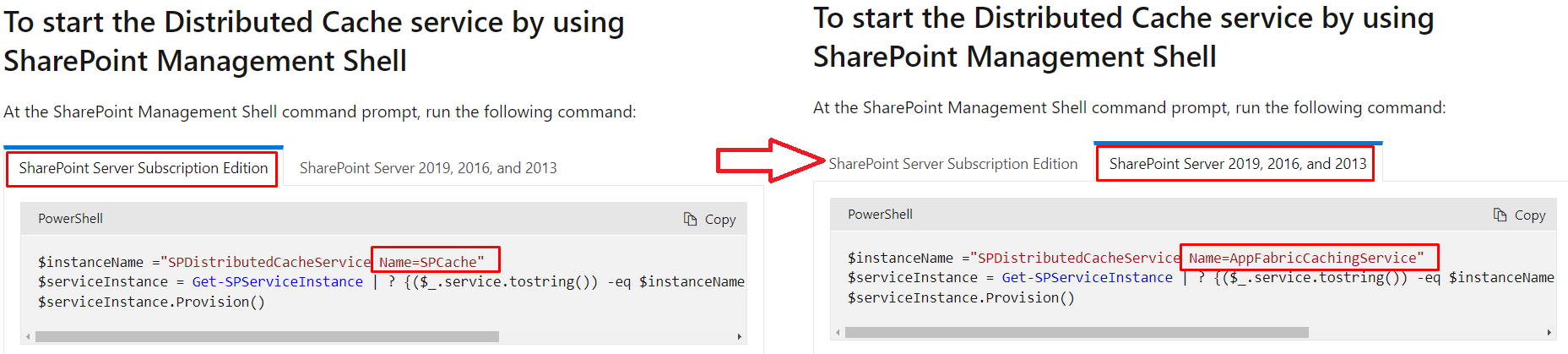
For SharePoint server 2013, please run the following command to start the Distributed Cache:
$instanceName ="SPDistributedCacheService Name=AppFabricCachingService"
$serviceInstance = Get-SPServiceInstance | ? {($_.service.tostring()) -eq $instanceName -and ($_.server.name) -eq $env:computername}
$serviceInstance.Provision()
Please note the difference between SharePoint Server Subscription Edition and SharePoint server 2013:
If the answer is helpful, please click "Accept Answer" and kindly upvote it. If you have extra questions about this answer, please click "Comment".
Note: Please follow the steps in our documentation to enable e-mail notifications if you want to receive the related email notification for this thread.
Thanks Julie, this is what I got when I run your proposed commands:
PS C:\Windows\system32> $instanceName ="SPDistributedCacheService Name=AppFabricCachingService"
PS C:\Windows\system32> $serviceInstance = Get-SPServiceInstance | ? {($.service.tostring()) -eq $instanceName -and ($.server.name) -eq $env:computername}
PS C:\Windows\system32> $serviceInstance.Provision()
Exception calling "Provision" with "0" argument(s): "cacheHostInfo is null"
At line:1 char:2
PS C:\Windows\system32>
Delete the Distributed Cache Instance as follows:
$instanceName ="SPDistributedCacheService Name=AppFabricCachingService"
$serviceInstance = Get-SPServiceInstance | ? {($_.service.tostring()) -eq $instanceName -and ($_.server.name) -eq $env:computername}
If($serviceInstance -ne $null){ $serviceInstance.Delete()}
Then recreate the service:
Add-SPDistributedCacheServiceInstance
Julie, I was able to delete but can't create. See below error.
PS C:\Windows\system32> Add-SPDistributedCacheServiceInstance
Add-SPDistributedCacheServiceInstance : ErrorCode<UnspecifiedErrorCode>:SubStatus<ES0001>:No such host is known
At line:1 char:5
Do you have any progress on this issue?
Please remember to update this thread if you need further assistance.

@JoyZ I have the same issue, in my case every command mentioned works but after running add-instance, it shows the status disabled with a new GUID, and Distributed Cache never gets started.