Microsoft 365 and Office | SharePoint | For business | Windows
A group of Microsoft Products and technologies used for sharing and managing content, knowledge, and applications.

This browser is no longer supported.
Upgrade to Microsoft Edge to take advantage of the latest features, security updates, and technical support.
' cx='32' cy='32' r='32' /%3E%3Ctext x='50%25' y='55%25' dominant-baseline='middle' text-anchor='middle' fill='%23FFF' %3EJT%3C/text%3E%3C/svg%3E)
Product: Sharepoint Lists Online
Creating a formula using SharePoint lists, is it possible to have a field that checks the following using formula
IF any of [A], [B] or [C] = "Fail", set column string to fail
Else If [A], [B] or [C] = "No Run", set column string to no run
Else = "Pass"
I would really appreciate the assistance.
Thanks
A group of Microsoft Products and technologies used for sharing and managing content, knowledge, and applications.
Answer accepted by question author
' cx='32' cy='32' r='32' /%3E%3Ctext x='50%25' y='55%25' dominant-baseline='middle' text-anchor='middle' fill='%23FFF' %3EED%3C/text%3E%3C/svg%3E)
Here're steps:
1.Create three column named A, B and C.
2.Create a calculated column with following formula.
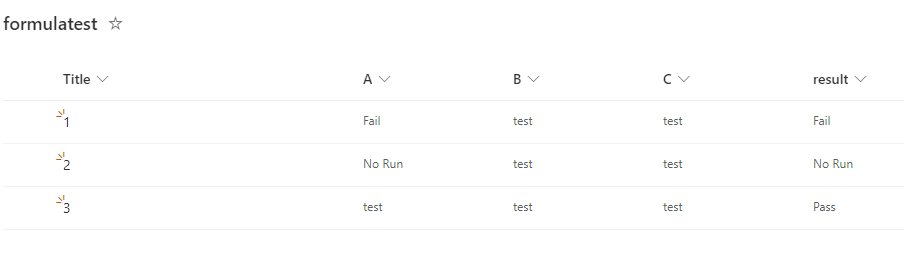
=IF(OR([A] = "Fail", [B] = "Fail",[C] = "Fail"), "Fail", IF(OR([A] = "No Run", [B] = "No Run",[C] = "No Run"), "No Run", "Pass"))
3.Result.
If the answer is helpful, please click "Accept Answer" and kindly upvote it. If you have extra questions about this answer, please click "Comment".
Note: Please follow the steps in our documentation to enable e-mail notifications if you want to receive the related email notification for this thread.