How to delegate "Delete Subtree" on an OU using powershell script

Mohd Arif 946 Reputation points
2021-11-30T13:13:02.43+00:00

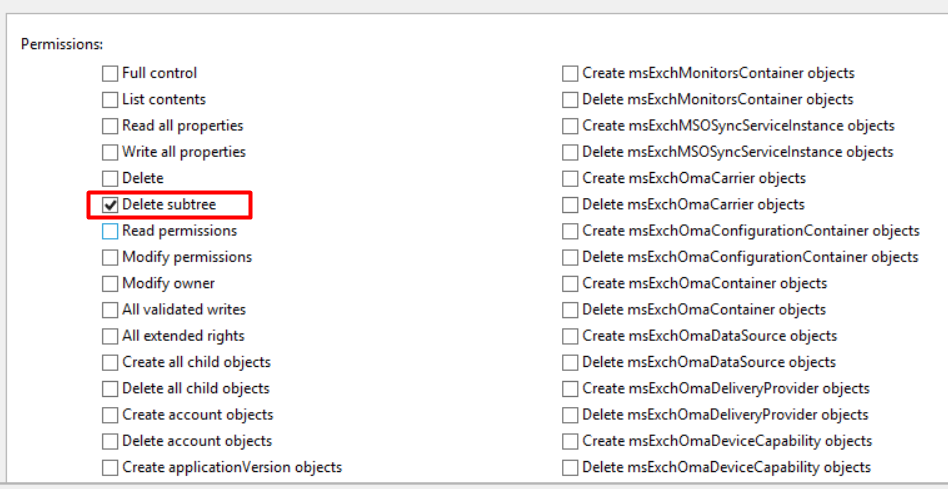
I have enabled Create Computer (CC) and Delete Computer (CD) for a group "SystemAdmins" on an OU. However, there is some child object of computers hence CCDC permission is not enough for such object because it has a child object. So, in this case I have to manually give "Delete Subtree" option to group so they can delete an object which have a child object. So, may I know how could I grant "Delete Subtree" option using PowerShell script. I am talking about below option. I used below script to grant delegate access.

*$ou = get-adorganizationalUnit -filter 'name -like "UK"' -SearchBase "dc=superit,dc=com" -SearchScope OneLevel

# Computers OU rights / Create,delete computer accounts  
$DelOU = "ou=Servers,"+$ou.DistinguishedName  
 

dsacls "$DelOU" /I:T /G "SystemAdmins:CCDC;computer"*

153610-image.png

Windows for business | Windows Client for IT Pros | Directory services | Active Directory
Windows for business | Windows Server | User experience | PowerShell
0 comments No comments
{count} votes

Answer accepted by question author
  1. Clément BETACORNE 2,496 Reputation points
    2021-12-13T20:29:14.763+00:00

    Ok so what you can do :

    1. Retrieve the SID of your group
    2. Use this SID to delegate the right

    Below an example :

    Import-Module ActiveDirectory
    
    $group = Get-ADGroup SystemAdmins
    $OUs = Get-ADOrganizationalUnit -Filter 'name -like "UK*"' -SearchBase "dc=superit,DC=com" -SearchScope OneLevel
    
    foreach($OU in $OUs) {
        $OUPath = "AD:\$($OU.DistinguishedName)"
        $acl = Get-Acl -Path $OUPath
        $ace = New-Object System.DirectoryServices.ActiveDirectoryAccessRule($group.SID,[System.DirectoryServices.ActiveDirectoryRights]::DeleteTree,[System.Security.AccessControl.AccessControlType]::Allow)
        $acl.AddAccessRule($ace)
        Set-Acl -Path $OUPath -AclObject $acl
    }

    

4 additional answers

Sort by: Most helpful
  1. Clément BETACORNE 2,496 Reputation points
    2021-11-30T15:31:00.357+00:00

    Hello,

    I'm not really a fan of dsacls for Active Directory delegation if you don't mind I think it will be easier for you to be granular for Active Directory with Get-Acl, Set-Acl and the System.DirectoryServices.ActiveDirectoryAccessRule, below an example that will give delete subtree using these elements :

    Import-Module ActiveDirectory #To access the AD PSProvider  
    $OUPath = "AD:\ou=servers,$($ou.DistinguishedName)"  
    $acl = Get-ACL -Path $OUPath  
    $ace = New-Object System.DirectoryServices.ActiveDirectoryAccessRule(<SystemAdminsSID>,[System.DirectoryServices.ActiveDirectoryRights]::DeleteTree,[System.Security.AccessControl.AccessControlType]::Allow)  
    $acl.AddAccessRule($ace)  
    Set-ACL -path $OUPath -AclObject $acl  
    

    If you need more information on ActiveDirectoryAccessRule :
    https://learn.microsoft.com/en-us/dotnet/api/system.directoryservices.activedirectoryaccessrule?view=dotnet-plat-ext-6.0

    Regards,


  2. Limitless Technology 40,076 Reputation points
    2021-11-30T20:32:22.137+00:00

    Hello @Mohd Arif

    I think you can use DT: Delete an object and all of its child objects.

    https://learn.microsoft.com/en-us/previous-versions/windows/it-pro/windows-server-2012-r2-and-2012/cc771151(v=ws.11)

    Hope this helps with your query,

    ----------

    --If the reply is helpful, please Upvote and Accept as answer--


  3. Mohd Arif 946 Reputation points
    2021-12-13T08:36:06.923+00:00

    I am not good on powershell stuff. please can you modify this script for me .

    $ou = get-adorganizationalUnit -filter 'name -like "UK*"' -SearchBase "dc=superit,dc=com" -SearchScope OneLevel

    Computers OU rights / Create,delete computer accounts

    $DelOU = "ou=Servers,"+$ou.DistinguishedName
    dsacls "$DelOU" /I:T /G "SystemAdmins:CCDC;computer"*

    0 comments No comments

  4. Mohd Arif 946 Reputation points
    2021-12-22T09:27:34.84+00:00

    @Clément BETACORNE Thank you very much for your comment. I will keep your solution for next implementation. Since this was urgent and I am a little aware about dsacls, I used below and it worked now. Last line will grant Delete Subtree permission.

    $ou = get-adorganizationalUnit -filter 'name -like "UK*"' -SearchBase "dc=superit,dc=com" -SearchScope OneLevel

    Computers OU rights / Create,delete computer accounts
    $DelOU = "ou=Servers,"+$ou.DistinguishedName
    dsacls "$DelOU" /I:T /G "SystemAdmins:CCDC;computer"
    dsacls "$DelOU" /I:S /G "SystemAdmins:DT;;computer"

    0 comments No comments

Your answer

Answers can be marked as 'Accepted' by the question author and 'Recommended' by moderators, which helps users know the answer solved the author's problem.