SQL Server Reporting Services
A SQL Server technology that supports the creation, management, and delivery of both traditional, paper-oriented reports and interactive, web-based reports.
This browser is no longer supported.
Upgrade to Microsoft Edge to take advantage of the latest features, security updates, and technical support.
' cx='32' cy='32' r='32' /%3E%3Ctext x='50%25' y='55%25' dominant-baseline='middle' text-anchor='middle' fill='%23FFF' %3ENB%3C/text%3E%3C/svg%3E)
HI,
I can't get a "sum" function to work in Power BI Paginated Reports. Anybody who can help or explane why this is not working?
I've a dataset from a REST API Json file in power BI and exported it as a PowerBI dataset. For example,
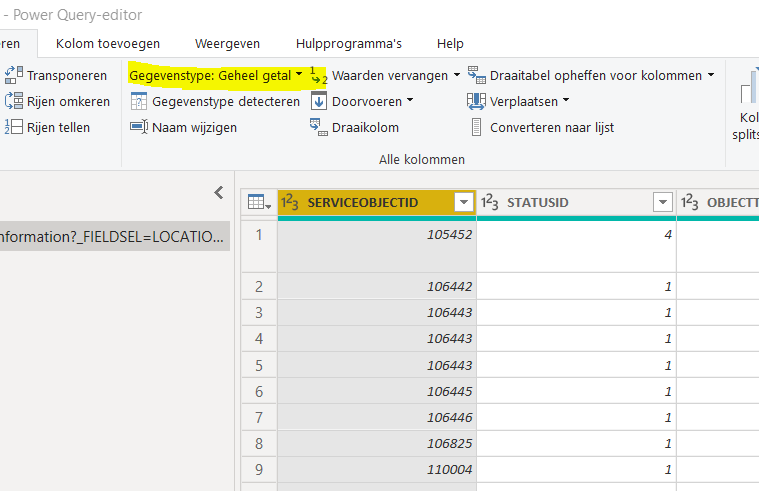
in power Query the field is a "Whole number"
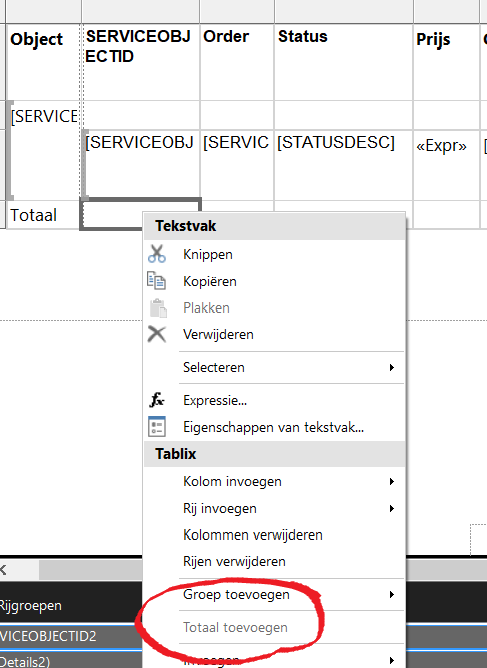
So i can not select "Add total" or make a expression like "=sum(Fields!...)
Anybody having a idea?

Hi @Nick Budel ,
Has your issue been resolved?
If the answer is helpful, please click "Accept Answer" and upvote it.
Best Regards,
Joy
Hi @Nick Budel ,
By default, a total is the sum of the numeric, non-null data in a group or in the data region, after filters are applied. To add totals for a group, click Add Total on the shortcut menu for the group in the Grouping pane. To add totals for an individual cell in the tablix body area, click Add Total on the shortcut menu for the cell.
The Add Total command is context-sensitive and enabled only for numeric fields. Depending on the tablix cell that you select, you can add a total for a single cell by selecting a cell in the tablix body area or for the entire group by selecting a cell in the tablix row group area or the tablix column group area.
In your case, you need to consider two situations:
If the answer is the right solution, please click "Accept Answer" and kindly upvote it. If you have extra questions about this answer, please click "Comment".
Note: Please follow the steps in our documentation to enable e-mail notifications if you want to receive the related email notification for this thread.
Hi Joy,
Thank you for your answer. It has been solved.
May I ask how you solved it?