SQL Server Box Getting Clean Install of Server 2019

cipher7836 86 Reputation points
2021-12-01T18:28:41.957+00:00

We have a two node cluster both running on Windows Server 2012 R2. The second node has Failover Cluster Manager present. It does not have SSMS. My question is...on node 1 do I evict node 2 first before doing the fresh install?

SQL Server | Other
{count} votes

Answer accepted by question author
  1. AmeliaGu-MSFT 14,011 Reputation points Microsoft External Staff
    2021-12-03T07:22:32.737+00:00

    Hi NickCoronado-4758,
    Thanks for your reply.

    What to do when you upgrade a node and don't let the primary know what you were doing and now can't add it back and getting yelled at by boss.

    Windows server Cluster Rolling Upgrade requires removing one node at a time from the cluster. And for Windows server 2012 R2, we need to upgrade to 2016 first, then upgrade from 2016 to 2019.

    Please check the upgrade steps in the following docs:
    Cluster operating system rolling upgrade
    Upgrading Failover Clusters on the same hardware

    And for WSFC issue, you can open a thread with the Windows-Server-Clustering tag to get more help.

    Best Regards,
    Amelia


    If the answer is the right solution, please click "Accept Answer" and kindly upvote it. If you have extra questions about this answer, please click "Comment".
    Note: Please follow the steps in our documentation to enable e-mail notifications if you want to receive the related email notification for this thread.


3 additional answers

Sort by: Most helpful
  1. AmeliaGu-MSFT 14,011 Reputation points Microsoft External Staff
    2021-12-02T02:09:36.777+00:00

    Hi NickCoronado-4758,

    Do you mean you want to install a new SQL Server stand-alone instance on a node of Windows failover cluster? If I misunderstood, please let me know.
    If so, you can just run the setup file on the node, and there is no need to evict node before installation.
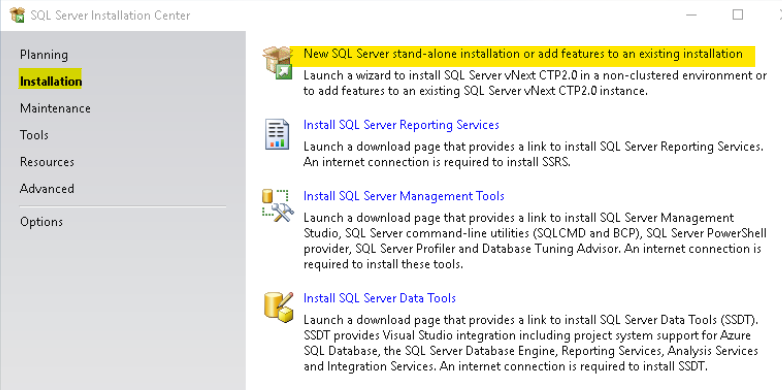
    You can click on Installation tab -> New SQL Server stand-alone installation or add features to an existing installation to install it in the SQL Server Installation Center.

    154230-image.png

    And here is a tutorial which might be helpful.
    For SSMS, you can download the latest version from here.

    We have a two node cluster both running on Windows Server 2012 R2.

    The SQL Server 2019 is not supported on Windows Server 2012 R2. Please refer to Operating system support.
    You can install SQL Server 2017 instead on Windows Server 2012 R2, or upgrade windows server to 2016 or later and then install SQL Server 2019.

    If you have any question, please feel free to let us know.

    Best Regards,
    Amelia


    If the answer is the right solution, please click "Accept Answer" and kindly upvote it. If you have extra questions about this answer, please click "Comment".
    Note: Please follow the steps in our documentation to enable e-mail notifications if you want to receive the related email notification for this thread.

    0 comments No comments

  2. Olaf Helper 47,586 Reputation points
    2021-12-02T06:46:24.37+00:00

    It does not have SSMS

    SSMS is a client tool, you can install it everywhere / on any client machine, it's not madatory to have it on the server where SQL Server is running.

    0 comments No comments

  3. cipher7836 86 Reputation points
    2021-12-02T13:54:11.913+00:00

    Okay guys...I didn't explain myself correctly.

    We have a two node cluster for testing purposes. It's setup with 4 Dummy databases in a Failover Cluster environment. We only installed SSMS on node 1. (Why am I telling you all this? It's not a relevant detail).

    We want to eventually upgrade the production servers from Server 2012 R2 to Server 2019. So my question above is a very simple run through of what we'll need to do later on.

    So for our simple case we just said, "Hmm...that node 2 doesn't run SSMS. Has FCM...looks kinda slow and old...let's go ahead and just put Server 2019 on there!"

    "Great! But...do we have to like evict node 2 before wiping everything and putting Server 2019 on it?

    "What do you mean?"

    "Imagine we just go ahead and wipe node 2. Then we upgrade it to Windows 2019. We add SQL back to node 2. We add FCM back to it. But when we try to add node 2 back, FCM on node 1 might be like, 'I have no idea who you are. Error!"

    GOOGLE: What to do when you upgrade a node and don't let the primary know what you were doing and now can't add it back and getting yelled at by boss

    0 comments No comments

Your answer

Answers can be marked as 'Accepted' by the question author and 'Recommended' by moderators, which helps users know the answer solved the author's problem.
