Microsoft 365 and Office | Excel | For business | Windows
A family of Microsoft spreadsheet software with tools for analyzing, charting, and communicating data

This browser is no longer supported.
Upgrade to Microsoft Edge to take advantage of the latest features, security updates, and technical support.
' cx='32' cy='32' r='32' /%3E%3Ctext x='50%25' y='55%25' dominant-baseline='middle' text-anchor='middle' fill='%23FFF' %3ER%3C/text%3E%3C/svg%3E)
can i ask a excel problem here?
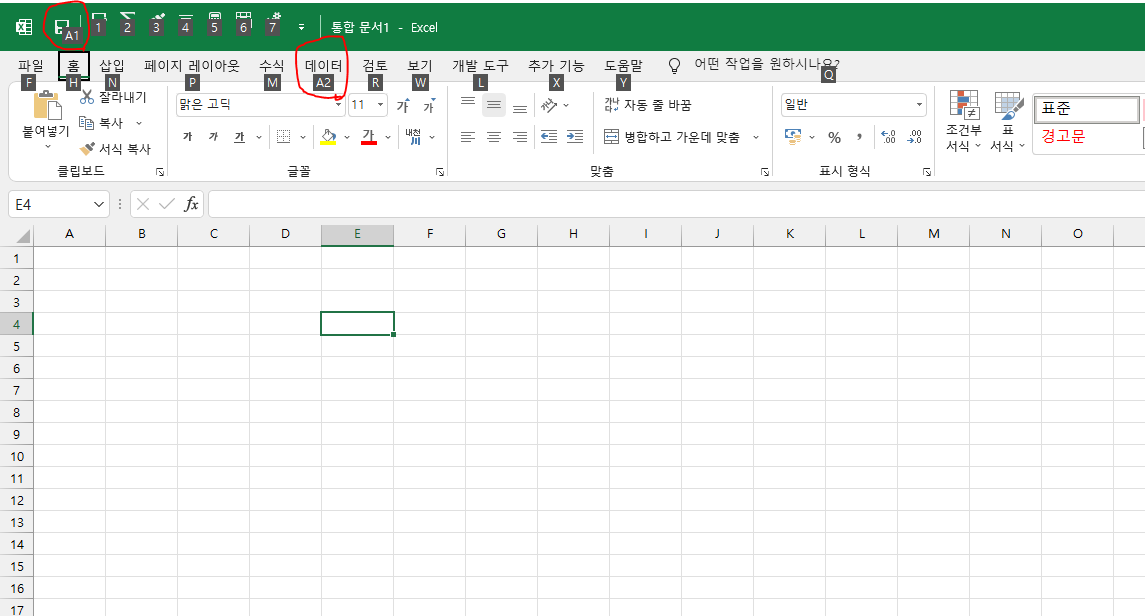
there is a save button on the left side from quick access toolbar after excel is automatically updated few days ago
and when i press "alt + a" to access data tab, there will be "1" shortcut on the new save button
so i have to press 2 one more time to access data tab.
so, I want to delete the second save button from the left side.
do you guys know about this problem?
and do you have any plan to fix it?
i dont need the save button, i dont want to press alt +a + 1 to save.
i can press ctrl + s to save
or alt + 1 , 2 , 3 , 4, etc on quick access toolbar.
i dont know why there should be a save button.
I look forward to hearing from you.

Hi @RYU
According to your image, it seems that your Excel uses a new interface that are "coming soon" for Microsoft 365 for Apps
Currently, I would suggest you try following steps to have a check.
Go to Computer\HKEY_CURRENT_USER\SOFTWARE\Microsoft\Office\16.0\Common\ExperimentConfigs\ExternalFeatureOverrides\excel, change the following three key values to false.
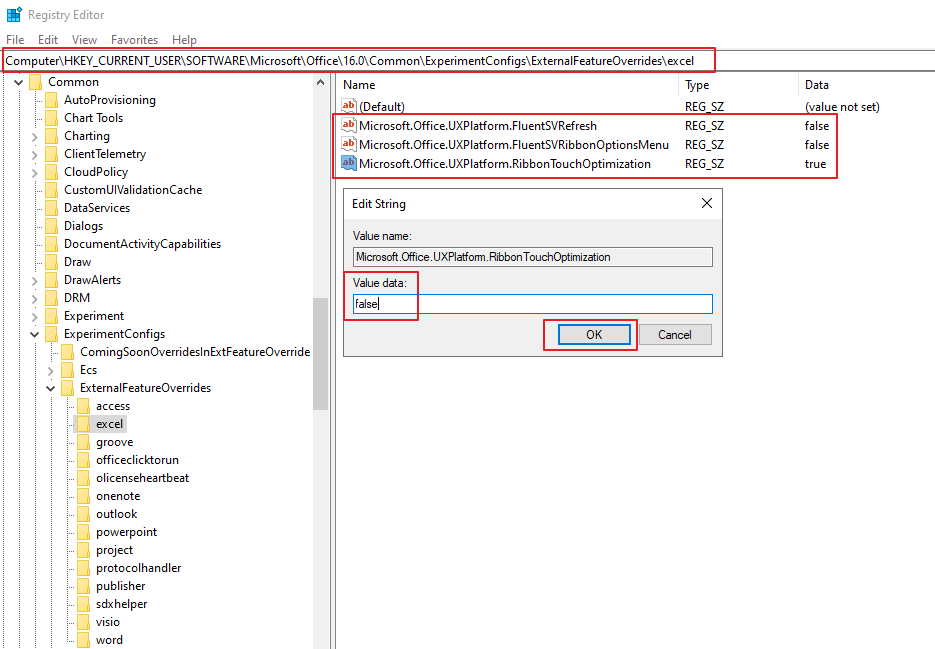
If needed, the same operation for Word (Computer\HKEY_CURRENT_USER\SOFTWARE\Microsoft\Office\16.0\Common\ExperimentConfigs\ExternalFeatureOverrides\word) and other Office apps.
Hope the information is helpfu to you.
If the answer is helpful, please click "Accept Answer" and kindly upvote it. If you have extra questions about this answer, please click "Comment".
Note: Please follow the steps in our documentation to enable e-mail notifications if you want to receive the related email notification for this thread.
wow! amazing
thanks a lot
it was very helpful!!