Developer technologies | .NET | Blazor
A free and open-source web framework that enables developers to create web apps using C# and HTML, developed by Microsoft.
This browser is no longer supported.
Upgrade to Microsoft Edge to take advantage of the latest features, security updates, and technical support.

We are working on a government-based project on which it takes a lot of paperwork just to open a single public-facing URL.
The organization wants to create a new SINGLE public-facing website (ASP.NET Core MVC app, with Web API endpoints) which will need to contain various context-specific sub-applications. We would like to have each sub-application to be it's own Blazor hosted WASM project. All of these will communicate with the same web API endpoints on the public-facing site.
Basically we want to create an MVC app (.NET Core) which will provide links for deploying multiple Blazor WASMs from it.
After much searching, I haven't seen any examples of how to do this. The closest I've seen is this:
https://learn.microsoft.com/en-us/aspnet/core/blazor/host-and-deploy/webassembly?view=aspnetcore-6.0#hosted-deployment-with-multiple-blazor-webassembly-apps
However in this example, it has each Blazor app use a different port #. This won't work for us.
Advice? Doable? Bad idea??
A free and open-source web framework that enables developers to create web apps using C# and HTML, developed by Microsoft.

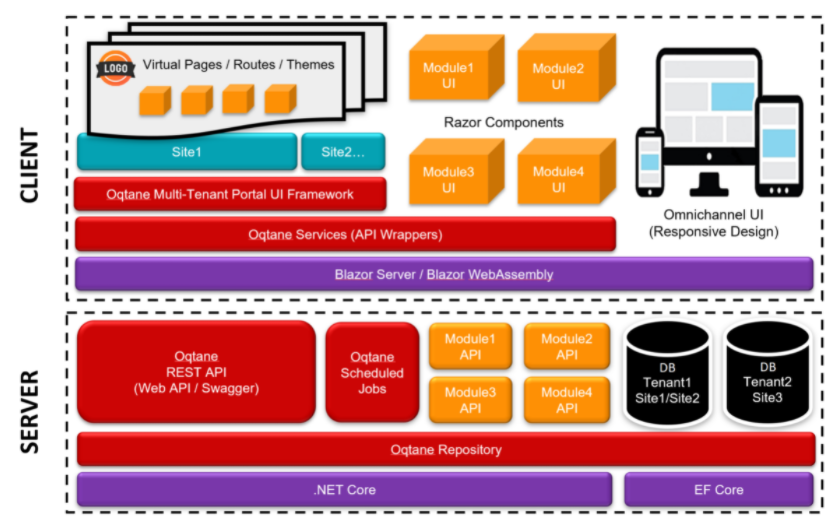
Oqtane will allow you to achieve this: https://github.com/oqtane/oqtane.framework
' cx='32' cy='32' r='32' /%3E%3Ctext x='50%25' y='55%25' dominant-baseline='middle' text-anchor='middle' fill='%23FFF' %3EBS%3C/text%3E%3C/svg%3E)
the browser limits you to one WASM loaded per website. generally blazor WASM are hosted by a static website, so you just need one static site with folders per sub application. the browser will see the each folder as its own site.
/app1/<blazor site>
/app2/<blazor site>
when you publish the blazor sites you need to set the base path as explained in the article you referenced. port numbers are fine for development.
note: an asp.net core site could host all the blazor sites in wwwroot. this would just be a deploy step.