Azure Logic Apps
An Azure service that automates the access and use of data across clouds without writing code.
This browser is no longer supported.
Upgrade to Microsoft Edge to take advantage of the latest features, security updates, and technical support.
' cx='32' cy='32' r='32' /%3E%3Ctext x='50%25' y='55%25' dominant-baseline='middle' text-anchor='middle' fill='%23FFF' %3EDP%3C/text%3E%3C/svg%3E)
Hello
I am new to Logic Apps and I have to solve the following problem
I have to send an email when one or more files are uploaded from a web UI to Azure ffile share storage.
I was thinking to use a HTTP trigger and pass in a POST request all the parameters that are dynamic, that is can change based on the user account: the recipient of the message, the Cc list, and the list of files uploaded which are to be attached to the mail
So, JSON object to send in the HTTP should be like
{
"to": "xxx@永爱不变 .zzz",
"subject": "Bla bla",
"html":"Mail body",
"attachments":["file1.csv","file2.txt"],
"path":"path-to-azure-storage"
}
I tried to use a foreach connector to build the full path of the file to attach, but never worked: I received either a 'compilation error' or an email without attachments
Thank you for your help

@Diego Polidori If you need to attach multiple files then you need to create an array of attachments and then pass the attachment variable to your Send email action.
In my workflow, I am getting the list of files in a particular blob, and after getting the blob content I am appending the content and fileName to the array variable in for loop of my workflow.
As the send email action uses the attachment parameter as the array in the below format
[{
  "ContentBytes": "contentbytes1",
  "Name": "fileName1"
},
{
  "ContentBytes": "contentbytes2",
  "Name": "fileName2"
}]
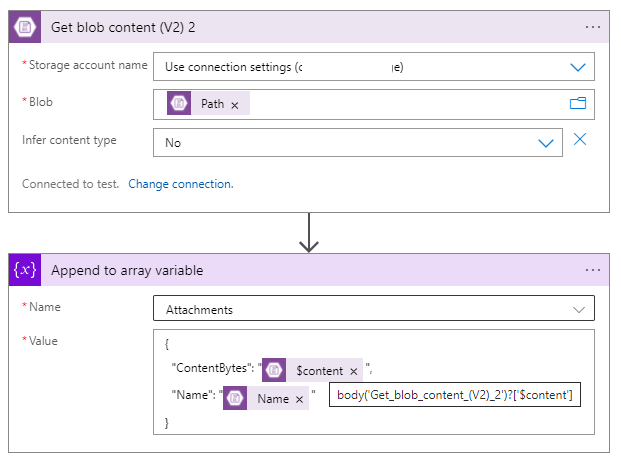
Note: I am getting the byte blob contents using $content as below
{
  "ContentBytes": "@{body('Get_blob_content_(V2)_2')?['$content']}",
  "Name": "@{items('For_each')?['Name']}"
}
In my Send Email action, I am passing the attachments variable to the Attachment of Send Email Action.
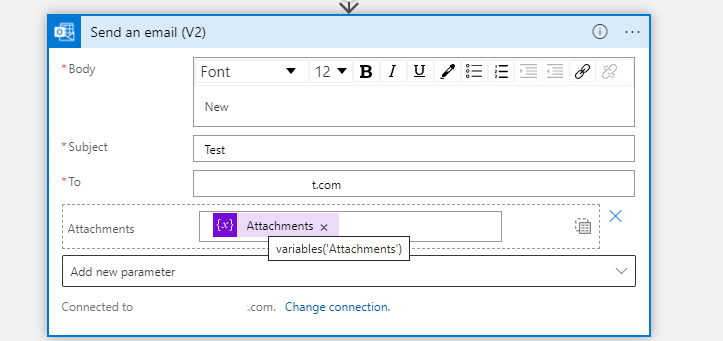
You can modify the flow and change the value as per your HTTP request body. Let me know if you need any assistance.

Using the array attachments is good when the number of file is unknown and you get it dynamically, but if you know which files you want to attached, then I prefer to use the detailed option instead of array.
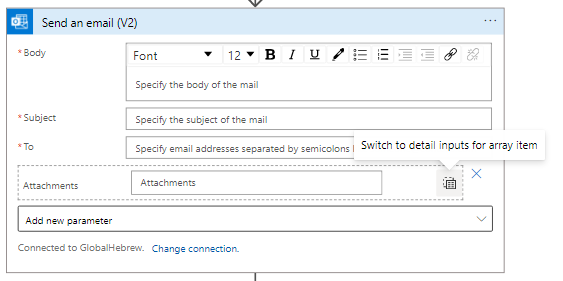
It's simpler to add multiple "get blob content" actions (one for each file) and no need for the append to array before. Instead, you can use the option "Add new item" for each file that you want to attach
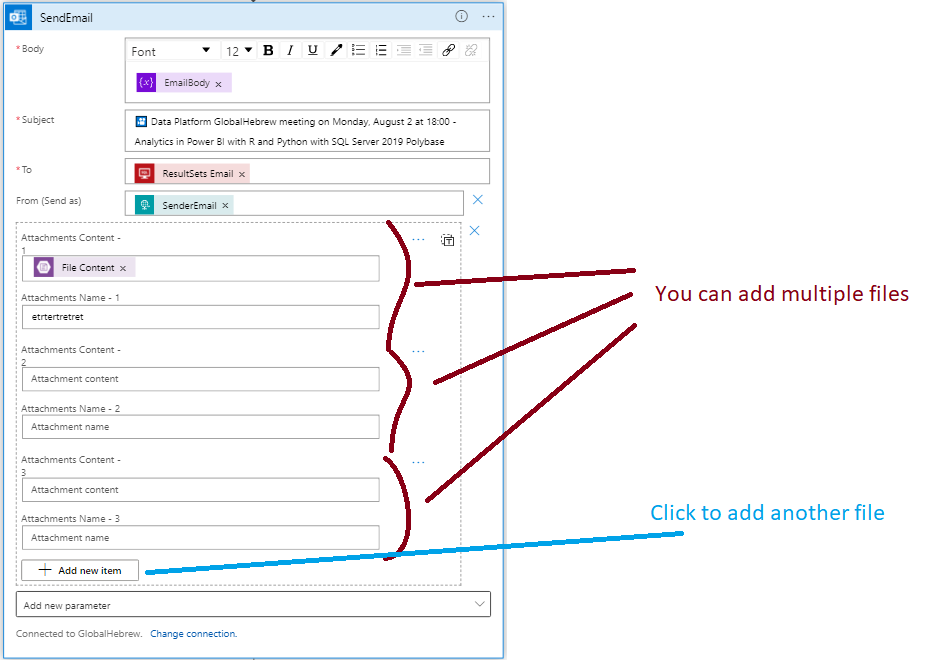
@Ronen Ariely If you know the number of files to be attached then your solution should work, In case if it is the dynamic number of attachments (as per @Diego Polidori scenario the files will be in the HTTP request will be dynamic) then you need to pass the array list to attachments.
This is exactly what I said a few minutes before your comment :-)
I added this about 4 minutes before your comment:
Using the array attachments is good when the number of file is unknown and you get it dynamically, but if you know which files you want to attached, then I prefer to use the detailed option instead of array.
probably I sent the edited message while you was writing yours :-)
Thank you, @MayankBargali-MSFT and @Ronen Ariely
You really helped me!
@Diego Polidori Thanks for your response. Glad to know that it helped. Feel free to 'Accept as Answer' so it can help other community members facing a similar issue.
@MayankBargali-MSFT : acceptance done!
Thank you again, I am using your advices in my current project
Best!
' cx='32' cy='32' r='32' /%3E%3Ctext x='50%25' y='55%25' dominant-baseline='middle' text-anchor='middle' fill='%23FFF' %3ENN%3C/text%3E%3C/svg%3E)
Note: I am getting the byte blob contents using $content as below
@MayankBargali-MSFT What does $content do in ContentBytes? It works fine for me without $content and throws error if I use it.
NOTE for others who might have faced a separate error: I was getting an error when I used this array variable while sending email: "Cannot convert the literal ... to expected Edm.Binary"
I overcame it by using base64() function for ContentBytes while defining the array variable:-
{
            "ContentBytes": "@{**base64**(body('Get_blob_content_(V2)_2'))}",
            "Name": "@{items('For_each')?['Name']}"
}
You might see the base64() disappear from UI even after you apply it. However, it will still be present in Code view (can see through "Peek Code"). This is expected behaviour: https://learn.microsoft.com/en-us/azure/logic-apps/workflow-definition-language-functions-reference#base64-encoding-and-decoding
EDIT: Formatting
' cx='32' cy='32' r='32' /%3E%3Ctext x='50%25' y='55%25' dominant-baseline='middle' text-anchor='middle' fill='%23FFF' %3EGM%3C/text%3E%3C/svg%3E)
any way to add conditions in array?
' cx='32' cy='32' r='32' /%3E%3Ctext x='50%25' y='55%25' dominant-baseline='middle' text-anchor='middle' fill='%23FFF' %3EJC%3C/text%3E%3C/svg%3E)
call base64() function on the file content, otherwise the attachment will not work.