Microsoft 365 and Office | Excel | For business | Windows
A family of Microsoft spreadsheet software with tools for analyzing, charting, and communicating data

This browser is no longer supported.
Upgrade to Microsoft Edge to take advantage of the latest features, security updates, and technical support.
' cx='32' cy='32' r='32' /%3E%3Ctext x='50%25' y='55%25' dominant-baseline='middle' text-anchor='middle' fill='%23FFF' %3ET%3C/text%3E%3C/svg%3E)
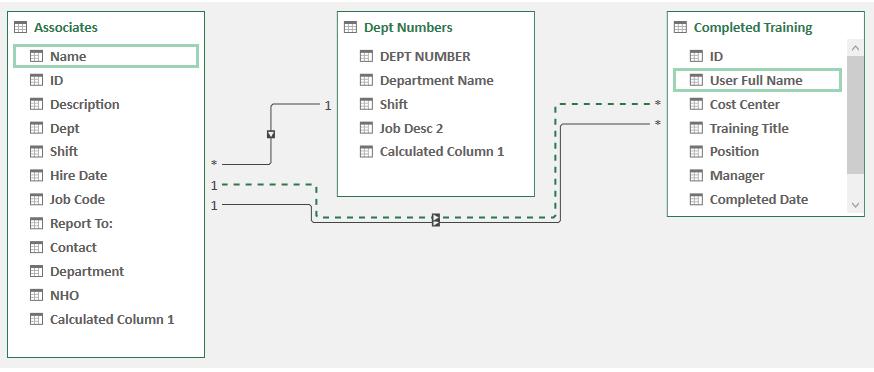
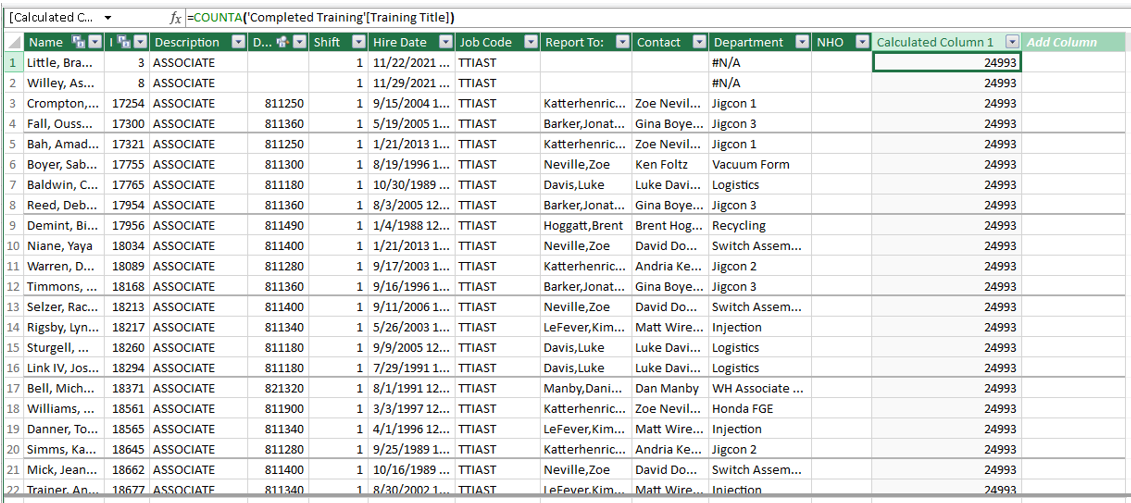
I am trying to learn Power Pivots. I have three tables joined and am trying to pull in how many training classes each associate has taken into another table. My tables are called Associate List, Dept Number and Completed Training. I am in the Associate List trying to create a formula that counts each class each associate has taken in the Completed Training table. They are joined by Dept between the Associate List and Dept Numbers and by ID between the Associate List and Completed Training. I have a formula in Associate List stating - =DISTINCTCOUNT('Completed Training'[Training Title]) which counts the total distinct training classes for the entire workbook. I want it to count them for each associate. What would my formula be?
(I don't know what to put in the Tags field.)

Hi @TRiggs ,
Could you please share us with some screenshots about your three tables.
Currently, I would suggest check whether CALCULATE function could be helpful.