Azure Data Factory
An Azure service for ingesting, preparing, and transforming data at scale.
This browser is no longer supported.
Upgrade to Microsoft Edge to take advantage of the latest features, security updates, and technical support.
' cx='32' cy='32' r='32' /%3E%3Ctext x='50%25' y='55%25' dominant-baseline='middle' text-anchor='middle' fill='%23FFF' %3ERA%3C/text%3E%3C/svg%3E)
I have a ADF pipeline which has two activities
Question1:
Function app will tell me the path of Input data and this path needs to passed as input to a Databricks Notebook. I tired linking them using the parameters in the settings tab but the pipeline fails.
Also I didn't find any document for reference on this.
Question2:
Post the Databricks activity how connect it to a service bus on the Job status.
An Azure service for ingesting, preparing, and transforming data at scale.

Hi @Rajamannar A K ,
Just checking in to see if the below answer helped. If this answers your query, do click  and upvote
  for the same. And, if you have any further query do let us know.
Hi @Rajamannar A K ,
Thank you for posting your Query in Microsoft Q&A Platform.
Once you get path from FunctionApp try to store it One variable using Set Variable activity. and Pass that variable as value to Databricks note book using Databricks notebook activity.
How to pass values to Notebook parameters from ADF Pipeline discussed in below video. Kindly check it once.
https://www.youtube.com/watch?v=quPsLwDjTds
Below is high level blue print of pipeline design.
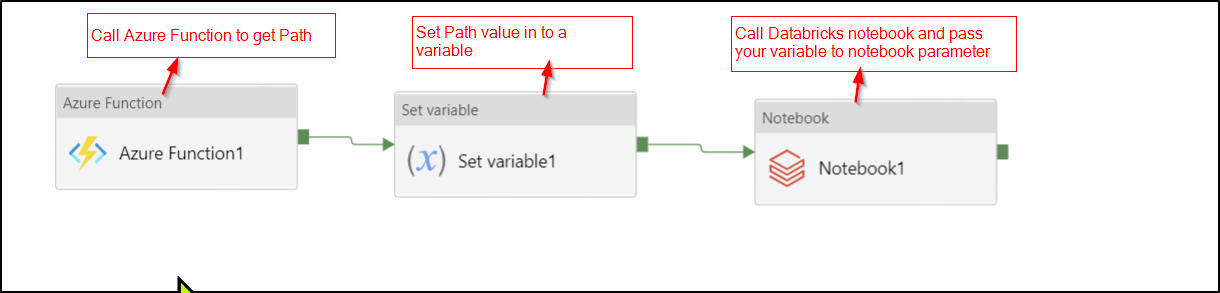
Azure data factory doesn't has service bus connector. However there are several options available to you. Kindly check below link where similar discussion happened.
https://learn.microsoft.com/en-us/answers/questions/111361/how-to-connect-service-bus-queue-to-azure-data-fac.html
Hope this helps. Please let us know if any further queries. Thank you.
----------------------
Please consider hitting Accept Answer button. Accepted answers helps community as well.
In Set Variable we can create a default value and pass them right, I wasn't able to set the value passed by Azure Functions.