Developer technologies | VB
An object-oriented programming language developed by Microsoft that can be used in .NET.
This browser is no longer supported.
Upgrade to Microsoft Edge to take advantage of the latest features, security updates, and technical support.
' cx='32' cy='32' r='32' /%3E%3Ctext x='50%25' y='55%25' dominant-baseline='middle' text-anchor='middle' fill='%23FFF' %3ECJ%3C/text%3E%3C/svg%3E)
Windows 10 Pro
Microsoft Visual Studio Community 2019
Version 16.11.7
VisualStudio.16.Release/16.11.7+31911.196
Microsoft .NET Framework
Version 4.8.04084
Installed Version: Community
I have an app that reads data from two different web pages and copies the data to a textbox.
Earlier this year,I had to switch to webview2 since the webpage I was going to wouldn't recognize netscape7 which is what the webbrowser control won't recognize it any longer. I used the old webbrowser control for the second webpage somce it couold select all of the page, copy it, set focus to the textbox and copy the data to the textbox with no problems .
I updated my code and decided to change both webbrowsers to webview2 in case the second webpage would stop using netscape as well. After I updated my code, ran into a problem. Webview2 doesn't highlight the data when I use ctrl a programically. I went back to the old webbrowser and it works again.
Bad code:
[code]
Public Sub Load_text_Box_Two()
Clipboard.Clear()
TXTBRK1.Clear()
Webview21.focus
SendKeys.SendWait("^a") 'ctrl+a
SendKeys.SendWait("^c") 'ctrl+c
Textbox.Focus()
SendKeys.SendWait("^v") ' paste.Focus()
'It copies text from the web into a textbox
End Sub
[/code]
Code that works.
[code]
Public Sub Load_text_Box_Two()
Clipboard.Clear()
TXTBRK1.Clear()
webbrowser1.Focus()
SendKeys.SendWait("^a") 'ctrl+a
SendKeys.SendWait("^c") 'ctrl+c
Textbox.Focus()
SendKeys.SendWait("^v") ' paste.Focus()
'It copies text from the web into a textbox
End Sub
[/code]
I searched the web for a solution, but evidently, I not searching for the right thing. From what little I was able to find, It appears to be a bug in webview2. Someone said to install the pre-release version of Webview2. I did that to no avail. Is there a way to programmically select all and copy from webview2? Thanks

Did you try some other Web pages, and Select( ) instead of Focus( )?
Thank you for responding. No, select doesn't work for Webview2. I did try it with the old browser and it did work, but not the new.
Both of Focus and Select seems to work. Did you try some other static Web pages?
Maybe you are trying to select the contents prematurely, when the page is not ready yet. Sometimes the pages are generated differently for different browsers.
How to reproduce the problem?

This test seems to work on my OS (Windows 10 21H1) ,
with a WebView2 and a RichTextBox, click on Button2 to test :
webView2.ExecuteScriptAsync("document.execCommand(""SelectAll"")")
webView2.ExecuteScriptAsync("document.execCommand(""Copy"")")
RichTextBox1.Focus()
RichTextBox1.Clear()
SendKeys.SendWait("^v")
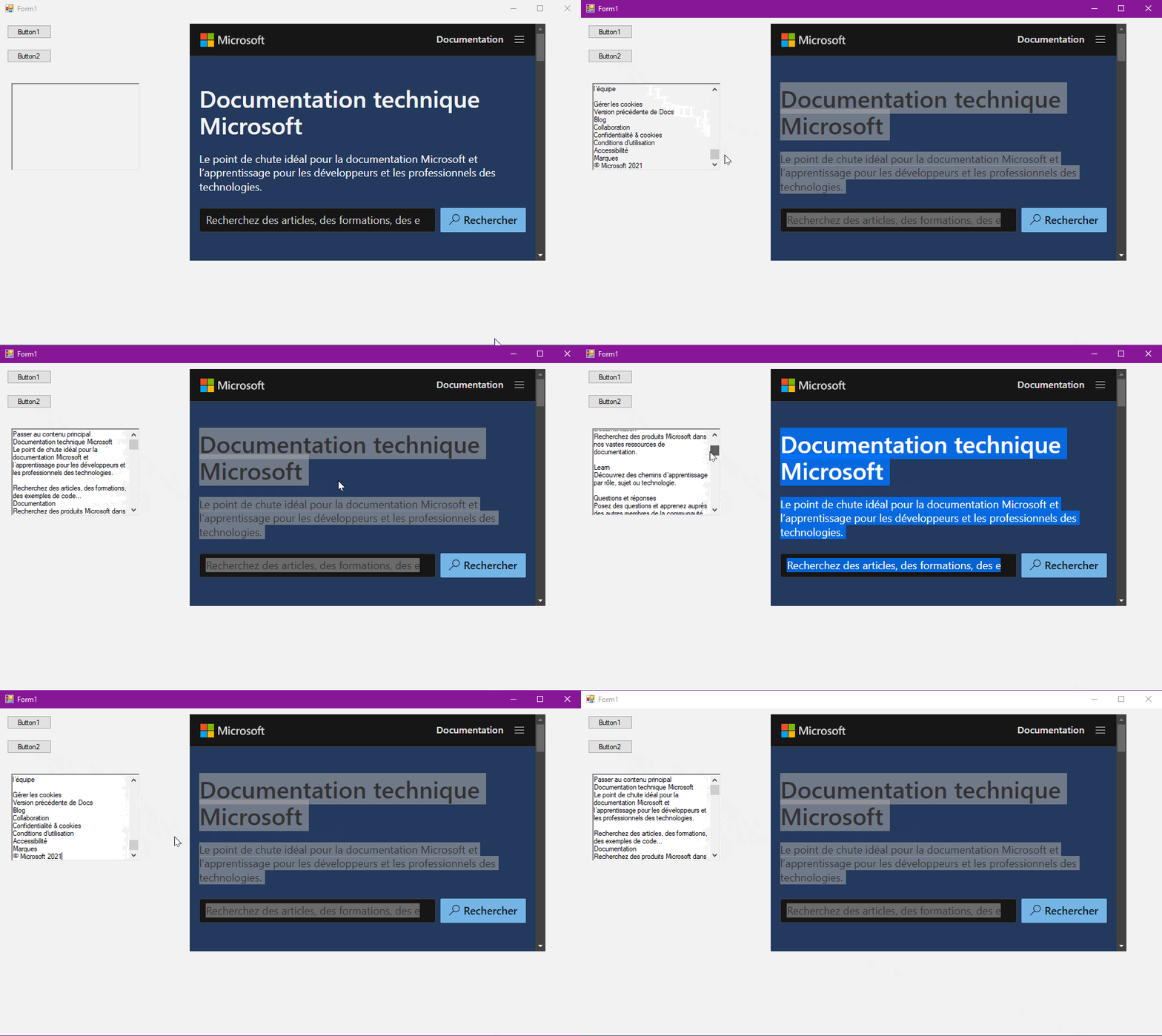
Castorix31, I'm sorry I am getting back to you so late, but your suggestion is what I am looking for. The format that comes back when I copy the data is different than I had with the textbox, but I am working on it now. Thanks again,.
Carroll
Hi, can you tell me where you found the information that you helped me with? I really would like to be self reliant and look this stuff up about Webview2. There are more things I would like to do with it. Thanks
' cx='32' cy='32' r='32' /%3E%3Ctext x='50%25' y='55%25' dominant-baseline='middle' text-anchor='middle' fill='%23FFF' %3EXZ%3C/text%3E%3C/svg%3E)
Hi @Carroll Jolly ,
Here's a reference you may need:
HTML DOM execCommand() Method
It lists all commands to execute on the selected section.
Thank you Xingyu Zhao-MSFT for your response. This is another area that I have to learn!!!
Hi @Carroll Jolly ,
If your problem has been solved, please click "Accept Answer", and it will help others with similar questions find the solution quickly.
Thank you for your cooperation.