Share via

NTLM accept-incomplete

Hayes Jupe 21 Reputation points
2021-12-06T00:22:04.51+00:00

Hi all,

Rolling out a Windows 10 21H2 SOE and am having an issue when connecting to existing Windows 7 (fully patched) machines via UNC.

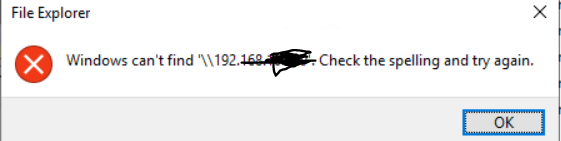
When trying via File explorer, we get the error message:

155019-image.png

Using wireshark, i can see the following

155086-image.png

The important line i believe is this -

155020-image.png

I've tried a few things with no success and am looking for ideas.

Windows for business | Windows Client for IT Pros | Devices and deployment | Configure application groups
0 comments No comments

Answer accepted by question author

Gary Nebbett 6,476 Reputation points
2021-12-06T10:15:35.31+00:00

Hello Hayes,

"The Simple and Protected Generic Security Service Application Program Interface (GSS-API) Negotiation Mechanism" is documented in RFC 4178 and section 4.2.2 describes the meaning of "accept-incomplete" as:

At least one additional negotiation message from the peer is needed to establish the security context.

It is informational rather than an error condition and the subsequent two packets in your network trace show that an additional negotiation message is indeed exchanged. The Wireshark screen snapshot seems to show that the session setup is completed successfully.

The reason why the TCP connection is reset is not visible in the network trace; I would suggest using the Microsoft-Windows-SMBClient ETW provider to see if that contains any information about the cause of the disconnection.

If you trace a successful connection to an SMB share using NTLM authentication, you should see the same "accept-incomplete" data there too.

There is no need to conceal private networking addressing (e.g. 192.168.X.X addresses) - the numbers are completely useless/meaningless outside of the private network. I spent more time wondering why that information had been concealed than analysing the rest of the data :-)

Gary

Was this answer helpful?

0 comments No comments

3 additional answers

Sort by: Most helpful
  1. Hayes Jupe 21 Reputation points
    2021-12-07T21:40:57.973+00:00

    Hey,
    so just as a follow up.... i found that as soon as i added the user account to the local admins on the target workstation - it worked with no issues.

    The problem appears to be one of the source workstation lockdown security settings which prevents a prompt for username/password when the existing user does not already have permissions. Not 100% sure which GPO setting is responsible for it yet - but will work on it.

    So yes, nothing to do with the networking after all... apologies for the red herring - but thanks for the response Gary.

    Was this answer helpful?

    0 comments No comments

  2. Gary Nebbett 6,476 Reputation points
    2021-12-06T12:26:14.73+00:00

    Hello Hayes,

    That link that you posted is the instrumentation manifest XML for one version of the provider. The name Microsoft-Windows-SMBClient can be used as an argument to several built-in commands (e.g. logman, pktmon, "netsh trace", ...) to trace SMB client events.

    Gary

    Was this answer helpful?

    0 comments No comments

  3. Hayes Jupe 21 Reputation points
    2021-12-06T10:43:46.333+00:00

    Hey Gary,
    Thanks for the response.... while i agree with you on 192.168.x.x.... that's not how the security team see's it! For the 30 seconds it takes to black them out - I'm ok with not rocking the boat.

    Ok - that's interesting about the accept-incomplete... i didn't think to compare to a successful connection.

    As far as the provider - i assume you are talking about this - https://github.com/repnz/etw-providers-docs/blob/master/Manifests-Win10-17134/Microsoft-Windows-SMBClient.xml ?

    I've not used that before - ill suss it out. Thanks.

    Was this answer helpful?

    0 comments No comments

Your answer

Answers can be marked as 'Accepted' by the question author and 'Recommended' by moderators, which helps users know the answer solved the author's problem.