Microsoft 365 and Office | SharePoint | Development
The process of building custom applications and tools that interact with Microsoft SharePoint, including SharePoint Online in Microsoft 365.

This browser is no longer supported.
Upgrade to Microsoft Edge to take advantage of the latest features, security updates, and technical support.
' cx='32' cy='32' r='32' /%3E%3Ctext x='50%25' y='55%25' dominant-baseline='middle' text-anchor='middle' fill='%23FFF' %3EMW%3C/text%3E%3C/svg%3E)
I have developed a custom New form in SharePoint 2016 with HTML and JavaScript. I want to allow the user the ability of adding an attachment. I looked through several articles, but can't get the page to accept the attachment. Any help in pointing me in the right direction, greatly appreciated.
Michael Williams
' cx='32' cy='32' r='32' /%3E%3Ctext x='50%25' y='55%25' dominant-baseline='middle' text-anchor='middle' fill='%23FFF' %3ER%3C/text%3E%3C/svg%3E)
Hi @Michael Williams ,
I have tested a code to upload attachment to a list item. Please refer to following code
155522-uploadattachment.txt
If the answer is helpful, please click "Accept Answer" and kindly upvote it. If you have extra questions about this answer, please click "Comment".
Note: Please follow the steps in our documentation to enable e-mail notifications if you want to receive the related email notification for this thread.
I still get an Error that says:
Request failed with error message - File Not Found. .Stack Trace -undefined.
Hi @Michael Williams ,
Per my test, there is something wrong with the url var attachmentFolder = oWeb.getFolderByServerRelativeUrl('/sites/dev/Lists/NewList/Attachments/1');
Please modify the url like following
var attachmentFolder = oWeb.getFolderByServerRelativeUrl('Lists/NewList/Attachments/1');
Still no dice. I get the same error: Request failed with error message - file Not Found. .Stack Trace - undefined
Hi @Michael Williams ,
Please check the url in sharepoint. You should get a List called "NewList". The column called "Attachments". And an item which id is 1.
NewList/Attachments does not exist, but CourseInformation/Attachments does exist. I type in the full URL myself.
It's now says the attachment was successful, but when I browse to the location: List/CourseInformation/Attachments I am unable to see any attachments in the folder and not able to see any attachments in the list.
Mike
When is the folder getting created and with what code? If it's a New Form that's being submitted, how does the system know what folder and essentially what item to associate that attachment with?
Mike
Hi @Michael Williams ,
Since the Attachments column is hidden. You can check if the file has been attached by following steps
Click Edit Item first.
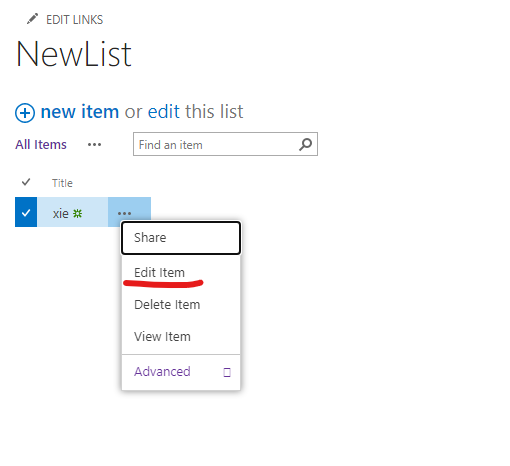
And you can see following attachment added.
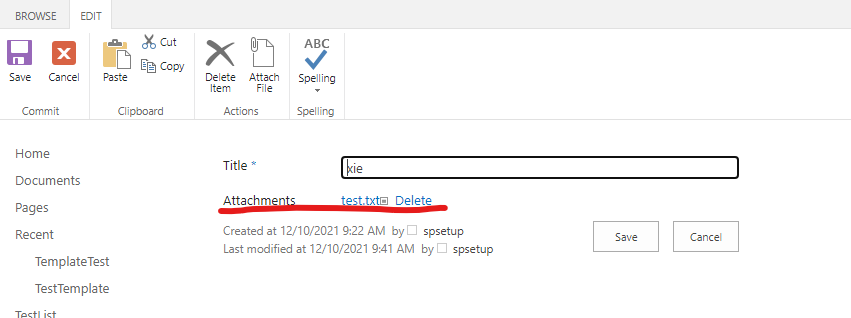
Hi @Michael Williams ,
The following code controls which list item to attach. 'NewList' is the name of list which in yours should be 'CourseInformation' and the '1' is item id. We can find the item to attach file by id.
var oList = oWeb.get_lists().getByTitle('NewList');
var attachmentFolder = oWeb.getFolderByServerRelativeUrl('Lists/NewList/Attachments/1');
If I attach 100 different documents on 100 different forms, will the /1 change to relate to the form it should be associated with? I'm a little confused on the /1 folder. The form I'm adding an attachment to is a New Form. Do this present a problem?
Hi @Michael Williams ,
Yes, If you want to add attachments for an item which id is 100. The 1 should be changed to 100.
Hello Raytheon,
So I'm guessing I need to get the (last ID entered in the system + 1) for the folder new number. Question is how do I do that?
Hi @Michael Williams ,
You can create a calculated column in list settings like following pic
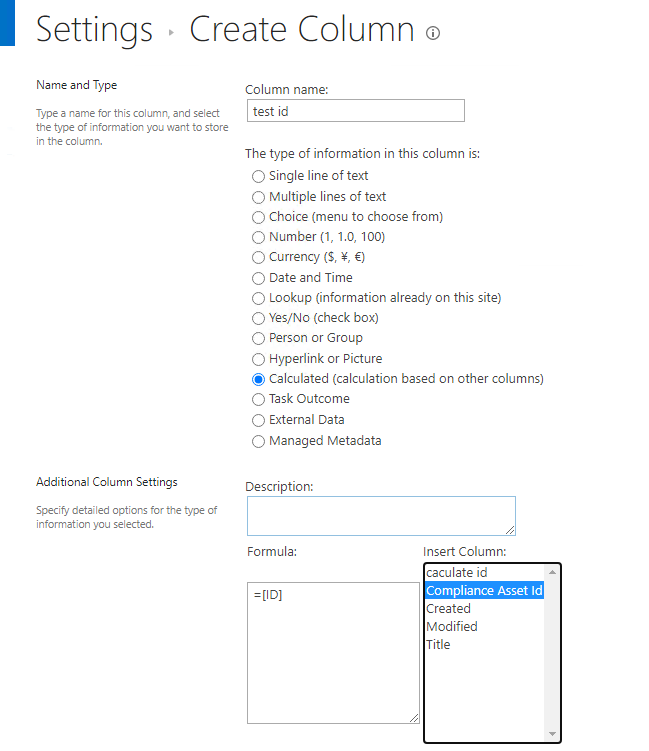
This is the id for an edit form, not a new form. Correct? How would I incorporate this into the code as well?
Hi @Michael Williams ,
The id is for the item which need to add attachment. In order to facilitate other users with similar issues to find solutions, the forum advocates one ticket corresponding to one issue. Please raise a new ticket if you have other new requirement.
I don't think my first and only question was answered.
Hi @Michael Williams ,
The caculate id is item id and the code will add attachment to the id specified in var attachmentFolder = oWeb.getFolderByServerRelativeUrl('Lists/NewList/Attachments/1');
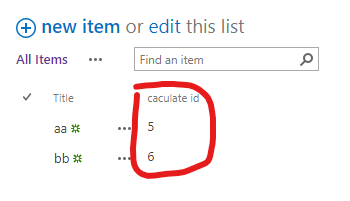
Hi @Michael Williams ,
I am checking to see if the problem has been resolved.
Hi @Michael Williams ,
I am checking to see how things are going there on this issue.
Hi @Michael Williams ,
If there's anything you'd like to know, don't hesitate to ask.
' cx='32' cy='32' r='32' /%3E%3Ctext x='50%25' y='55%25' dominant-baseline='middle' text-anchor='middle' fill='%23FFF' %3EI%3C/text%3E%3C/svg%3E)
To alleviate the ID issue, I added code to add the attachment after a successful add item so that it knew what the ID actually is. However, it won't add the attachment. I receive no error message it just stops at the register function.
function querysuccess30(){
console.log('Get ID');
var listItemInfo = '';
var itemLink = "";
var listItemEnumerator1 = listItems.getEnumerator();
var divHTML ='';
listItemEnumerator1.moveNext();
var oListItem = listItemEnumerator1.get_current();
var Intake = oListItem.get_item('ID');
ID1 = Intake;
console.log(ID1);
document.querySelector("#appRoot > div.Files-hostContainer > div > div.od-OverlayHost > div > div > div.od-Panel.od-Panel--md.od-panel-md-listform.od-Panel--hiddenScroll.od-Panel--hasCommandBar.od-Panel--hasPadding > div > div > div.list-form-wrapper.list-form-client.list-form-client--withRightPane > div > div > div > div > div.ReactClientFormFields > div:nth-child(35)");
SP.SOD.executeFunc('sp.js', 'SP.ClientContext', registerClick);
}
function registerClick(){
console.log('Register');
//Register File Upload Click Event
$("#addFileButton").click(readFile);
}
function readFile() {
console.log('Read File');
//Get File Input Control and read th file name
var element = document.getElementById("attachment-file-name");
var file = element.files[0];
var parts = element.value.split("\");
var fileName = parts[parts.length - 1];
//Read File contents using file reader
var reader = new FileReader();
reader.onload = function(e) {
uploadFile(e.target.result, fileName);
}
reader.onerror = function(e)
{
alert(e.target.error);
}
reader.readAsArrayBuffer(file);
}
    function uploadFile(arrayBuffer, fileName)
    {
        //Get Client Context and Web object.
        clientContext = new SP.ClientContext();
        var oWeb = clientContext.get_web();

        //Get list and Attachment folder where the attachment of a particular list item is stored.
        var oList = oWeb.get_lists().getByTitle('NewList');
        var attachmentFolder = oWeb.getFolderByServerRelativeUrl('/sites/Repository/Lists/NewList/Attachments/' +ID1);

        //Convert the file contents into base64 data
        var bytes = new Uint8Array(arrayBuffer);
        var i, length, out = '';
        for (i = 0, length = bytes.length; i < length; i += 1) {
            out += String.fromCharCode(bytes[i]);
        }
        var base64 = btoa(out);
        //Create FileCreationInformation object using the read file data
        createInfo = new SP.FileCreationInformation();
        createInfo.set_content(base64);
        createInfo.set_url(fileName);

        //Add the file to the list item
        attachmentFiles = attachmentFolder.get_files().add(createInfo);

        //Load client context and execute the batch
        clientContext.load(oList);
        clientContext.load(attachmentFiles);
        clientContext.executeQueryAsync(QuerySuccessAT, QueryFailureAT);
    }