
How to change the commandLink programmatically?
' cx='32' cy='32' r='32' /%3E%3Ctext x='50%25' y='55%25' dominant-baseline='middle' text-anchor='middle' fill='%23FFF' %3ER%3C/text%3E%3C/svg%3E)
Ramon
26
Reputation points
Hi, I am working on creating the custom credential Provider
Flow:
- User attempting to login
- Username, and password check
- Auth result
I want to make a 2nd chance for user if their password is not correct by letting the user input the password by themselves directly.
So the flow will be:
- User attempting to login
- Username, and password check
3. Incorrect password - Using the same username and domain, please input the correct password
- Auth result
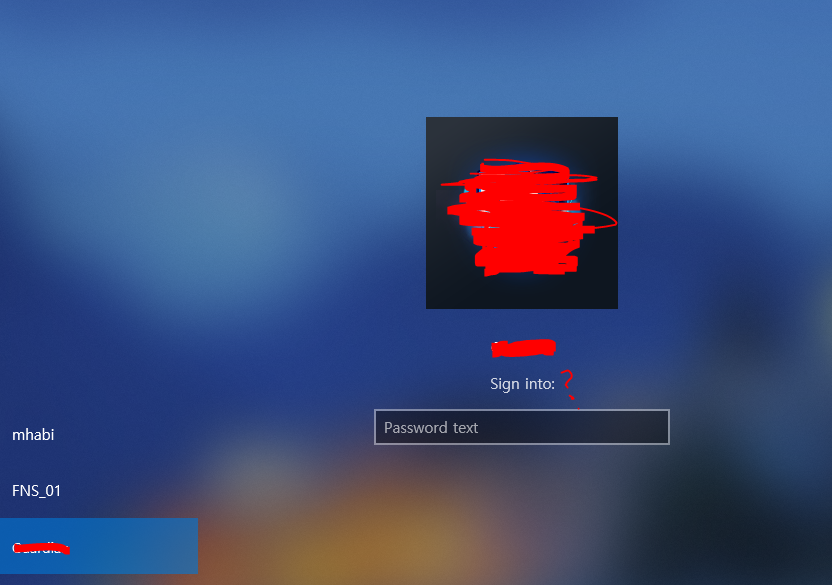
The "Sign in" text is build based on CPFT_COMMAND_LINK which I disabled (so the used cannot clicked it)
Since it is a 2nd attempt, I just show the password field right after the failed attempt detected
HRESULT CMyCredential::ReportResult(
 NTSTATUS ntsStatus,
 NTSTATUS ntsSubstatus,
 PWSTR* ppwszOptionalStatusText,
 CREDENTIAL_PROVIDER_STATUS_ICON* pcpsiOptionalStatusIcon
)
{
if (!SUCCEEDED(HRESULT_FROM_NT(ntsStatus)))
 {
 if (_pCredProvCredentialEvents)
 {
 IsWrongPassword = true;
 LOG_DEBUG << "Wrong password???";

 //password --> show
 _pCredProvCredentialEvents->SetFieldState(this, s_rgCredProvFieldDescriptors[SFI_PASSWORD].dwFieldID, CPFS_DISPLAY_IN_BOTH);
 _pCredProvCredentialEvents->SetFieldInteractiveState(this, s_rgCredProvFieldDescriptors[SFI_PASSWORD].dwFieldID, CPFIS_NONE);

 //Change the "sign-in to" value
                    string tempInfo = "Sign in to: " + _savedUser._username;
 HRESULT hr;
 hr = SHStrDupW((LPCWSTR)tempInfo.c_str(), &_rgFieldStrings[SFI_SIGN_IN_TO_TEXT]);  // --> naively, I think this is how it should be done ._.

 _pCredProvCredentialEvents->SetFieldState(this, s_rgCredProvFieldDescriptors[SFI_SIGN_IN_TO_TEXT].dwFieldID, CPFS_DISPLAY_IN_BOTH);
 _pCredProvCredentialEvents->SetFieldInteractiveState(this, s_rgCredProvFieldDescriptors[SFI_SIGN_IN_TO_TEXT].dwFieldID, CPFIS_NONE);
 }
 }
}
-----------
Question---------------
Well the password field is shown but the commandlink text is still the same with the one that I instantiated at the beginning
Is my Approach correct by using SHStrDupW?
I just take the inspiration from the instantiation like this:
HRESULT CMyCredential::Initialize(
 CREDENTIAL_PROVIDER_USAGE_SCENARIO cpus,
 const CREDENTIAL_PROVIDER_FIELD_DESCRIPTOR* rgcpfd,
 const FIELD_STATE_PAIR* rgfsp,
){
   ...
HRESULT hr = S_OK;

if (SUCCEEDED(hr))
 {
 hr = SHStrDupW(L"Sign into: ", &_rgFieldStrings[SFI_SIGN_IN_TO_TEXT]);
 }

   ...
}
Windows for business | Windows Client for IT Pros | User experience | Other
Sign in to answer