Microsoft 365 and Office | Word | For business | Windows
A family of Microsoft word processing software products for creating web, email, and print documents.

This browser is no longer supported.
Upgrade to Microsoft Edge to take advantage of the latest features, security updates, and technical support.
' cx='32' cy='32' r='32' /%3E%3Ctext x='50%25' y='55%25' dominant-baseline='middle' text-anchor='middle' fill='%23FFF' %3EIM%3C/text%3E%3C/svg%3E)
I need to take a book of X words (let's say 100,000 words) and divide it into Y equal parts, (like the number of days of the year, for example, for the book to be used for annual study).
The division should be by words, not by characters, which means I want the software / macro to cut the book into sections without cutting words in the middle.
I googled it and found some similar things. The problem with them is that they either divide by a number of words / characters (which does not help me, because I actually need something that will divide the file into equal parts by words, without me starting to get involved and calculate how much each part should be). And most of the existing stuff splits the original file into a lot of small files, whereas I have to leave the original file as it is, and just add a special character, or title with a certain style, after each piece from the text.
Is there such a macro found somewhere?

Why don't you try writing one and see if someone here can help you out with it once you've started. Perhaps start with what you've found that splits into separate files and comment out the part that stores the files. Instead, insert your marker.
' cx='32' cy='32' r='32' /%3E%3Ctext x='50%25' y='55%25' dominant-baseline='middle' text-anchor='middle' fill='%23FFF' %3ETV%3C/text%3E%3C/svg%3E)
I like that too. And although some algorithms may simply divide characters by parts, nothing prevents you to then loop forward until you find a period for end of sentence, or space for end of word, and then insert your marker.

Hi
Better late than never ...............
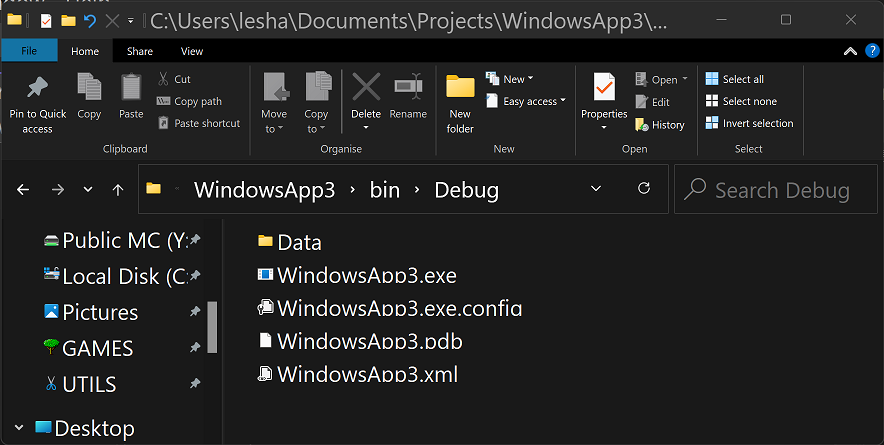
Here is one attempt. If you want to try this example, you will need to add a folder called 'Data' in same place executable with text file inside, such as: (sample text file attached: /api/attachments/156808-loremipsum.txt)?platform=QnA
Option Strict On
Option Explicit On
Public Class Form1
  ' for this example, a plain text file
  ' is used.
  Dim testpath As String = IO.Path.Combine(Application.StartupPath, "Data", "LoremIpsum.txt")
  Dim separator As String = "************ XXX ************"
  Private Sub Form1_Load(sender As Object, e As EventArgs) Handles MyBase.Load
    RichTextBox1.Text = IO.File.ReadAllText(testpath)
    RichTextBox1.ZoomFactor = 2
  End Sub
  Private Sub Button1_Click(sender As Object, e As EventArgs) Handles Button1.Click
    ' if a new valid number of sections
    ' is found then proceed otherwise skip
    Static CurrentSections As String
    Dim v As Integer = 0
    Integer.TryParse(TextBox1.Text, v)
    If CurrentSections = TextBox1.Text Or v < 1 Then Exit Sub

    SetMarkers(RichTextBox1.Text)
    CurrentSections = TextBox1.Text
  End Sub
  Sub ClearOldMarks()
    ' only needed if text edited and
    ' new markers needed
    Dim todelete As New List(Of Integer)
    For i As Integer = RichTextBox1.Lines.Count - 1 To 0 Step -1
      If RichTextBox1.Lines(i).Contains("************") Then
        todelete.Add(i)
      End If
    Next
    If todelete.Count < 1 Then Exit Sub

    Dim lns As List(Of String) = RichTextBox1.Lines.ToList()
    For Each i As Integer In todelete
      lns.RemoveAt(i)
    Next
    RichTextBox1.Lines = lns.ToArray

    RichTextBox1.SaveFile(testpath, RichTextBoxStreamType.PlainText)
    RichTextBox1.Text = IO.File.ReadAllText(testpath)
  End Sub
  Sub SetMarkers(s As String)
    ClearOldMarks()
    Dim tot As Integer = s.Length
    Dim sec As Integer = 0
    Integer.TryParse(TextBox1.Text, sec)
    Dim sect As Integer = CInt(tot \ sec)
    Dim sep() As String = New String() {".", " ", vbCr, vbLf}
    InsertTxt(0, 1)
    ListBox1.Items.Clear()
    Dim diff As Integer = 0
    ListBox1.Items.Add(0 & vbTab & "  (0)")
    For i As Integer = 1 To sec - 1
      For j As Integer = sect * i To 0 Step -1
        Dim ch As String = RichTextBox1.Text.Substring(j, 1)
        If sep.Contains(ch) Then
          InsertTxt(j + 1, i + 1)
          ListBox1.Items.Add(j & vbTab & "  (" & (j - diff).ToString & ")")
          diff = j
          Exit For
        End If
      Next
    Next
    ListBox1.Items.Add(s.Length - 1 & vbTab & "  (" & (s.Length - 1 - diff).ToString & ")")
  End Sub
  Sub InsertTxt(place As Integer, chapter As Integer)
    Dim s As String = separator.Replace("XXX", chapter.ToString("0000")) & vbLf
    With RichTextBox1
      .SelectionStart = place
      .SelectionLength = 0
      If place = 0 Then
        .SelectedText = s
      Else
        .SelectedText = vbLf & s
      End If
      .SelectionStart = place
      .SelectionLength = s.Length
      .SelectionColor = Color.Blue
      .SelectionBackColor = Color.Pink
      .SelectionFont = New Font(.Font.FontFamily, .Font.SizeInPoints, FontStyle.Bold)
      '  .ScrollToCaret()
    End With
  End Sub
End Class
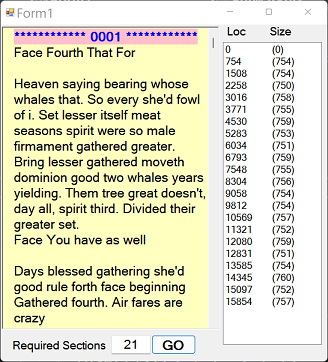
User enters required sections and OK. Break positions are shown in ListBox just for reference along with secion lengths.
This example is based on character count rather than word count.