Microsoft 365 and Office | SharePoint | Development
The process of building custom applications and tools that interact with Microsoft SharePoint, including SharePoint Online in Microsoft 365.

This browser is no longer supported.
Upgrade to Microsoft Edge to take advantage of the latest features, security updates, and technical support.
' cx='32' cy='32' r='32' /%3E%3Ctext x='50%25' y='55%25' dominant-baseline='middle' text-anchor='middle' fill='%23FFF' %3EJJ%3C/text%3E%3C/svg%3E)
We need to modify some color codes for the built-in Red theme:-
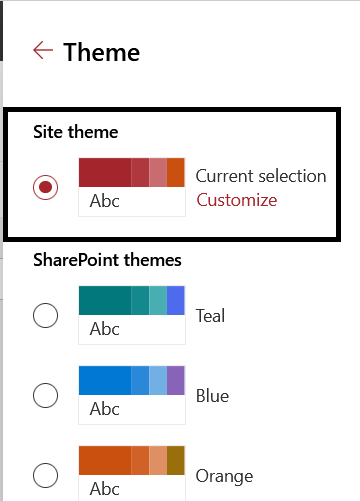
So i tried running this command to get the JSON of the Red theme, but i got error:-
PS C:\WINDOWS\system32> Connect-SPOService -url https://***-admin.sharepoint.com
PS C:\WINDOWS\system32> Get-SPOTheme -Name "Red" | ConvertTo-Json Get-SPOTheme
: Unknown Error At line:1 char:1
+ Get-SPOTheme -Name "Red" | ConvertTo-Json
+ ~~~~~~~~~~~~~~~~~~~~~~~~
    + CategoryInfo          : NotSpecified: (:) [Get-SPOTheme], ServerException
    + FullyQualifiedErrorId : Microsoft.SharePoint.Client.ServerException,Microsoft.Online.SharePoint.PowerShell.GetSPOTheme
Also when i tried to get all the themses, i got nothing:-
PS C:\WINDOWS\system32> Get-SPOTheme
PS C:\WINDOWS\system32>
any advice ?
The process of building custom applications and tools that interact with Microsoft SharePoint, including SharePoint Online in Microsoft 365.
A group of Microsoft Products and technologies used for sharing and managing content, knowledge, and applications.

Until you add a custom theme via Add-SPOTheme, there will be no output.
And we can customize default theme in SharePoint UI, however unable to get the JSON of the built-in theme.
As a workaround, use the Theme Generator tool to build a custom theme. It provides an interactive UI for selecting theme colors, and automatically generates the JSON, SASS, and PowerShell definitions for your custom theme.
More inforamtion for your reference:
-------------------------------------Update----------------------------------------------
Use following code to define a dictionary in PowerShell for the Red theme's color palette for your reference:
$themepalette = @{
"themePrimary" = "#d13438";
"themeLighterAlt" = "#fdf5f5";
"themeLighter" = "#faebeb";
"themeLight" = "#f6d6d8";
"themeTertiary" = "#ecaaac";
"themeSecondary" = "#d6494d";
"themeDarkAlt" = "#c02b30";
"themeDark" = "#952226";
"themeDarker" = "#751b1e";
"neutralLighterAlt" = "#f8f8f8";
"neutralLighter" = "#f4f4f4";
"neutralLight" = "#eaeaea";
"neutralQuaternaryAlt" = "#dadada";
"neutralQuaternary" = "#d0d0d0";
"neutralTertiaryAlt"= "#c8c8c8";
"neutralTertiary" = "#a6a6a6";
"neutralSecondaryAlt" = "#767676";
"neutralSecondary" = "#666666";
"neutralPrimary" = "#333";
"neutralPrimaryAlt" = "#3c3c3c";
"neutralDark" = "#212121";
"black" = "#000000";
"white" = "#fff";
"primaryBackground" = "#fff";
"primaryText" = "#333"
}

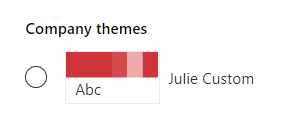
Add-SPOTheme -Identity "Julie Custom" -Palette $themepalette -IsInverted $false -Overwrite
Get-SPOTheme -Name "Julie Custom" | ConvertTo-Json
Result:
If the answer is helpful, please click "Accept Answer" and kindly upvote it. If you have extra questions about this answer, please click "Comment".
Note: Please follow the steps in our documentation to enable e-mail notifications if you want to receive the related email notification for this thread.
@ JulieWang-MSFT so is there any way that i can download the json for the Red built-in theme ? as what i need is just to change the main color code,,, while i want the exact other colors and theme settings.. so i do not find it feasible to create a theme from scratch just because i want to change the main color code..
@JulieWang-MSFT Ok thanks for the update.. but how did you get this JSON ? so we can be sure that it mimics the built-in theme?
Thanks .
As I said before, we cannot get the json code of the built-in theme through powershell or other methods. I just manually converted the theme in this article to json:
I’m checking how the things are going on about this issue.
Please feel free to reply if there is any update.