Share via

AppDomain.CurrentDomain.SetupInformation.TargetFrameworkName is null

liu juan 1 Reputation point
2021-12-09T02:45:07.253+00:00

我做了一个C++调用C#的程序 EXE(C++) --> DLL(C#)
编译环境:VS2012,VS2019
DLL(C#)工程设定目标框架是 .NETFramework,Version=v4.8

调用接口如下:
CLRCreateInstance -> GetRuntime("v4.0.30319") ->GetInterface ->ExecuteInDefaultAppDomain ★
"v4.0.30319" 只是CLR版本,没有指定目标框架版本的参数。

接口正常动作,DLL(C#)程序正常启动。
但是,DLL(C#)中打印AppDomain.CurrentDomain.SetupInformation.TargetFrameworkName信息是发现为null,而不是预期的 .NETFramework,Version v4.8
对应的ServicePointManager.SecurityProtocol默认值为 Ssl3, Tls, 也不是预期的 SystemDefault

如果 EXE(C# v4.8) --> DLL(C#)的话,
DLL(C#)中 TargetFrameworkName和SecurityProtocol都是预期值。

我觉得原因在于 ★方式下, DLL(C#)没能按照设定的目标框架动作,而是启动了该CLR版本的最低.NETFramework
有解决办法吗?
我希望DLL(C#)按照预期目标框架动作。

English ==================================================================================================

I made a C++ EXE to call C# dll using VS2019.
C# dll 's target framework version is set to v4.8 in project property.
Call API is: CLRCreateInstance -> GetRuntime("v4.0.30319") ->GetInterface ->ExecuteInDefaultAppDomain ★
"v4.0.30319" is CLR vresion,it seems that there is no parameter to set target framework version.

C# dll is called ,
but in C# dll, AppDomain.CurrentDomain.SetupInformation.TargetFrameworkName is null , not v4.8.
and ServicePointManager.SecurityProtocol is Ssl3, Tls,not SystemDefault
Ref:
https://learn.microsoft.com/en-us/dotnet/api/system.net.servicepointmanager.securityprotocol?view=netframework-4.8

if c# exe(v4.8 ) call this c# dll, the value is all right.

I think the problem is ★'s way, C# dll can not start with target version.

i want AppDomain.CurrentDomain.SetupInformation.TargetFrameworkName = v4.8
and ServicePointManager.SecurityProtocol = SystemDefault
how to fix the problem?

Developer technologies | C++

A high-level, general-purpose programming language, created as an extension of the C programming language, that has object-oriented, generic, and functional features in addition to facilities for low-level memory manipulation.

Developer technologies | C#

An object-oriented and type-safe programming language that has its roots in the C family of languages and includes support for component-oriented programming.

0 comments No comments

1 answer

Sort by: Most helpful
  1. YujianYao-MSFT 4,296 Reputation points Microsoft External Staff
    2021-12-09T09:28:38.963+00:00

    Hi @liu juan ,

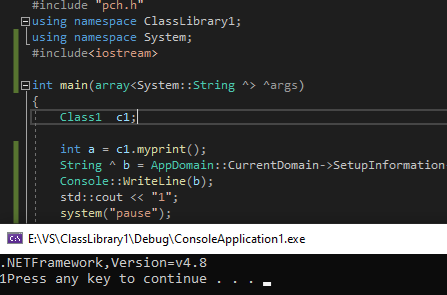
    I successfully output the .NET version number in the main function. I created a CLR project and my C++/CLI version is 4.8. You could refer to my method.

    #include "pch.h"  
    using namespace ClassLibrary1;  
    using namespace System;  
    #include<iostream>  
    int main(array<System::String ^> ^args)  
    {  
    Class1 c1;  
      
    int a = c1.myprint();  
    String ^ b = AppDomain::CurrentDomain->SetupInformation->TargetFrameworkName;  
    Console::WriteLine(b);  
    std::cout << "1";  
    system("pause");  
    //auto a = AppDomain.CurrentDomain.SetupInformation.TargetFrameworkName;  
    // System.Console.WriteLine(a);  
    return 0;  
    }  
    

    156246-ress.png

    Best regards,

    Elya


    If the answer is the right solution, please click "Accept Answer" and upvote it.If you have extra questions about this answer, please click "Comment".

    Note: Please follow the steps in our documentation to enable e-mail notifications if you want to receive the related email notification for this thread.

    Was this answer helpful?


Your answer

Answers can be marked as 'Accepted' by the question author and 'Recommended' by moderators, which helps users know the answer solved the author's problem.