Microsoft Edge | Microsoft Edge development
Developing and testing features or extensions for Microsoft Edge

This browser is no longer supported.
Upgrade to Microsoft Edge to take advantage of the latest features, security updates, and technical support.
' cx='32' cy='32' r='32' /%3E%3Ctext x='50%25' y='55%25' dominant-baseline='middle' text-anchor='middle' fill='%23FFF' %3EM%3C/text%3E%3C/svg%3E)
I have almost 300 employees that work from home using a mix of personal and company-owned computers (So none are on the same network). One of the websites they need to access requires IE mode. There are two solutions that I am aware of, I am looking for an easier way if one is out there.
(Solution 1) Reloading the page in IE mode (current solution we are using)
Open the page and click on the ellipse and select "Reload in Internet Explorer mode"
Here is the issue with this, they first click on a desktop icon to bring them to the website that redirects them to a single sign-on page and sign in. Then they have to reload the page in IE mode which brings them back to the single sign-on page where they have to sign in again and repeat the 2FA. Once they sign in for the second time everything works. btw, if we reload in IE mode on the single sign-on page then we get an error and cannot continue, so we have to reload after the first attempt on the single sign-on page.
(Solution 2) Configure IE mode
If I add the website to the "Internet Explorer mode pages" everything works smoothly. But the issue here is that the page expires after 30 days. Unfortunately, most of my employees then begin reaching out to our IT department thinking something is broken and we lose productivity and sales.
Any thoughts or suggestions?
' cx='32' cy='32' r='32' /%3E%3Ctext x='50%25' y='55%25' dominant-baseline='middle' text-anchor='middle' fill='%23FFF' %3EA%3C/text%3E%3C/svg%3E)
Hi @Mike_647
Can your employees set GPO on their computers? If they can, you can ask them to set IE mode policies according to this doc. After setting the policies, the site will always load in IE mode without other operations. But the problem is that the employees are not in the same domain, so you can't use a Domain Admins account to distribute the policies. The employees need to set the Local Group Policy on their own computers.
If the setting group policy way is out of consideration, you can only use the above two ways you mentioned in the question.
If the answer is the right solution, please click "Accept Answer" and kindly upvote it. If you have extra questions about this answer, please click "Comment".
Note: Please follow the steps in our documentation to enable e-mail notifications if you want to receive the related email notification for this thread.
Regards,
Yu Zhou
Thank you @Anonymous
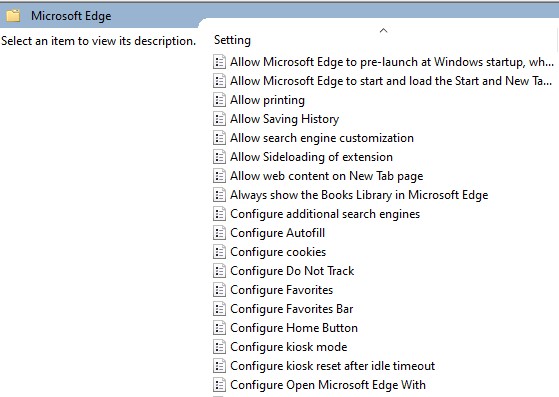
I have been following the document you provided and having issues locating the "Configure Internet Explorer integration" in the group policies. I have been Googling it and followed a different article where I replaced the MS Edge Group Policies and unfortunately it is still not displaying. Any thoughts?
Hi @Mike_647
I guess you find the wrong path in GPO. The right path for Configure Internet Explorer integration should be under Administrative Templates > Microsoft Edge, not under Administrative Templates > Windows Components > Microsoft Edge.
Besides, which article do you follow to replace Edge group policies? You can refer to this official doc to configure Edge policy settings on Windows.
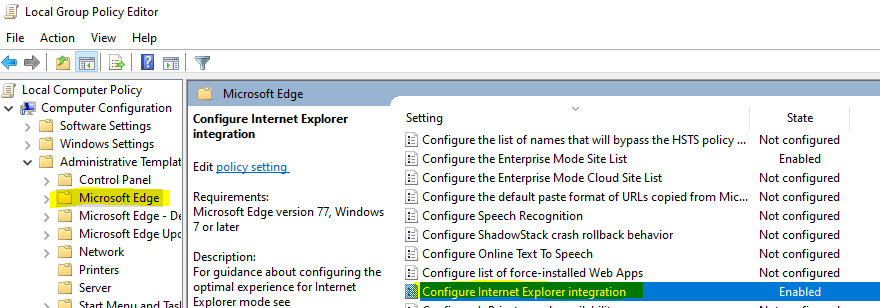
Thank you, I had accidentally moved the ADMX files to the en-US folder and that is why it was not populating. Once I corrected this, Everything is populating properly. Appreciate your assistance with this.