Azure Logic Apps
An Azure service that automates the access and use of data across clouds without writing code.
This browser is no longer supported.
Upgrade to Microsoft Edge to take advantage of the latest features, security updates, and technical support.
' cx='32' cy='32' r='32' /%3E%3Ctext x='50%25' y='55%25' dominant-baseline='middle' text-anchor='middle' fill='%23FFF' %3EBF%3C/text%3E%3C/svg%3E)
When running vscode in debug mode, the @result(‘scope’) variable is hanging when trying to use it.
Here’s the output from the Logic App debug run. Notice the set variable ResultScope never ends.
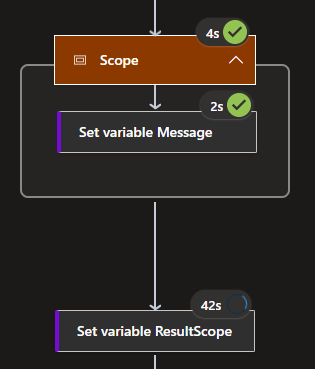
When running from Azure after deploying, everything works as expected:

Here's my code:
{
"definition": {
"$schema": "https://schema.management.azure.com/providers/Microsoft.Logic/schemas/2016-06-01/workflowdefinition.json#",
"actions": {
"Scope": {
"type": "Scope",
"actions": {
"Set_variable_Message": {
"type": "SetVariable",
"inputs": {
"name": "Message",
"value": "Test Message"
},
"runAfter": {}
}
},
"runAfter": {
"Initialize_variable_ResultScope": [
"Succeeded"
]
}
},
"Initialize_variable_ResultScope": {
"type": "InitializeVariable",
"inputs": {
"variables": [
{
"name": "ResultScope",
"type": "array"
}
]
},
"runAfter": {
"Initialize_variable_Message": [
"Succeeded"
]
}
},
"Initialize_variable_Message": {
"type": "InitializeVariable",
"inputs": {
"variables": [
{
"name": "Message",
"type": "string"
}
]
},
"runAfter": {}
},
"Set_variable_ResultScope": {
"type": "SetVariable",
"inputs": {
"name": "ResultScope",
"value": "@result('scope')"
},
"runAfter": {
"Scope": [
"Succeeded"
]
}
},
"Response": {
"type": "Response",
"kind": "http",
"inputs": {
"statusCode": 200,
"body": "@variables('ResultScope')"
},
"runAfter": {
"Set_variable_ResultScope": [
"Succeeded"
]
}
}
},
"triggers": {
"manual": {
"type": "Request",
"kind": "Http",
"inputs": {
"method": "GET"
}
}
},
"contentVersion": "1.0.0.0",
"outputs": {}
},
"kind": "Stateful"
}
Thank you, Bob Feller
Update: I opened a ticket with Microsoft, and they were able to reproduce the problem. This is a bug in VSCode and has been sent to PG group. Estimated fix time is 2 months.