Microsoft Security | Intune | Configuration Manager | Other
Other Configuration Manager-related features and issues

This browser is no longer supported.
Upgrade to Microsoft Edge to take advantage of the latest features, security updates, and technical support.
' cx='32' cy='32' r='32' /%3E%3Ctext x='50%25' y='55%25' dominant-baseline='middle' text-anchor='middle' fill='%23FFF' %3EG%3C/text%3E%3C/svg%3E)
Hi,
Having an issue with building a collection/query, finding all clients with build 19042 (Win10 v 20H2). It's not getting all of them.¨
Using the query builder "operating system.Build Number equal to..." yields 922 results
Using "system.Build equal to.." yields 947 results...
(Combining them using OR, select distinct, yields 925 results)
And some clients are only present in the query getting the fewer results, but missing from the query with the most results.
This query stuff seems very sensitive, almost random. How to go about troubleshooting, and knowing what source to trust?
Other Configuration Manager-related features and issues
Answer accepted by question author

If your heartbeat discovery dates are 2 months back you have unhealthy clients and you need to look at first. Start by forcing all of you client to send update heartbeat discovery data.

Hi @GonWild ,
We could check the tab of Heatbeat DDR in the console of SCCM server. If the client could be found by heatbeat, the date could be shown on it. Please check them on the console and the result of query.
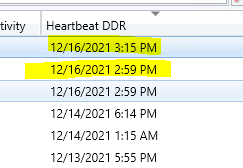
Besides, about heatbeat discovery, we could check InventoryAgent.log and InventoryProvider.log, they record activities of hardware inventory, software inventory, and heartbeat discovery actions on the client.
If the answer is the right solution, please click "Accept Answer" and kindly upvote it. If you have extra questions about this answer, please click "Comment".
Note: Please follow the steps in our documentation to enable e-mail notifications if you want to receive the related email notification for this thread.
The first query uses Hardware inventory. Have you confirm that it is showing the details correctly within Resource Explorer?
The second query uses Heartbeat discovery, Have you confirmed that it is showing correctly for the device properties?
I see, some of the clients not found by the second query have inactive status, and heartbeat discovery date 1-2 months back. Will it have to be more current for this query to be accurate? Will Configmgr not gather and store data from these? Will I have to examine the clients to determine their health? (Client check result in console = "Passed")
generated from the query builder:

Without your query everyone will be guessing as to the problem. Please post your query.