Microsoft 365 and Office | Access | Development
The creation and customization of database applications using Microsoft Access

This browser is no longer supported.
Upgrade to Microsoft Edge to take advantage of the latest features, security updates, and technical support.
' cx='32' cy='32' r='32' /%3E%3Ctext x='50%25' y='55%25' dominant-baseline='middle' text-anchor='middle' fill='%23FFF' %3EFR%3C/text%3E%3C/svg%3E)
I have a series of Access queries where I have identified data parameters. Because there are multiple queries and a chart, the process requests the information multiple times. Is there a better process method that would reduce the duplication of information entry?
The first query "qryWOData_Crosstab" is a Select Query:
SELECT Month([MCMP date]) AS Months, [Operational_Data_data (1)].[Order Number], [Operational_Data_data (1)].[On Time], [Operational_Data_data (1)].[Main Work Center]
FROM [Operational_Data_data (1)]
GROUP BY Month([MCMP date]), [Operational_Data_data (1)].[Order Number], [Operational_Data_data (1)].[On Time], [Operational_Data_data (1)].[Main Work Center];
The second query qryCrosstab_SubTotal is a Crosstab Query:
PARAMETERS [Enter main Work Center:] Text ( 255 );
TRANSFORM (Nz(Count([qryWOData_Crosstab].[Order Number]),0)) AS [CountOfOrder Number]
SELECT qryWOData_Crosstab.Months, Count(qryWOData_Crosstab.[Order Number]) AS [Total Of Order Number]
FROM qryWOData_Crosstab
WHERE (((qryWOData_Crosstab.[Main Work Center]) Like "" & [Enter Main Work Center:] & ""))
GROUP BY qryWOData_Crosstab.Months, qryWOData_Crosstab.[Main Work Center]
PIVOT qryWOData_Crosstab.[On Time];
The third Query qryCrossTab_SubTotal 2 is a Select Query:
SELECT DISTINCTROW qryCrossTab_SubTotal.Months, Sum(qryCrossTab_SubTotal.[MCMP or Priority Code Missing]) AS [Sum Total MCMP or Priority Code Missing], Sum([MCMP or Priority Code Missing])/Sum([Total Of Order Number]) AS [MCMP or No Priority %], Sum(qryCrossTab_SubTotal.[On Time]) AS [Sum Total On Time], Sum([On Time])/Sum([Total Of Order Number]) AS [On Time %], Sum(qryCrossTab_SubTotal.[Not On Time]) AS [Sum Total Not On Time], Sum([Not On Time])/Sum([Total Of Order Number]) AS [Not On Time %], Sum(qryCrossTab_SubTotal.[Total Of Order Number]) AS [Sum Total Order Number], 0.73 AS [Goal %]
FROM qryCrossTab_SubTotal
GROUP BY qryCrossTab_SubTotal.Months;

Create an unbound dialogue form in which there is a text box to enter the parameter value, and a button to open the third query. Reference the text box as a parameter using the following syntax:
Forms![NameOfForm]![NameOfTextBox]
Open the dialogue form, enter the parameter value, and click the button to open the query.
Hello @Ken Sheridan
Sorry for the delayed response. Below are the updated queries; and, I have created the Dialog Form "frmDClassification" with a Text field "Classification" --> Forms![frmDClassification]![Classification]. For this I want to run a report from the Third query. Currently I receive the following error message.

Is this a syntax issue?
First Query:
SELECT Month([MCMP date]) AS Months, tblTableauWOList.[Order Number], tblTableauWOList.[On Time], tblTableauWOList.[Main Work Center]
FROM tblTableauWOList
WHERE (((tblTableauWOList.[MCMP Date])>=#7/1/2021#));
Second Query:
TRANSFORM (Nz(Count([qryWOData1].[Order Number]),0)) AS [CountOfOrder Number]
SELECT qryWOData1.Months, Count(qryWOData1.[Order Number]) AS [Total Of Order Number]
FROM qryWOData1
WHERE (((qryWOData1.[Main Work Center])=[Forms]![frmDClassification]![Classification]))
GROUP BY qryWOData1.Months, qryWOData1.[Main Work Center]
PIVOT qryWOData1.[On Time];
Third Query:
SELECT DISTINCTROW qryWOData2.Months, Sum(qryWOData2.[MCMP or Priority Code Missing]) AS [Sum Total MCMP or Priority Code Missing], Sum([MCMP or Priority Code Missing])/Sum([Total Of Order Number]) AS [MCMP or No Priority %], Sum(qryWOData2.[On Time]) AS [Sum Total On Time], Sum([On Time])/Sum([Total Of Order Number]) AS [On Time %], Sum(qryWOData2.[Not On Time]) AS [Sum Total Not On Time], Sum([Not On Time])/Sum([Total Of Order Number]) AS [Not On Time %], Sum(qryWOData2.[Total Of Order Number]) AS [Sum Total Order Number], 0.73 AS [Goal %]
FROM qryWOData2
GROUP BY qryWOData2.Months;
Parameters in a crosstab query must be declared in a PARAMETERS clause at the start of the SQL statement, e.g. if the data type is a long integer:
PARAMETERS [Forms]![frmDClassification]![Classification] LONG;
TRANSFORM ……….etc
Hello @Ken Sheridan
Thanks for your responses. Another question... based on my queries I am receiving the appropriate data but can't determine how to sort the information in chronological order (by MonthYr). I receive the following...
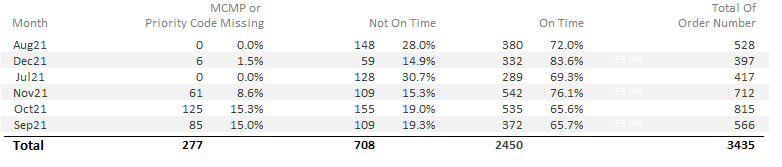
I know the MonthYr field is NOT a date; however, I am wanting Jul21, Aug21, Sep21, Oct21, Nov21, Dec21, Jan22, etc. Following is update SQL.
SELECT Format([MCMP Date],"mmmyy") AS MonthYr, tblTableauWOList.[Order Number], tblTableauWOList.[On Time], tblTableauWOList.[Main Work Center], tblTableauWOList.[MCMP Date]
FROM tblTableauWOList
WHERE (((tblTableauWOList.[MCMP Date])>=#7/1/2021#))
ORDER BY tblTableauWOList.[MCMP Date];
PARAMETERS [Forms]![frmDClassification]![Classification] Text ( 255 );
TRANSFORM (Nz(Count([qryWOData1].[Order Number]),0)) AS [CountOfOrder Number]
SELECT qryWOData1.MonthYr, Count(qryWOData1.[Order Number]) AS [Total Of Order Number]
FROM qryWOData1
WHERE (((qryWOData1.[Main Work Center])=[Forms]![frmDClassification]![Classification]))
GROUP BY qryWOData1.MonthYr, qryWOData1.[Main Work Center]
PIVOT qryWOData1.[On Time];
SELECT DISTINCTROW qryWOData2.MonthYr, Sum(qryWOData2.[MCMP or Priority Code Missing]) AS [Sum Total MCMP or Priority Code Missing], Sum([MCMP or Priority Code Missing])/Sum([Total Of Order Number]) AS [MCMP or No Priority %], Sum(qryWOData2.[On Time]) AS [Sum Total On Time], Sum([On Time])/Sum([Total Of Order Number]) AS [On Time %], Sum(qryWOData2.[Not On Time]) AS [Sum Total Not On Time], Sum([Not On Time])/Sum([Total Of Order Number]) AS [Not On Time %], Sum(qryWOData2.[Total Of Order Number]) AS [Sum Total Order Number], 0.73 AS [Goal %]
FROM qryWOData2
GROUP BY qryWOData2.MonthYr;
You need to include the year and month in the result table of the first query with:
YEAR([MCP Date]) AS MCPYear, MONTH((MCP Date]) AS MCPMonth .......etc
You'll then be able to group the other queries with:
GROUP BY MCPYear, MCPMonth ......etc.