Azure SQL Database
An Azure relational database service.
This browser is no longer supported.
Upgrade to Microsoft Edge to take advantage of the latest features, security updates, and technical support.
' cx='32' cy='32' r='32' /%3E%3Ctext x='50%25' y='55%25' dominant-baseline='middle' text-anchor='middle' fill='%23FFF' %3ECV%3C/text%3E%3C/svg%3E)
Hello Team ,
I have created replication as below :
Publisher : On-premises Server (SQL Server 2014)
Network Setting : S2S VPN between Azure and On-premises server.
Subscriber : Azure SQL Managed Instance (default port : 1433)
As we know that if we create a replication by default it creates a Linked server ,
My replication is working fine as expected ,
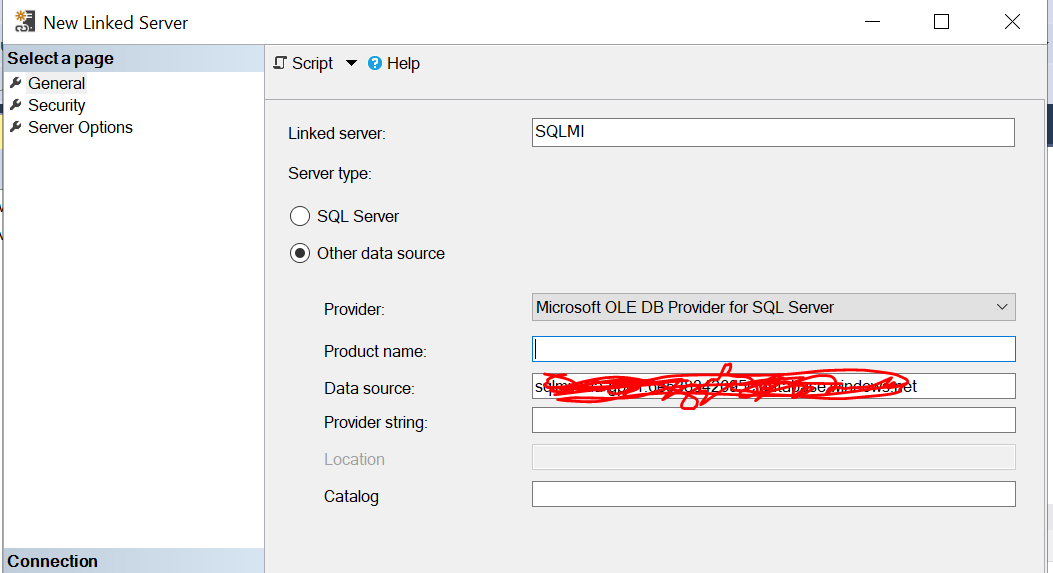
Now i wanted to create linked server on On-premises Server towards SQL Managed Instance.
Here is the configuration setting
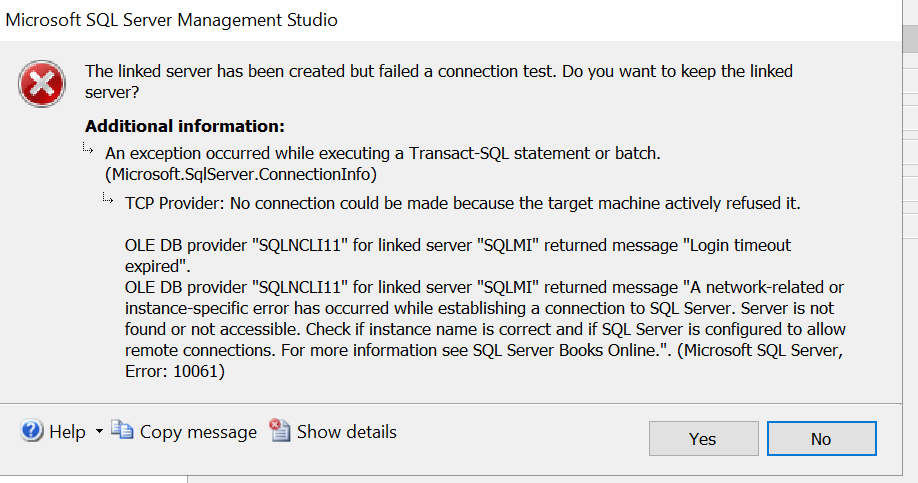
This is the error :
Thanks in advance!

It seems like your issue is with the authentication of the LOGIN.
Check my answer - I add there links to configure the remote connection to the managed instance. Before you start thinking about the linked server, first confirm that you can connect from the machine that host the on-premises SQL Server to your managed instance (using SSMS or Azure SQL Studio).
Good day
As we know that if we create a replication by default it creates a Linked server ,
What is the relation of replica and linked server?!?
If you want to create a linked server then create a linked server directly with 2 simple queries (first create the linked server and second create the linked server login to be used for the linked server)
Open SSMS from the same machine where your server is or if SSMS is not installed use Azure Data Studio (does not require any installation)
If this step ok then you have no issue to create the linked server. If this step has issue then this is not related to linked server - you first need to configure the managed instance for remote connection according to your security requirements and network architecture
For this task you can use public endpoint:
https://learn.microsoft.com/en-us/azure/azure-sql/managed-instance/public-endpoint-configure
Note: remember that to connect Managed instance we use port 3342
Or you can use VPN gateway to a virtual network
https://learn.microsoft.com/en-us/azure/azure-sql/managed-instance/point-to-site-p2s-configure
Or you can use Virtual Machine which is on the same vNet as your managed instance
For the linked server you will use the exact same information which you used to connect from your SSMS
(1) open the portal and navigate to the managed instance list
(2) click the managed instance you want to connect
(3) Select the Connection strings tab under the Settings configuration
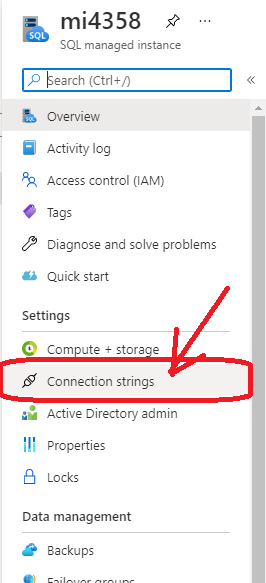
(4) Copy the public server path as you can see in the following screenshot - this is all you need :-)
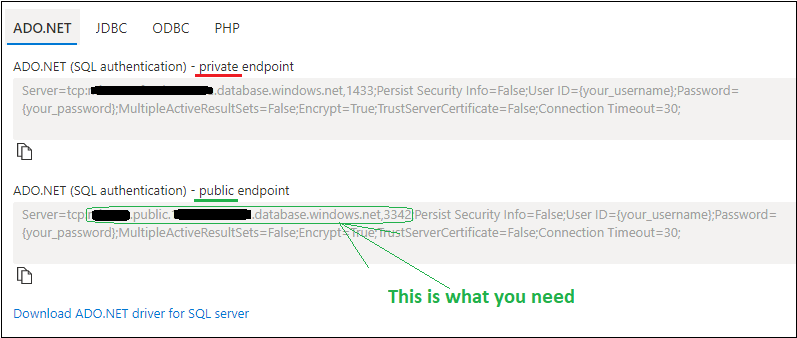
Notice that the format should look like: <your instance name>.public.<some automatic name the azure created for you>.database.windows.net, 3342
EXEC master.dbo.sp_addlinkedserver @server = N'Name_You_Want_4_The_Linked_Server', @srvproduct=N'', @provider=N'SQLNCLI', @datasrc=N'<your instance name>.public.<some automatic name the azure created for you>.database.windows.net, 3342', @catalog=N'Database_Name'
GO
EXEC master.dbo.sp_addlinkedsrvlogin @rmtsrvname=N'Name_You_Want_4_The_Linked_Server',@useself=N'False',@locallogin=NULL,@rmtuser=N'Your_Login_to_MI',@rmtpassword='Your_Password_4_MI'
GO
and that is all you need :-)
Note: you can configure more options for the connection using the stored procedure master.dbo.sp_serveroption but the above are the only required queries you need in order to configure the linked server
What is the relation of replica and linked server?!?
If we create transactional replicaton , By default it creates a Linked server on Publisher (Same name as Subsriber server name)
Open SSMS from the same machine where your server is or if SSMS is not installed use Azure Data Studio (does not require any installation)
Actually I dont have Remote desktop access on the publisher server so i can't connect server remotely and create linked server from there instead i have connected the publisher from other machine (via SSMS) and trying to create the linked server by TSQL and after that when i try to test it is showing me error in the above thread.

Actually I dont have Remote desktop access on the publisher server
Then you need to find someone who has and who can help you to troubleshoot the problem.
It is a good start to see that you can connect to the MI from your desktop. But that does not prove that the SQL Server machine, which may be segmented away on the network without Internet access, can access the MI.
Sure I'll check and revert in the thread with status.