Microsoft 365 and Office | Install, redeem, activate | For business | Windows
Processes in Microsoft 365 for setting up Office apps, redeeming product keys, and activating licenses.

This browser is no longer supported.
Upgrade to Microsoft Edge to take advantage of the latest features, security updates, and technical support.
' cx='32' cy='32' r='32' /%3E%3Ctext x='50%25' y='55%25' dominant-baseline='middle' text-anchor='middle' fill='%23FFF' %3EYZ%3C/text%3E%3C/svg%3E)
 ]1
]1
When i want to add "translator" or any other add-ins in word, it always shows,
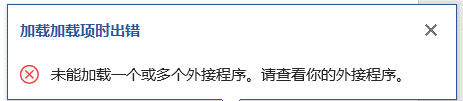
An error occurred while loading the add-in,
Failed to load one or more add-ins.Check out your add-ins
also ,it alerted me that my proofing tool was missing a language pack, but when I downloaded it as prompted, it didn't change
Processes in Microsoft 365 for setting up Office apps, redeeming product keys, and activating licenses.
A family of Microsoft word processing software products for creating web, email, and print documents.
' cx='32' cy='32' r='32' /%3E%3Ctext x='50%25' y='55%25' dominant-baseline='middle' text-anchor='middle' fill='%23FFF' %3EYS%3C/text%3E%3C/svg%3E)
Hi @yc z ,
Welcome to Microsoft Q&A!
Please understand that the "office-exchange-hybrid-itpro" tag is for general questions about Exchange hybrid deployment. Since from your description, your issue is not related to Exchange hybrid, I'll remove the "office-exchange-hybrid-itpro" tag. Thanks for your understanding.

Hi @yc z ,
What version of Office did you use?
Did this problem only appear in Word? How about other Office applications?
If this problem only appear in Word, I suggest you go to this location:
C:\Users\user name\AppData\Roaming\Microsoft\Templates
Change the Normal.dotm to Normatl.dotm.old, this will help you reset the Word custom settings. Then open Word and check the result.
If this problem appear in all Office applications, try to open Office as an administrator.
You can also repair Office application:
https://support.microsoft.com/en-us/office/repair-an-office-application-7821d4b6-7c1d-4205-aa0e-a6b40c5bb88b
Try these methods and let me know if you would like further assistance, I'm glad to help you.
If the response is helpful, please click "Accept Answer" and upvote it.
Note: Please follow the steps in our documentation to enable e-mail notifications if you want to receive the related email notification for this thread.
Thanks for your help.
Microsoft 365 is the version.
The problem appear in all Office.I have tried the online repair and even re-download several times.But i still cannot use the translator or load the add-in.
Hi @yc z ,
Did the add-in is under Insert tab- Add-ins group?
Did you enable firewall and antivirus software? Try to disable them.
Yes.
I've tried to disable the firewall and i may don't have antivirus software.
I guess it may have something to do with my movement. Not long ago,I saw that the C drive was full, so I moved some files stored on the C drive to the D drive,including Office. Then my word won't be able to use the built-in translation feature and it shows missing a proofing tool.I thought it would be good to re-download it, but it failed.Do I need to format my computer?
No, you can try to re-install Office. Before download the office tool to uninstall all Office completely:
https://aka.ms/SaRA-officeUninstallFromPC
Then re-install the Office.