Microsoft 365 and Office | SharePoint | Development
The process of building custom applications and tools that interact with Microsoft SharePoint, including SharePoint Online in Microsoft 365.

This browser is no longer supported.
Upgrade to Microsoft Edge to take advantage of the latest features, security updates, and technical support.
' cx='32' cy='32' r='32' /%3E%3Ctext x='50%25' y='55%25' dominant-baseline='middle' text-anchor='middle' fill='%23FFF' %3EKJ%3C/text%3E%3C/svg%3E)
Hi All,
Is there any OOTB URL available to open the sharePoint Document library folder in the browser using folder GUID.
Currently pass the folder relative path in the ID parameter of library view to open the folder, instead of path can we use GUID to open? Any url parameter available in share point ?
Thanks in advance
Regards.
Kannan J

Hello @Kannan J ,
Is there anything else I can help with regarding this issue?
You can comment us at any time and we will continue to follow up.
Thanks,
Echo Du
' cx='32' cy='32' r='32' /%3E%3Ctext x='50%25' y='55%25' dominant-baseline='middle' text-anchor='middle' fill='%23FFF' %3ESH%3C/text%3E%3C/svg%3E)
In my experience of SharePoint Modern so far, which has largely been good, URL/paths/folders are definitely a weak spot. Like using FQL to filter on a folder with site:equals("https://tenant.sharepoint.com/sites/sitecollection/subsite/folderinsubsite") means some solutions are vulnerable to random administrators changing folder names. It would be nice to just lock a folder and not let anyone ever change the path and then essentially the path is the (local) GUID.
Hi @Kannan J ,
Welcome to Q&A Forum!
According to my research, there is no GUID (Document ID) for Folders in SharePoint Online, only ID. GUID acts on the file level. For more information, please see "Enable and configure unique Document IDs" article.
Also, there is no OOTB way to open the folder by GUID or ID.
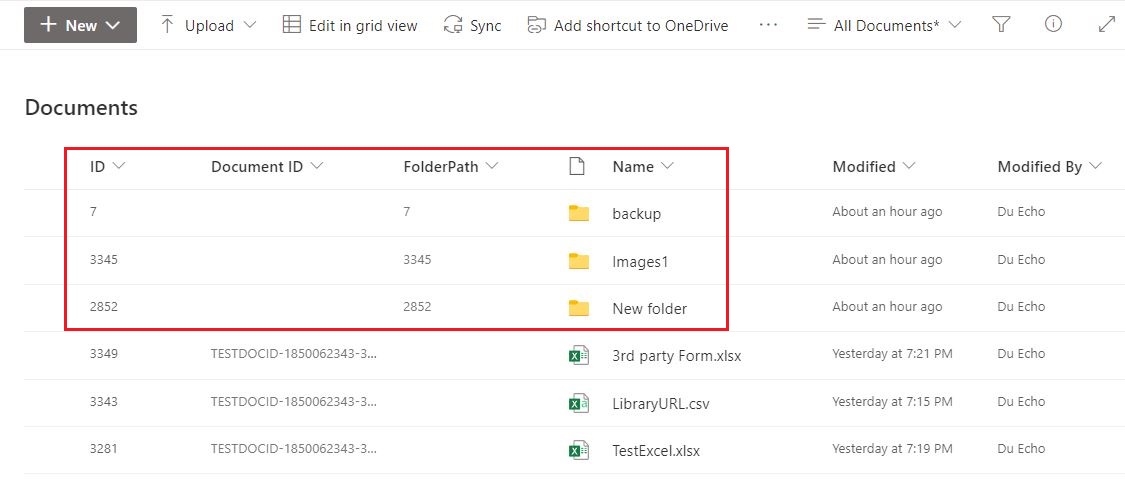
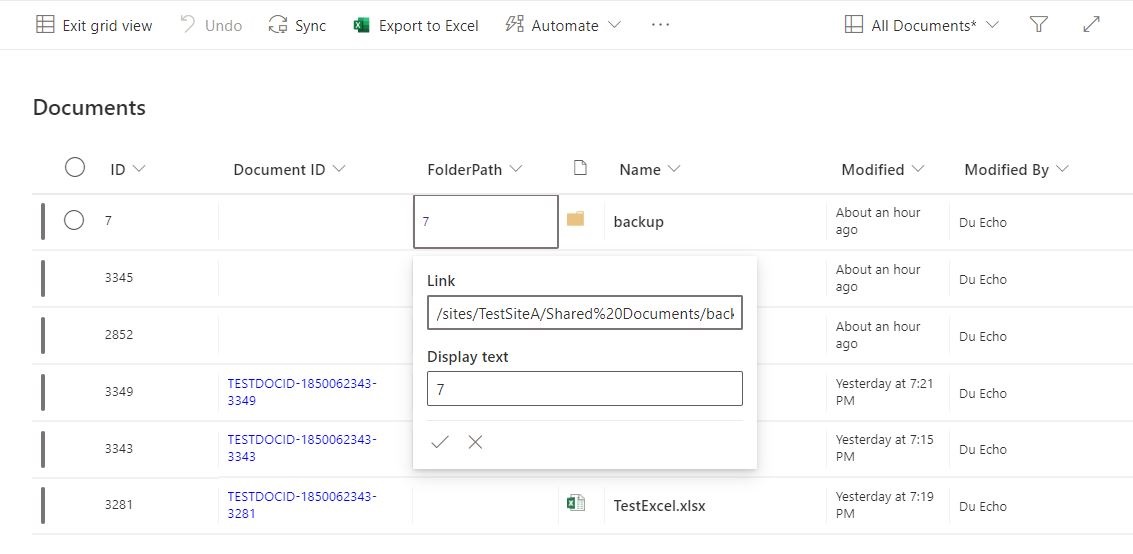
Here I provide a workaround for you reference:
1.Go to the Document Library as a site admin
2.Create a Hyperlink column named [FolderPath]

3.Link: Fill in the relative path of the folder
Display text: Enter the ID value of the folder
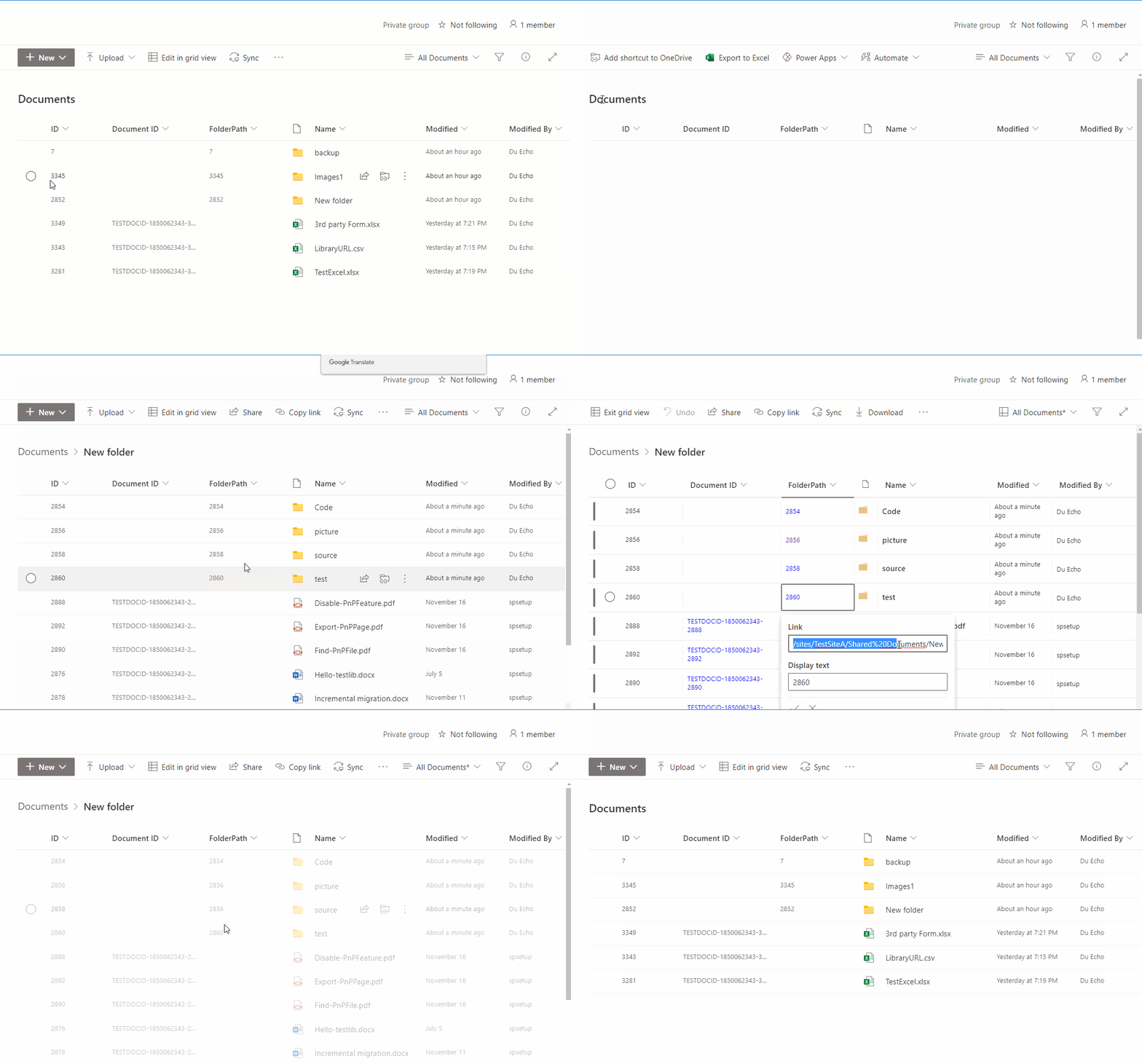
Thanks,
Echo Du
============================
If the answer is helpful, please click "Accept Answer" and kindly upvote it. If you have extra questions about this answer, please click "Comment".
Note: Please follow the steps in our documentation to enable e-mail notifications if you want to receive the related email notification for this thread.
Hi @Kannan J ,
Is there anything else I can help with regarding this issue?
You can comment us at any time and we will continue to follow up.
Thanks,
Echo Du
Hi @Kannan J ,
Have you tried the solution I proposed? If you have any questions or progress, you can contact me in time.
Looking forward to your reply.
Have a nice day!
Thanks,
Echo Du

That's a pretty cunning solution.
Hello Echo du,
Thank you,
Does this possible to open the folder by GUID ? Can you please post the related msdn article/forum link if you have.
Regards,
Kannan.