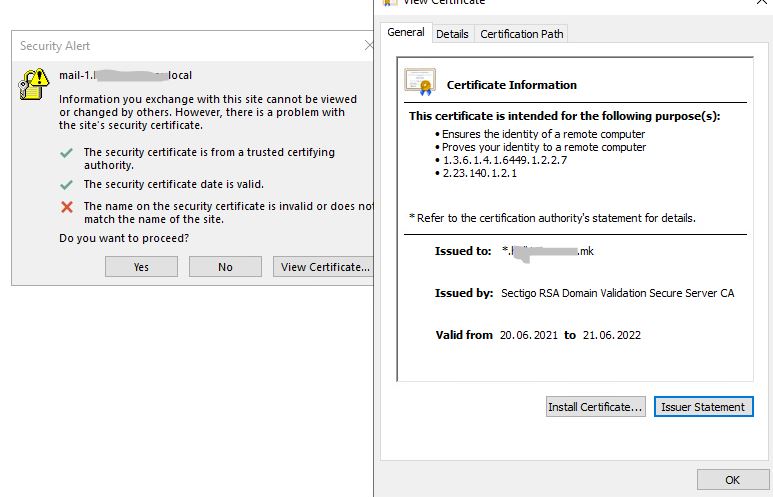
Problem with SSL for Outlook clients

AleksandarB 66 Reputation points
2021-12-22T19:32:24.45+00:00

Hi everyone,
I have newly deployed on premises Exchange environment.
All of the Outlook clients, receive warning messages, about problem with certificate from Exchange servers. Of course, there is installed valid certificate from public authority, however, the error (warning) message from the Outlooks, refers to internal Net-Bios name of the Exchange servers.

Please, how to find the problem,
Aleksandar

Outlook | Windows | Classic Outlook for Windows | For business
Exchange | Exchange Server | Management
The administration and maintenance of Microsoft Exchange Server to ensure secure, reliable, and efficient email and collaboration services across an organization.
{count} votes

Answer accepted by question author
  1. Andy David - MVP 159.7K Reputation points MVP Volunteer Moderator
    2021-12-23T14:39:01.497+00:00

    One of your client virtual directories isnt set correctly to the FQDN that matches a subject name on the cert.

    Run this from Outlook:
    https://answers.microsoft.com/en-us/msoffice/forum/all/mailboxes-test-e-mail-autoconfiguration/19f9c90a-4640-46c4-a574-dbec29bdb8ba?auth=1

    Then click on the XML tab in the results and check the URLs returned. See what they say for the results checking the <Protocol>

    you can post here minus any personal data as well ( copy and paste from the XML section

    Did you set the correct autodiscover URI?

    Example:

    Set-ClientAccessService -Identity "MBX-01" -AutoDiscoverServiceInternalUri "https://mbx01.contoso.com/autodiscover/autodiscover.xml"   
    

    https://learn.microsoft.com/en-us/powershell/module/exchange/set-clientaccessservice?view=exchange-ps

    1 person found this answer helpful.
    0 comments No comments

0 additional answers

Sort by: Most helpful

Your answer

Answers can be marked as 'Accepted' by the question author and 'Recommended' by moderators, which helps users know the answer solved the author's problem.