Microsoft 365 and Office | Excel | For business | Windows
A family of Microsoft spreadsheet software with tools for analyzing, charting, and communicating data

This browser is no longer supported.
Upgrade to Microsoft Edge to take advantage of the latest features, security updates, and technical support.
' cx='32' cy='32' r='32' /%3E%3Ctext x='50%25' y='55%25' dominant-baseline='middle' text-anchor='middle' fill='%23FFF' %3EJW%3C/text%3E%3C/svg%3E)
I use Mircosoft Excel and of late I have this problem that is driving me nuts. I have a data list that reaches down to 5000+ rows, and when at the bottom, I click a cell, or a range of cells, it jumps to the top of the spreadsheet.

Is any macro ran on your workbook?
If this file is in .xlsm format that store macro, I would suggest you save this file as .xlsx file to have a check.
If you do not click a cell or a range cells at the bottom of the data list, click other location such as row 100+, would this issue be reproduced?
It's recommended to open Excel in Safe Mode(Press and hold the CTRL key and double-click the Excel shortcut) first, and then open this worksheet to check this issue.
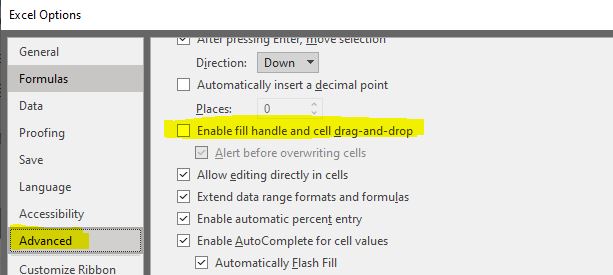
I also suggest you go to Excel > File > Options > Advanced > Under Editing Options, the "Enable fill handle and cell drag-and -drop" is not enabled.
Any updates, you could post back.
If the answer is helpful, please click "Accept Answer" and kindly upvote it. If you have extra questions about this answer, please click "Comment".
Note: Please follow the steps in our documentation to enable e-mail notifications if you want to receive the related email notification for this thread.
I'm sorry, but I did try all of your choices, but nothing helps. I even checked at 100- rows and it does the same thing. I do have macros which i need and the document is saved as a .xlsm, but i did try to save a copy on my desktop with out macros, but it still does the same thing. the funny part is that it only does it to me (it is a shared document) and only on one computer, and only this one document does that. All the other documents i use dont do that jumping.