Microsoft Teams | Microsoft Teams for business | Other
Additional features, settings, or issues not covered by specific Microsoft Teams categories

This browser is no longer supported.
Upgrade to Microsoft Edge to take advantage of the latest features, security updates, and technical support.
' cx='32' cy='32' r='32' /%3E%3Ctext x='50%25' y='55%25' dominant-baseline='middle' text-anchor='middle' fill='%23FFF' %3EGC%3C/text%3E%3C/svg%3E)
After reinstalling Microsoft Teams and Powershell, I am still left with this error:

After running in Powershell ISE, I've noticed that the required module to use the -MembershipType Parameter is not imported

How does one go about importing this package so I can set private channels in MicrosoftTeams
Thanks again
Additional features, settings, or issues not covered by specific Microsoft Teams categories

As mentioned in the documentation, you need the PREVIEW module for that parameter:
If you're using the PowerShell steps in this article to manage private channels, you must install and use the Teams PowerShell public preview module from the PowerShell Gallery. For steps on how to install the module, see Install Microsoft Teams PowerShell. The latest General Availability Teams PowerShell module doesn't support managing private channels.
Get it here: https://www.powershellgallery.com/packages/MicrosoftTeams/1.1.3-preview
' cx='32' cy='32' r='32' /%3E%3Ctext x='50%25' y='55%25' dominant-baseline='middle' text-anchor='middle' fill='%23FFF' %3ERF%3C/text%3E%3C/svg%3E)
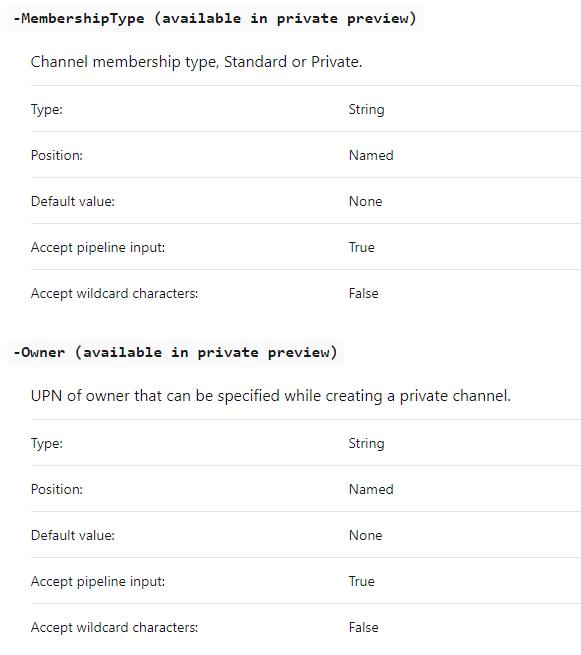
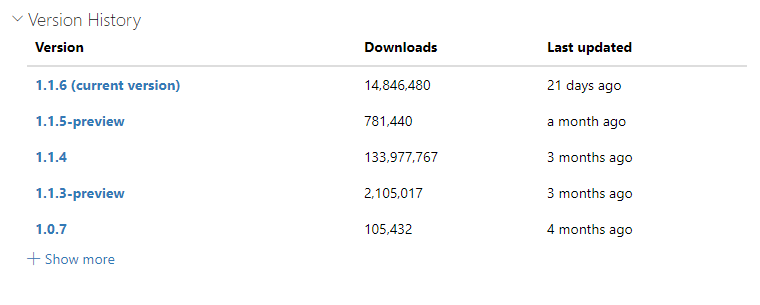
According to the current documentation those commands are only available in the private preview version, not in the public general or preview releases. However they are actually available in the 1.15-preview version.
The following should get you going
Install-Module -Name MicrosoftTeams -RequiredVersion 1.1.5-preview -AllowPrerelease -AllowClobber
https://learn.microsoft.com/en-us/powershell/module/teams/new-teamchannel?view=teams-ps
' cx='32' cy='32' r='32' /%3E%3Ctext x='50%25' y='55%25' dominant-baseline='middle' text-anchor='middle' fill='%23FFF' %3EA%3C/text%3E%3C/svg%3E)
Hi, I have the same problem while on that version. 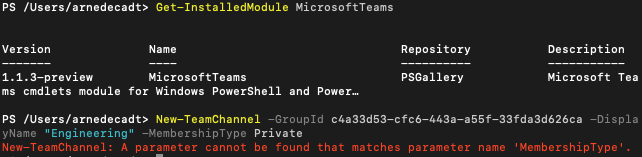
' cx='32' cy='32' r='32' /%3E%3Ctext x='50%25' y='55%25' dominant-baseline='middle' text-anchor='middle' fill='%23FFF' %3EA%3C/text%3E%3C/svg%3E)
Hi, are there any updates with this case? If not, please select the appropriate response as "Answered." Otherwise please let us know how we can assist you.
' cx='32' cy='32' r='32' /%3E%3Ctext x='50%25' y='55%25' dominant-baseline='middle' text-anchor='middle' fill='%23FFF' %3EJM%3C/text%3E%3C/svg%3E)
Hi!
I also agree with michev! You need to install Teams module for PowerShell.
For more details, you can refer to:
https://learn.microsoft.com/en-us/MicrosoftTeams/teams-powershell-overview
Hi!
Is there any update on this case?
If you have any update, please feel free to contact with us.
Do you have any further question on this topic?