Azure Machine Learning
An Azure machine learning service for building and deploying models.
This browser is no longer supported.
Upgrade to Microsoft Edge to take advantage of the latest features, security updates, and technical support.
' cx='32' cy='32' r='32' /%3E%3Ctext x='50%25' y='55%25' dominant-baseline='middle' text-anchor='middle' fill='%23FFF' %3EMR%3C/text%3E%3C/svg%3E)
I'm working on Azure ML and want to import another jupyter notebook from a notebook.
Thank you.

@Myong Rae Chang Did the below suggestion help you use your notebook in another notebook? It would be great if you could accept the answer if it helped you proceed further. Thanks!!
@Myong Rae Chang I don't see a direct way to import another notebook in a cell of a azure ML notebook. But, you can export the notebook that you want to run as a python script and then run it in a cell in the required notebook.
Export option:
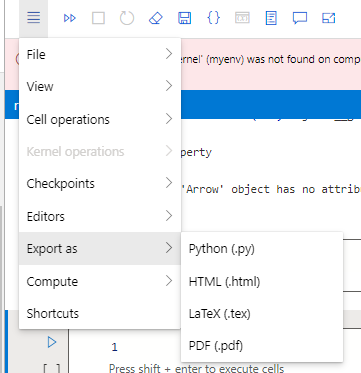
The generated .py script can be copied in a cell of your notebook which run everything in one execution. I hope this works!!
If an answer is helpful, please click on  or upvote
  which might help other community members reading this thread.