Azure Files
An Azure service that offers file shares in the cloud.
This browser is no longer supported.
Upgrade to Microsoft Edge to take advantage of the latest features, security updates, and technical support.
' cx='32' cy='32' r='32' /%3E%3Ctext x='50%25' y='55%25' dominant-baseline='middle' text-anchor='middle' fill='%23FFF' %3EM%3C/text%3E%3C/svg%3E)
Failed to delete resource group rg1: Deletion of resource group 'rg1' failed as resources with identifiers 'Microsoft.StorageSync/storageSyncServices/Storagesync1' could not be deleted. The provisioning state of the resource group will be rolled back. The tracking Id is 'fbee472e-fdad-4c3d-a3e0-d383121442e1'. Please check audit logs for more details. (Code: ResourceGroupDeletionBlocked) Can be deleted only if there are no sync groups in this storage sync service. (Code: MgmtDeletionDependency, Target: Validation) , , ,
An Azure service that offers file shares in the cloud.
Answer accepted by question author

@mourya Welcome to Microsoft Q&A Forum, Thank you for posting your query here!
As I understand you are unable to delete the resource group due to Azure Sync group am I correct?
Based on the error message(Code: MgmtDeletionDependency, Target: Validation)! You have to unregister servers first before you will be able to delete Azure File Sync:
This error occurs if the server is offline or doesn't have network connectivity. If the server is no longer available, unregister the server in the portal which will delete the server endpoints. To delete the server endpoints, follow the steps that are described in Unregister a server with Azure File Sync.
Troubleshoot Azure File Sync issue:
If you still find any difficulties, please let me know I can work closer on this issue.
Please let us know if you have any further queries. I’m happy to assist you further.
----------
Please do not forget to  and
and  wherever the information provided helps you, this can be beneficial to other community members.
i tried this method but the servers are not unregistering. if there is another method to delete the server end points please can you sugesst me
@mourya Deleting the metadata on an Azure file share that is currently in use by a cloud endpoint causes Azure File Sync operations to fail. If you then use this file share for sync in a different sync group, data loss for files in the old sync group is almost certain.
Note: If the server (Example: VM )is no longer available, unregister the server in the portal which will delete the server endpoints. To delete the server endpoints, follow the steps that are described in Unregister a server with Azure File Sync.
You can use Azure Powershell : https://learn.microsoft.com/en-us/powershell/module/az.storagesync/remove-azstoragesynccloudendpoint?view=azps-7.0.0
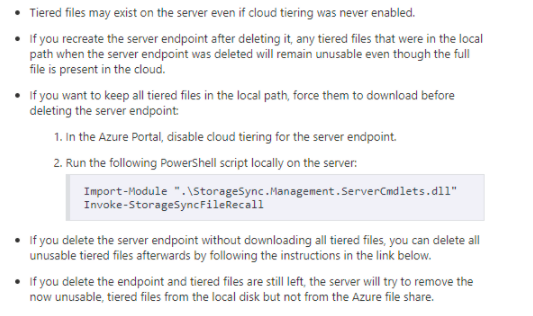
Server Endpoints cannot be removed when the server is no longer available. The best and simplest way to clean up is to go to the "Registered servers" blade in your Storage Sync Service, select the server that is the VM you deleted (state should show: "Appears Offline") and hit "Unregister".
Server un-registration breaks the trust relationship between server and cloud and as a consequence all Server Endpoints this server might still have in different Sync Groups get cleaned up as well. One stop shop. Hope this helps.
If the issue still persist, I wish to engage with you offline for a closer look and provide a quick and specialized assistance,
@mourya
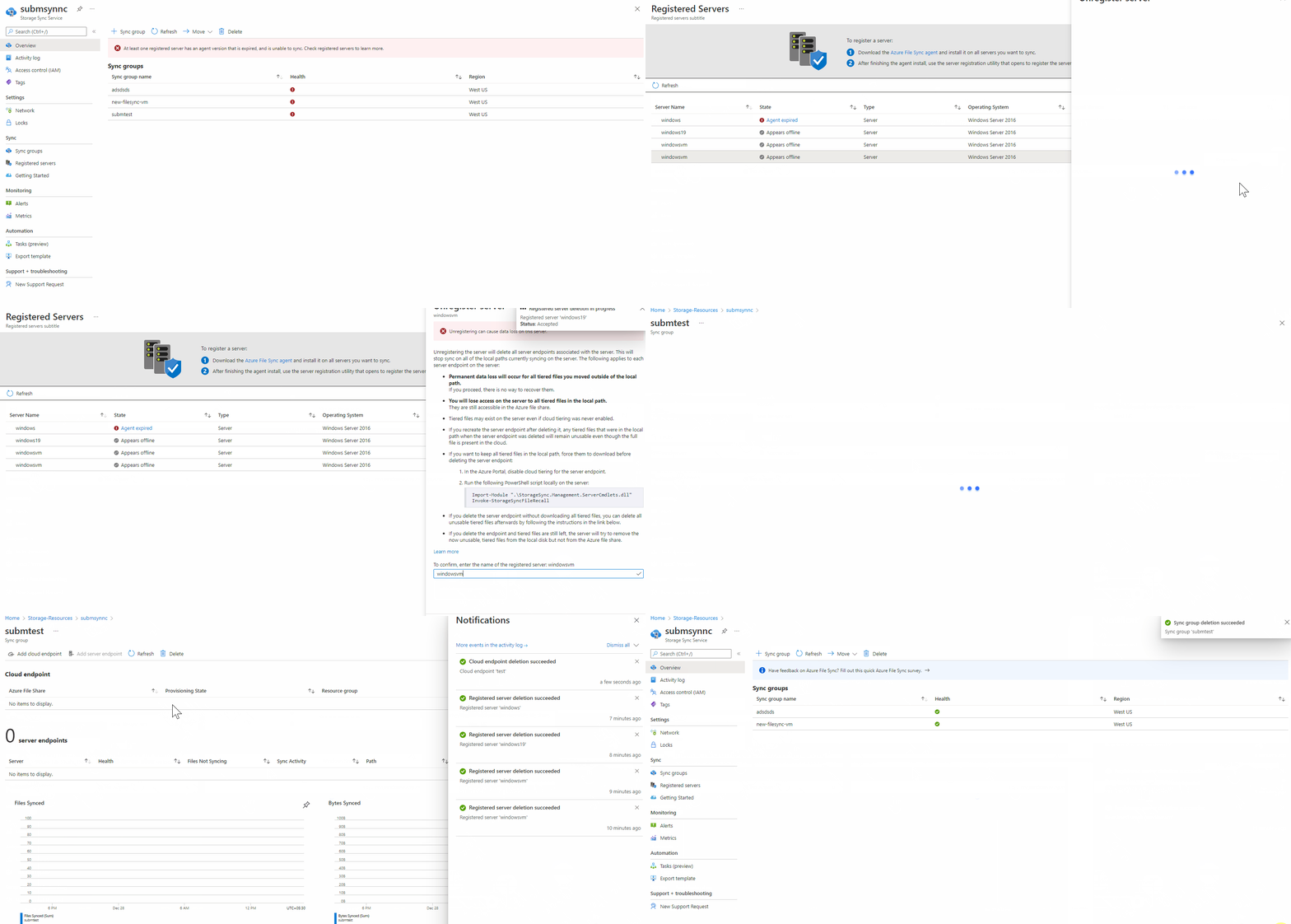
Go into Storage Sync Service-> Click on the Sync Service in question 
Click Registered Servers-> Click on the server you want to remove -> Unregister Server->Type in the (copy / paste) the name of the server in the confirmation box at the bottom
If the server is no longer available, unregister the server in the portal which will delete the server endpoints .
 ]5
]5
After Registered Server are been un-registered , You will be deleted with the Server Endpoints -> Then you can delete the Cloud Endpoint, It will take some-time to delete cloud endpoint you can click on notification button (bell icon) to check status(Sync status will stop)
After Sync status is stopped you can view the provisioning state changes from  to Provisioning