SQL Server Reporting Services
A SQL Server technology that supports the creation, management, and delivery of both traditional, paper-oriented reports and interactive, web-based reports.
This browser is no longer supported.
Upgrade to Microsoft Edge to take advantage of the latest features, security updates, and technical support.
' cx='32' cy='32' r='32' /%3E%3Ctext x='50%25' y='55%25' dominant-baseline='middle' text-anchor='middle' fill='%23FFF' %3EN%3C/text%3E%3C/svg%3E)
Hi All,
i am added a Rectangle in RDLC Report also added a TextBox on Rectangle Like Picture at Below
can possible to visible Rectangle if TextBox.Text content is Blank. means
i want to show only Rectangle (as same width and height) if TextBox is Empty.
for i want to maintain that space

with Regards
NazHim
' cx='32' cy='32' r='32' /%3E%3Ctext x='50%25' y='55%25' dominant-baseline='middle' text-anchor='middle' fill='%23FFF' %3EI1%3C/text%3E%3C/svg%3E)
Hi @NazHim ,
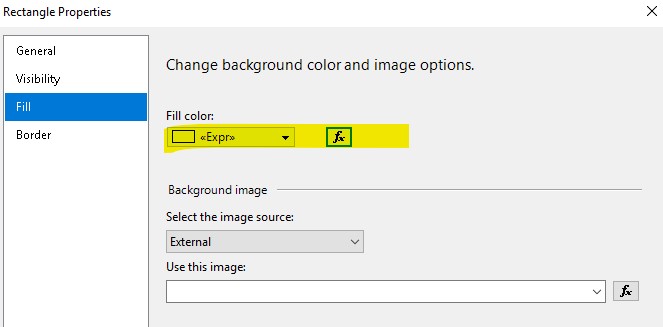
You can Name the textbox first ,such as “textboxname”,and then change the background color expression of the Rectangle like =iif(ReportItems!textboxname.value.length >0,"No Color","blue")

Best Regards,
Isabella
If the answer is the right solution, please click "Accept Answer" and upvote it. If you have extra questions about this answer, please click "Comment".
Note: Please follow the steps in our documentation to enable e-mail notifications if you want to receive the related email notification for this thread.
Hi @NazHim ,
Is the data in your text box a parameter value?
If it is a parameter value, you can try the following expression in the Rectangle Properties:
=IIF(IsNothing(Parameters!ParameterName.Value), "YourColor","NULL")
Best Regards,
Joy
If the answer is the right solution, please click "Accept Answer" and kindly upvote it. If you have extra questions about this answer, please click "Comment".
Note: Please follow the steps in our documentation to enable e-mail notifications if you want to receive the related email notification for this thread.