Microsoft Security | Microsoft Graph
An API that connects multiple Microsoft services, enabling data access and automation across platforms

This browser is no longer supported.
Upgrade to Microsoft Edge to take advantage of the latest features, security updates, and technical support.
' cx='32' cy='32' r='32' /%3E%3Ctext x='50%25' y='55%25' dominant-baseline='middle' text-anchor='middle' fill='%23FFF' %3EEV%3C/text%3E%3C/svg%3E)
I am new to the Graph API and would like to call my outlook calendars with the event schedules from a daemon application.
When I login to Microsoft account using this email I use to login to Azure: evakhovsky@réalisations .com I can see my calendar fine and I can also call the Web API using the Graph Explorer.
E.g. the Graph Explorer call:
https://graph.microsoft.com/v1.0/me/calendars
return my calendar events fine when I am logged in with my Microsoft account.
Now. I would like to be able to access the same API using a service application i.e. without the user login prompt. So I went to the Azure portal, created and registered a new application, gave it Calendar.Read application permission with the administrator's consent and downloaded a quickstart daemon app which makes
await apiCaller.CallWebApiAndProcessResultASync($"{config.ApiUrl}v1.0/users", result.AccessToken, Display);
call which works i.e. it returns a user so that I can see that the"userPrincipalName": "evakhovsky_yahoo.com#EXT#@evakhovskyyahoo.onmicrosoft.com"which is not what the Graph Explorer call returns. The Graph explorer call:
https://graph.microsoft.com/v1.0/users
returns"userPrincipalName": "evakhovsky@réalisations .com"
so basically when I make the Graph Explorer call:
graph.microsoft.com
https://graph.microsoft.com/v1.0/me/calendars
it returns the calendars' result which is correct.
However, an equivalent daemon API call
await apiCaller.CallWebApiAndProcessResultASync($"{config.ApiUrl}v1.0/users/f5a1a942-f9e4-460b-9c6c-16f45045548f/calendars", result.AccessToken, Display);
returns: Failed to call the web API: NotFound
Content: {"error":{"code":"ResourceNotFound","message":"Resource could not be discovered.","innerError":{"date":"2021-12-26T16:46:35","request-id":"67ef50e4-bec6-48ae-9e45-7765436d1345","client-request-id":"67ef50e4-bec6-48ae-9e45-7765436d1345"}}}
I suspect that the issue is in the userPrincipalName mismatch between the Graph Explorer and the daemon application, but I am failing to find a solution to this.
Also note that a normal ASP.Core sample which requires manual user login works ok. The issue is only with the daemon application.
' cx='32' cy='32' r='32' /%3E%3Ctext x='50%25' y='55%25' dominant-baseline='middle' text-anchor='middle' fill='%23FFF' %3ESM%3C/text%3E%3C/svg%3E)
Your understanding is correct here.
Even though you can use personal account with Azure AD, it remains a personal account only and there are some limitations around it. You may need to use a work or school account instead.
Please find the difference between Work & School accounts (Organizational accounts) and Microsoft Accounts (Personal Accounts) for better understanding:
A work or school account is created by an organization using a business service that has Azure Active Directory as the authentication and authorization platform.. A work account typically uses an organization’s custom domain name or company name ie.(******@yourorg.com). These are created by an organization’s administrator to enable a member of the organization access to Microsoft cloud services such as Microsoft Azure, Microsoft Intune or Microsoft 365.
A Microsoft account (MSA) is an account created by a user for personal use and is the new name for what used to be called “Windows Live ID”. The Microsoft account is the combination of an email address and a password that a user uses to sign into all consumer-oriented Microsoft products and cloud services such as Outlook (Hotmail), Messenger, OneDrive, MSN or Xbox LIVE. Your Microsoft account is created and stored in the Microsoft consumer identity account system that is run by Microsoft.
I would suggest that to create work or school account (aka Organizational Accounts) to work in this case and creates a user in the AAD Tenant and once the user gets created, you will find that you have the userPrincipalName set as "******@yourTenantName.onmicrosoft.com" to access the O365 Exchange Online.
------------------------------------------------------------------------------------------------------------------------
Please don't forget to click on Accept Button or upvote button whenever the information provided helps you.
After creating a new work account in Azure and linking a work email domain the calendar API seems to start working. I am still puzzled by the complexity of the setup process.
Hello @Edward Vakhovsky ,
Thanks for reaching out.
I tried to replicate your issue with Microsoft personal account and getting the same results in Graph Explorer as yours. I called the Graph API endpoint through postman and getting below error when using User Principal name
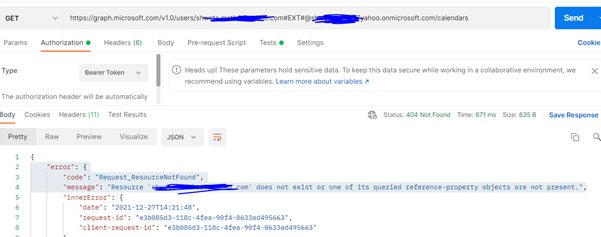
and below error while using userId
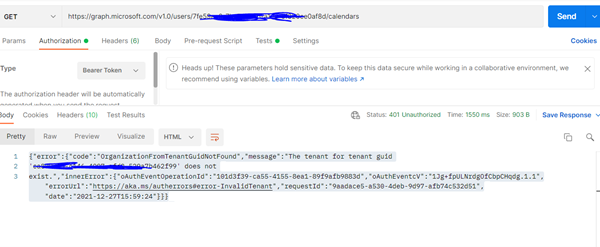
We are generally getting this {"error":{"code":"ResourceNotFound","message":"Resource could not be discovered."}} error for organizational users when license is not assigned to the users or mailbox is not configured for them.
I tried to assign the license to the Microsoft account user and getting below error.
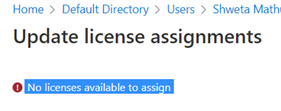
In order to call /{user-id}/events to work the user must have mailbox on Exchange Online if you are using client credentials for Daemon applications. In this case user does not have a mailbox (which make sense with null value), so the call wouldn’t work.
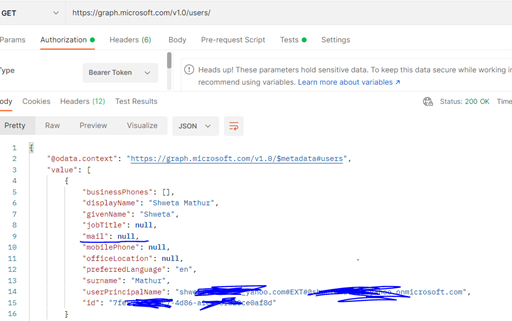
Also, It seems assigning license to a guest account (Microsoft personal account in this case) is not possible and hence the user account never gets access to the calendar service (part of o365 exchange online) due to which it cannot retrieve the calendar information of personal Outlook account.
I am still looking into to assign license to the user and if I find anything, I will update this post. However, I think in the case where graph explorer is getting the calendar information is from MSA account (outlook.com services) and not the Office365 services.
-------------------------------------------------------------------------------------------------
Please remember to "Accept Answer" if answer helped you.
Thank you for reaching back to me. Yes. This has been my suspicion from the beginning that the user-id I was using for the daemon application i.e. "userPrincipalName mismatch between the Graph Explorer and the daemon application" as pointed in the original question. So, we both see the cause of the problem, but there is still no resolution.
I am happy to pay whatever the fee to get access to the Office365 calendar if that's what required.
It sounds to me that Microsoft is not happy with my email i.e. evakhovsky@réalisations .com and considers it a personal email hence all the issues i.e. I cannot get a new email box etc.
But this is quite strange. Do I need to have a non-personal email account in order to use Azure? Makes little sense