Microsoft 365 and Office | Word | For business | Windows
A family of Microsoft word processing software products for creating web, email, and print documents.

This browser is no longer supported.
Upgrade to Microsoft Edge to take advantage of the latest features, security updates, and technical support.
' cx='32' cy='32' r='32' /%3E%3Ctext x='50%25' y='55%25' dominant-baseline='middle' text-anchor='middle' fill='%23FFF' %3ETS%3C/text%3E%3C/svg%3E)
Hello. We are using Office 365 and no longer have the popup "File In Use" in our Office 365 when opening files over network using WebDAV.
Current version: Microsoft® Word for Microsoft 365 MSO (Version 2111 Build 16.0.14701.20254) 64-bit
I installed a clean Windows 8.1 (no updates) with Office 2016 RTM version from 2015 (no updates) and we have the popup there:
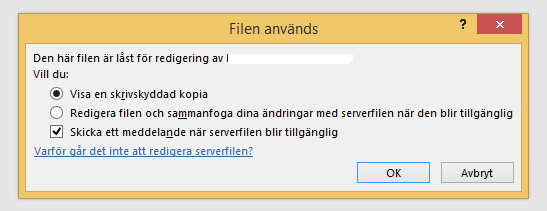
How can we get this behavior back to Office 365? It's very critical for our users to be aware that the file is locked by someone else upon opening it.

Hi @Tony Söderberg ,
As far as I know this feature is still existed in Office 365, this is related to how did you share the file and the permission of the shared folder.
You can also provide the steps for sharing here, I'm glad to help you.
If the response is helpful, please click "Accept Answer" and upvote it.
Note: Please follow the steps in our documentation to enable e-mail notifications if you want to receive the related email notification for this thread.