Microsoft 365 and Office | SharePoint Server | For business
A family of Microsoft on-premises document management and storage systems.

This browser is no longer supported.
Upgrade to Microsoft Edge to take advantage of the latest features, security updates, and technical support.
' cx='32' cy='32' r='32' /%3E%3Ctext x='50%25' y='55%25' dominant-baseline='middle' text-anchor='middle' fill='%23FFF' %3ETK%3C/text%3E%3C/svg%3E)
I setup the Search Service, as mentioned below on Cloud Servers

In Search Administration the Search Application Topology is not showing.
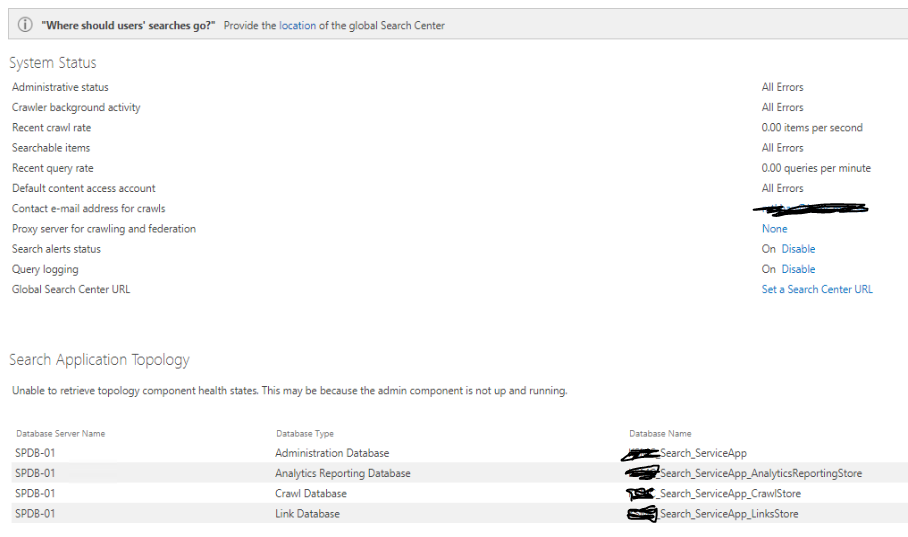
How to check where i am wrong.
I observed that Search Service using Ports from 16500 to 16519 if these ports are block, it will impact on services.
I check in On-Premises SP Server the service working fine and search Engine work properly.
above mentioned ports are open, in On-Premises but On the Cloud above mentioned ports are closed.
Please Advice
Thanks in Advance
TeeJay

Hi @Tahir Khan
I am checking to see how things are going there on this issue.
If there's anything you'd like to know, don't hesitate to ask.
Are you configured with a cloud hybrid search service?
Please restart the services in an order.
In addition, launch the Configuration Wizard and select the ‘Usage and Health data collection’ check box so as to create the service application.
In some cases the Usage service application will be created but might be in stopped state. You can run the below Power Shell script.
$UsageProxy = Get-SPServiceApplicationProxy | where {$_.TypeName -like "Usage*"}
$UsageProxy.Provision()