Microsoft Security | Microsoft Entra | Microsoft Entra ID
A cloud-based identity and access management service for securing user authentication and resource access

This browser is no longer supported.
Upgrade to Microsoft Edge to take advantage of the latest features, security updates, and technical support.
' cx='32' cy='32' r='32' /%3E%3Ctext x='50%25' y='55%25' dominant-baseline='middle' text-anchor='middle' fill='%23FFF' %3EMW%3C/text%3E%3C/svg%3E)
Hi,
I am trying to automate the process of making app registration for our tenants/customers using Powershell.
I got things up and running in test, but one thing is strange.
In my test I have created app registration manually using the steps with creating redirect url, API permission and client secret.
On that app I now try to create new secret/key using Powershell with this cmd:
New-AzureADApplicationPasswordCredential -ObjectId $app.ObjectId -CustomKeyIdentifier "FromPowershell" -StartDate $startDate -EndDate $endDate -Value $keyValue
Things runs like a charm, and I get response back, showing me the expected result.
Now I try to look at certificates and secrets on my app registration, but the list is empty. See image...
If I run Get-AzureADApplicationPasswordCredential -ObjectId $app.ObjectId I get the added key:
PS C:\Windows\system32> Get-AzureADApplicationPasswordCredential -ObjectId $app.ObjectId
CustomKeyIdentifier : {70, 114, 111, 109...}
EndDate : 29-12-2119 10:09:22
KeyId : 3f6aa47b-3d29-4d8b-a10b-4cf53c8bcab3
StartDate : 29-12-2021 10:09:22
Value :
The key works, but I am no to keen on putting onto production when I cannot see the key in the Portal UI.
What am I doing wrong?
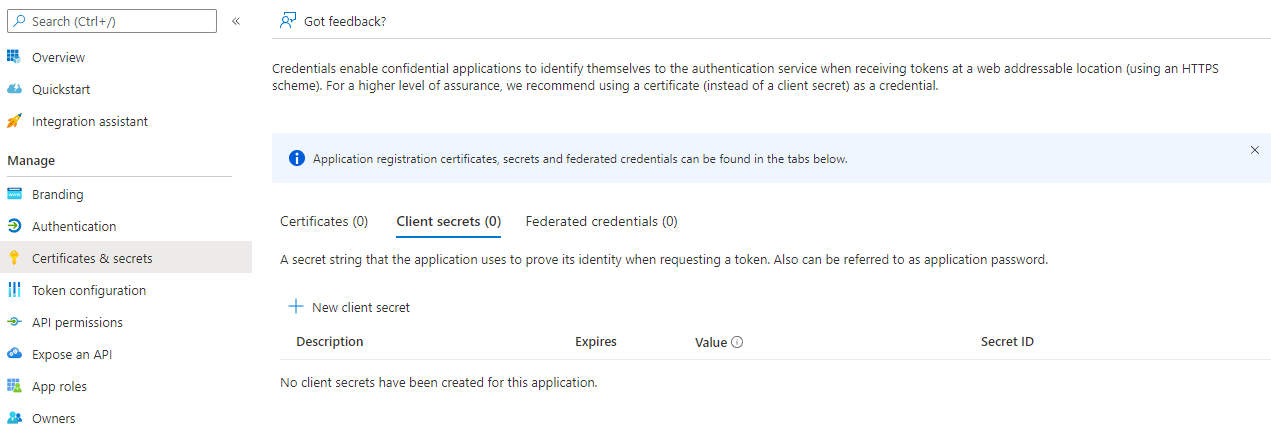
Update - it seemed to be a case of impatience + browser cache. After waiting 5 minutes and doing ctrl+f5 on portal, the key is appearing! Strange thing is, that I tried to log out of portal and back in with no change. But must be browser cache thinggy giving my a hard time.
A side question: would it be possible to extend a key without breaking running integrations using the key? Scenario: I've added a key through UI and did not change default expiry from 6 months. Now 3rd party is using app registration with key for integration. Now I want to extend expiry date. Could I just add new key with same value through Powershell, and delete the existing one?
Thanks

Hello @Mads Westen ,
Thanks for reaching out.
Extending the expiration date is not supported, but as you mentioned you can create new credential to use a custom value instead by using the following cmdlet, which allows you to set prior PasswordCredentials granted to the application.
New-AzureADApplicationPasswordCredential -ObjectId 34c04e6c-a0e1-46be-b0c2-14f1fb052391 -Value "Nez6kRbXgtphaIU0kQy2Jnn5SCj1CVMAV1xTYL8ABEU=" -CustomKeyIdentifier Test

Hope this helpful.
-----
Please "Accept the answer" if the information helped you. This will help us and others in the community as well.