
Check that virtualization is enabled in the computer bios for the processor. I would also double check your motherboard supports virtualization
This browser is no longer supported.
Upgrade to Microsoft Edge to take advantage of the latest features, security updates, and technical support.
' cx='32' cy='32' r='32' /%3E%3Ctext x='50%25' y='55%25' dominant-baseline='middle' text-anchor='middle' fill='%23FFF' %3EAB%3C/text%3E%3C/svg%3E)
See the image for error.
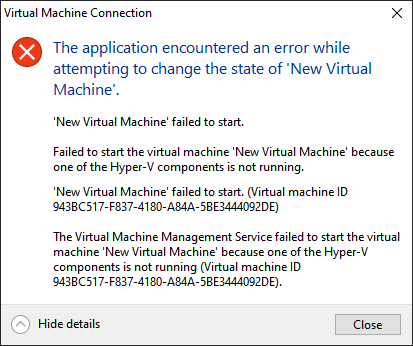
Virtualization is enabled in UEFI. I've run Hyper-V VMs on this install of Windows 10 before. Also, coreinfo64 reports that the processor does not support VT-x but it actually does. It is an Intel Core i5-6200U. WSL gives error 0x80370102 while installing a distro.

Check that virtualization is enabled in the computer bios for the processor. I would also double check your motherboard supports virtualization
It is enabled, I mentioned in the question. As I said I have run Hyper-V VMs before on this install of Windows.
I fixed this issue myself following these steps:
C:\Windows\System32\vmcompute.exe and C:\Windows\System32\vmwp.exe to 0 system overrides. Now I am able to run VMs in Hyper-V.