Developer technologies | ASP.NET | ASP.NET Core
A set of technologies in the .NET Framework for building web applications and XML web services.
This browser is no longer supported.
Upgrade to Microsoft Edge to take advantage of the latest features, security updates, and technical support.
' cx='32' cy='32' r='32' /%3E%3Ctext x='50%25' y='55%25' dominant-baseline='middle' text-anchor='middle' fill='%23FFF' %3EP%3C/text%3E%3C/svg%3E)
Hi,
I added the following codes to the relevant Textbox field, and it did assign today value to that field. How to avoid changing value of the relevant Textbox field?
    $(function () {
        $("#tb_valid_from").datepicker({
            autoclose: true,
            todayHighlight: false
        }).datepicker('update', new Date());
    });

Your question does not make a lot of sense. The code you've shared is a date picker which allows the user to select a date. If you do not want the user to change the date then use a label or set the input readonly attribute and set the date in the server.
Hi,
The code shown by me, is provide the way to select one date.
My issue is, the code (by me in above) does override the relevant value of the Textbox. How to avoid the problem?
' cx='32' cy='32' r='32' /%3E%3Ctext x='50%25' y='55%25' dominant-baseline='middle' text-anchor='middle' fill='%23FFF' %3EA%3C/text%3E%3C/svg%3E)
Hi @Peter_1985 ,
and it did assign today value to that field. How to avoid changing value of the relevant Textbox field?
According to your code, you are using Bootstrap Datepicker, right?
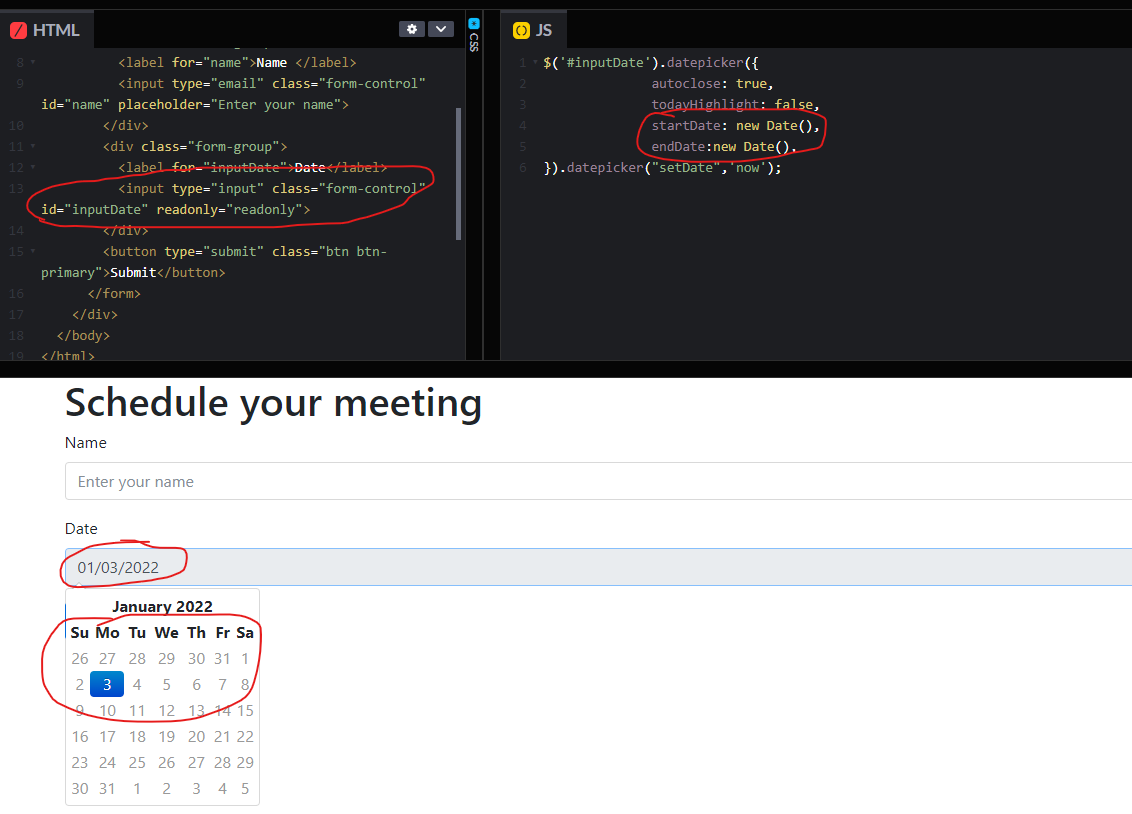
To assign today value and make the textbox read-only, you could set the date range and add the readonly property for the textbox.
Refer to the following sample: Set the datepicker's startDate and endDate property, limit the datepicker to select today.
<input type="input" class="form-control" id="inputDate" readonly="readonly">
$('#inputDate').datepicker({
              autoclose: true,
              todayHighlight: false,
              startDate: new Date(),
              endDate:new Date(),
}).datepicker("setDate",'now');
The result is like this (you can also view the result from this link):
If the answer is the right solution, please click "Accept Answer" and kindly upvote it. If you have extra questions about this answer, please click "Comment".
Note: Please follow the steps in our documentation to enable e-mail notifications if you want to receive the related email notification for this thread.
Best regards,
Dillion
Hi,
Do you mean "readonly" would avoid that field's original value cannot be overriden? I only expect datepicker to be available there (never to change field's value). Should I apply readonly to ASP Texbox?