Microsoft 365 and Office | Excel | For business | Windows
A family of Microsoft spreadsheet software with tools for analyzing, charting, and communicating data

This browser is no longer supported.
Upgrade to Microsoft Edge to take advantage of the latest features, security updates, and technical support.
' cx='32' cy='32' r='32' /%3E%3Ctext x='50%25' y='55%25' dominant-baseline='middle' text-anchor='middle' fill='%23FFF' %3EGG%3C/text%3E%3C/svg%3E)
Hey!
So I thought it was simple, but it seems I do need help with this.
I have two columns in my Excel sheet: Dates and Price, just like this:
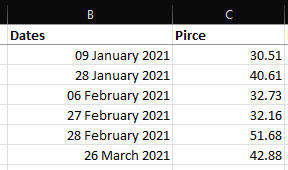
This list will grow over the year.
What I need is a summation of the prices of the first two months, then the next two months, etc., leading to a total of six separate summations. I tried some things to achieve this, but nothing worked so I was hoping someone here could help me.
Best,

Hi @Ganesh Gebhard ,
Just checking in to see if the information was helpful. Please let us know if you would like further assistance.
Hi @Ganesh Gebhard ,
I am just writing to see if you have obtained the opportunity to test the solution. If anything is unclear with the previous information I've provided to you, please don't hesitate to let me know. I am glad to be of assistance.
If the response is helpful, please click "Accept Answer" and upvote it.
Note: Please follow the steps in our documentation to enable e-mail notifications if you want to receive the related email notification for this thread.
' cx='32' cy='32' r='32' /%3E%3Ctext x='50%25' y='55%25' dominant-baseline='middle' text-anchor='middle' fill='%23FFF' %3EHS%3C/text%3E%3C/svg%3E)
Excel 365 Pro Plus with Power Pivot and Power Query.
Sum prices.
Group dates into the familiar 6 Duomo's (Two months periods).
https://www.mediafire.com/file/oepsgqqkdp3dbuc/01_02_22a.xlsx/file
https://www.mediafire.com/file/2vyehjld529xroz/01_02_22a.pdf/file
No formulas
Hi @Ganesh Gebhard ,
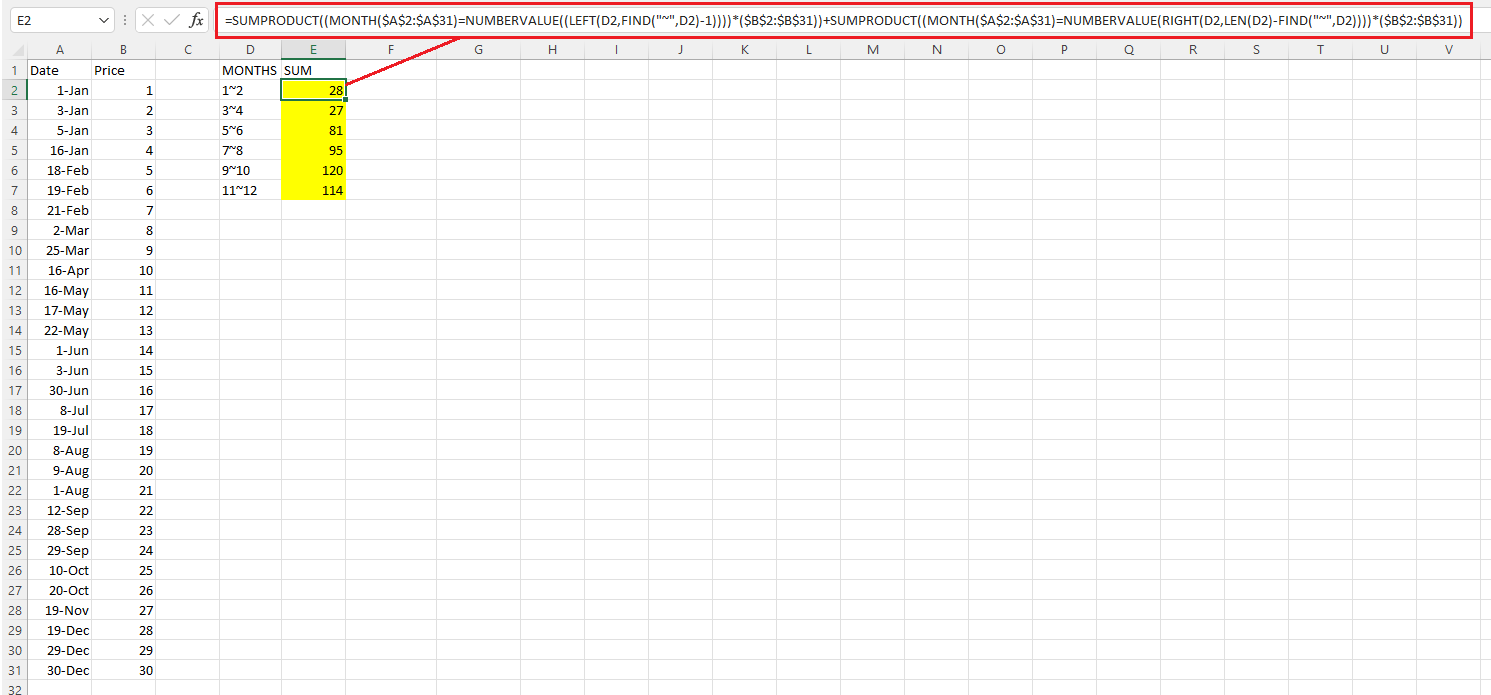
I created a sample about your requirement:
=SUMPRODUCT((MONTH($A$2:$A$31)=NUMBERVALUE((LEFT(D2,FIND("~",D2)-1))))($B$2:$B$31))+SUMPRODUCT((MONTH($A$2:$A$31)=NUMBERVALUE(RIGHT(D2,LEN(D2)-FIND("~",D2))))($B$2:$B$31))
If the response is helpful, please click "Accept Answer" and upvote it.
Note: Please follow the steps in our documentation to enable e-mail notifications if you want to receive the related email notification for this thread.
Hi @Ganesh Gebhard ,
Just checking in to see if the information was helpful. Please let us know if you would like further assistance.

Hi,
In cell D2, enter this formula
=LET(d,A2:A26,l,EOMONTH(DATE(YEAR(MIN(d)),MONTH(MIN(d)),1),{1;3;5;7;9;11}),IFNA(HSTACK(EOMONTH(l,-2)+1,l,DROP(GROUPBY(XMATCH(d,l,1),B2:B26,SUM),,1)),""))
Hope this helps.