
Did you check if you are still displaying Windows Desktop Icons?
Go to your Desktop, make a right click in an empty space and go to "View" and "Show Icon"
If thats not checked Windows doesnt display any icons.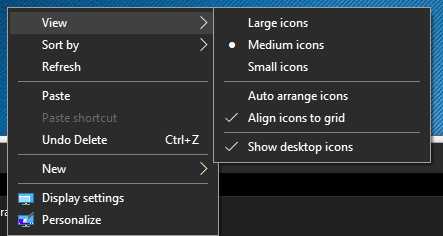
This browser is no longer supported.
Upgrade to Microsoft Edge to take advantage of the latest features, security updates, and technical support.
' cx='32' cy='32' r='32' /%3E%3Ctext x='50%25' y='55%25' dominant-baseline='middle' text-anchor='middle' fill='%23FFF' %3EMV%3C/text%3E%3C/svg%3E)
Hi Microsoft
i have a problem with my desktop everything is gone and will soon try everything to get it out again.
Have been inside and see if it is tablet mode.
And msconfig
Again been inside and doing windows restore back to 18-12 / 21
But it did not help.
I have a log file if you could help find the error
Regards
Mogens V
Answer accepted by question author

Did you check if you are still displaying Windows Desktop Icons?
Go to your Desktop, make a right click in an empty space and go to "View" and "Show Icon"
If thats not checked Windows doesnt display any icons.
Hi Microsoft
yes it does not fail anything, have soon tried everything to recover my files.
Regards Mogens V
' cx='32' cy='32' r='32' /%3E%3Ctext x='50%25' y='55%25' dominant-baseline='middle' text-anchor='middle' fill='%23FFF' %3EDD%3C/text%3E%3C/svg%3E)
Do all harddisks work?
Maybe you have moved your desktop location to a different drive than your system.
Maybe the icons aren't just displaying.
Open any folder.
Click on the desktop shortcut on the top left and say do you see any files?