' cx='32' cy='32' r='32' /%3E%3Ctext x='50%25' y='55%25' dominant-baseline='middle' text-anchor='middle' fill='%23FFF' %3EMN%3C/text%3E%3C/svg%3E)
' cx='32' cy='32' r='32' /%3E%3Ctext x='50%25' y='55%25' dominant-baseline='middle' text-anchor='middle' fill='%23FFF' %3EAM%3C/text%3E%3C/svg%3E)

Good day and happy new year
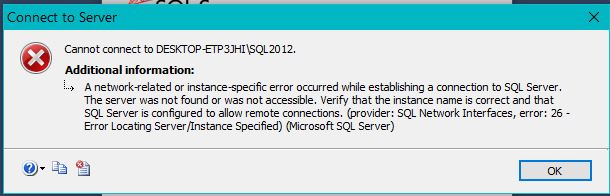
Can't start SQL 2012... I cannot connect
In the title of the thread you speak about issue to start the server, but in the content you speak about issue in connecting the server - these are two totally different tasks and both can be related to this specific issue. If the server cannot be started so there is no reason attempt to connect it (obviously) and the error will be this. If the server running but the client cannot find it, then it is like the server is not running from the client's perspective.
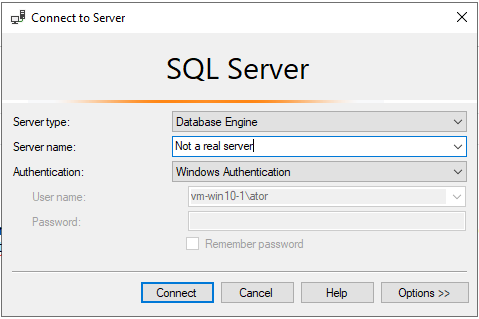
For example, you can test an attempt to connect to something like bellow and you will get the same error.
 Check if the server is running
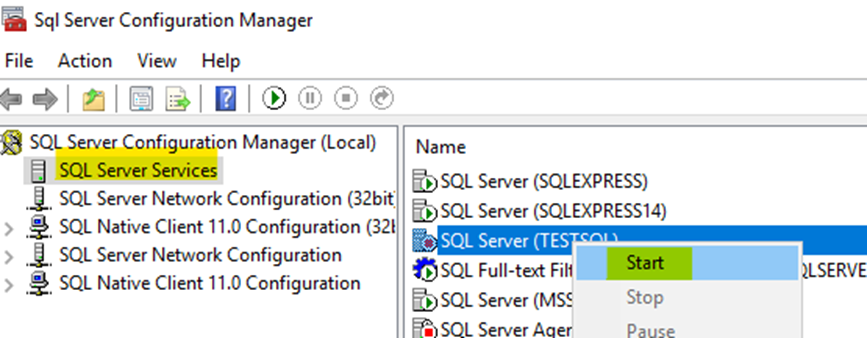
run -> services.msc -> find the service with the name: SQL Server (<here you should see the instance name>)
Confirm that the server is running and if it does not then start the service. This is the most common case.
If this did not solve your issue then
Go over the following Troubleshoot connecting to the SQL Server
Please inform us if the this solve your issue :-)
----------
Off-topic
This is the second post... on this issue today.
Please avoid duplicate posts! It considered as spam.
post to Microsoft
Posting here has nothing to do with posting to Microsoft! This is a community forum own by Microsoft and managed by both Microsoft employees and Community Moderators (which not related to Microsoft) and anyone can ask for help and anyone can and welcome to help others.
If you need Microsoft support then you can open a paid support ticket.
If you care for your users, please help me with this issue!
How many hours do you spend helping others in forums?!?
Everyone want to get but forget to give!!!
Before you have any complain, please think about what you give to the community and what the community "owes you". Next you can remember that other people spend hours contributing their free time to help others - these are the people here which you speak to right now
----------
 Ronen Ariely
Personal Site | Blog | Facebook | Linkedin