Microsoft 365 and Office | SharePoint | Development
The process of building custom applications and tools that interact with Microsoft SharePoint, including SharePoint Online in Microsoft 365.

This browser is no longer supported.
Upgrade to Microsoft Edge to take advantage of the latest features, security updates, and technical support.
' cx='32' cy='32' r='32' /%3E%3Ctext x='50%25' y='55%25' dominant-baseline='middle' text-anchor='middle' fill='%23FFF' %3EAZ%3C/text%3E%3C/svg%3E)
Hello Everyone!
Hope you guys understand what I want. I looked all over the internet for two days and couldn't find an answer.
If I can't get close to a response here, I'll give up on this and try other ways.
So I have a PowerApps application which uses a Sharepoint List. We call it Non Conformity Registry and the item (once created by any user) should pass through many users/groups edition. I tried everything with PowerAutomate, but only a few things worked.
In theory, my flow should be like this:
User Creates Item and fills in the first part of the formulary > The same user assign in a field for which Group/User the Non Conformity is being created > User or Group assigned by first user receives an e-mail or notification on Teams explaining there is a non conformity registry assigned to them > This group/user automatically gains access to the same item and can now fill in the second part of the formulary
When the group/user assigned saves the item after the edition, there is more automatization I need to do.
My Quality Team will receive the item with all this information and choose between approving or refusing the item.
If approved, the first user (the one who created the item in the first place) will receive a notification by e-mail explaining to him that now he can access the Action Plan fields on the list item (this part is already done by coding the PowerApps application I've made). After editing and assigning, the Action Plan will appear in the form of Planner Tasks for this users/group and when it's done, the Action Plan fields (whose were completed in Planner Tasks) will be updated on the sharepoint list item.
I know it may sound complex. But all I need to know is if it's possible. Knowing that this is possible, I'll do my best to achieve this.
Thanks in advance.
(Sorry about my writing. English is not my first language.)
' cx='32' cy='32' r='32' /%3E%3Ctext x='50%25' y='55%25' dominant-baseline='middle' text-anchor='middle' fill='%23FFF' %3ECM%3C/text%3E%3C/svg%3E)
Hi @Allan Zalla ,
According to your description, you could try to use flow with approvals. Then you could create an approval process so that every time an employee adds a request to a SharePoint list, somebody receives a request to eidt or approve it. You could use "Grant access to an item or a folder" action to "automatically gains access to item". So this step "This group/user automatically gains access to the same item and can now fill in the second part of the formulary" also is possible.
For Example:
1.Add a trigger.
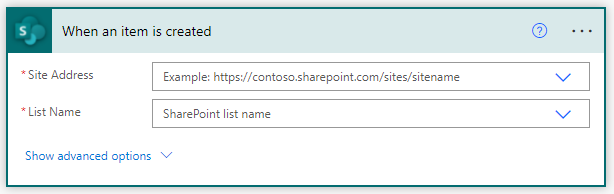
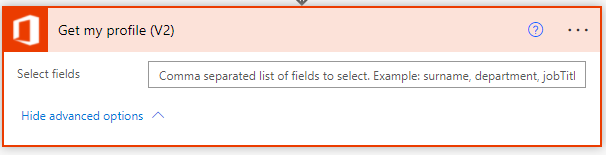
2.Add a profile action. Select the fields from your profile that you want to include in your flow.
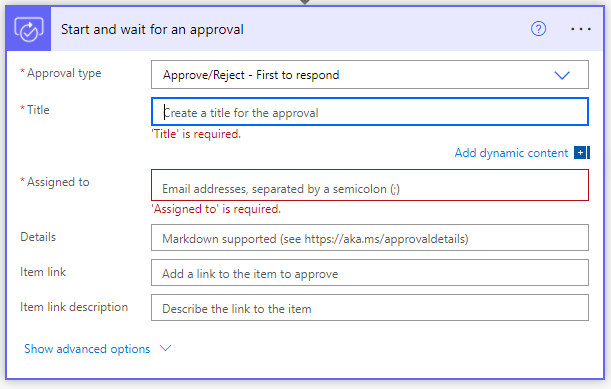
3.Add an approval action. Configure the Start and wait for an approval card to suit your needs.
4.You could add condition you want.
5.And you could add email actions for approvals
6.You could add "Grant access to an item or a folder"
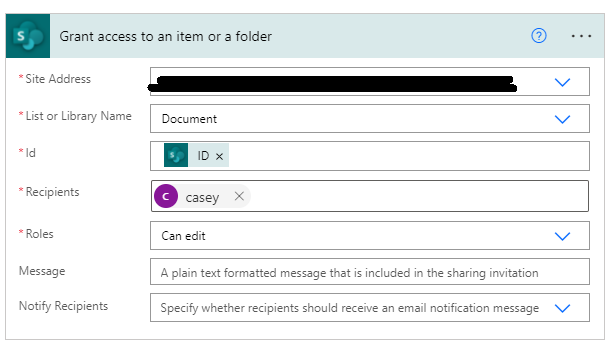
This article is an overview about using flows with approvals: Get started with approvals. You could get more details about flows with approvals such as single approvals, arpprovals with attachment and so on.
If the answer is helpful, please click "Accept Answer" and kindly upvote it. If you have extra questions about this answer, please click "Comment".
Note: Please follow the steps in our documentation to enable e-mail notifications if you want to receive the related email notification for this thread.
Thank you, Casey.
I'll use this first part and look for a solution for when the user/group needs edition permissions. Maybe I'll find a easier way to solve this second part.
Thank you for your time!
Hi @Allan Zalla ,
Per my test, you could use "Grant access to an item or a folder" action to "automatically gains access to item". I have updated my answer. Please have a look. You can see this action in Step 6. In "Recipients" you could add smoe user names or groups and grant them edit or view permission in "Roles".