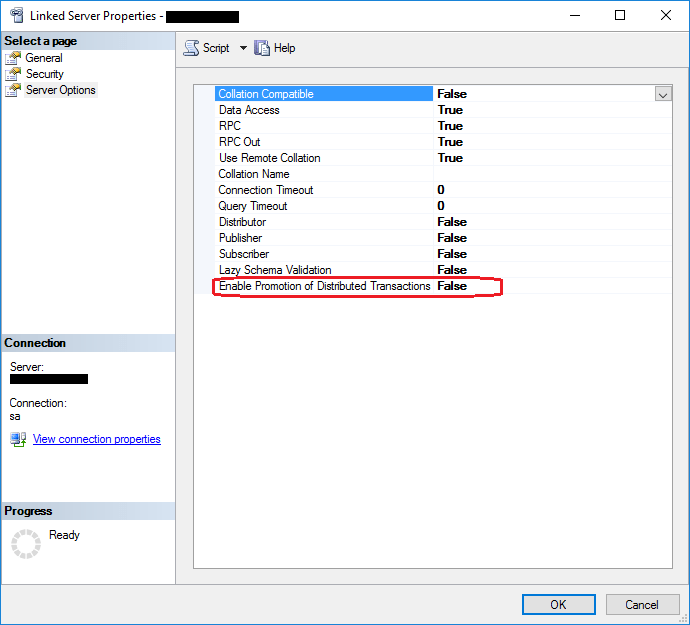
So I'm not necessarily a stranger to distributed transactions, but this is driving me crazy. In this case, I have a linked server named ONGUARD, and "Enable Promotion of Distributed Transactions" is set to false.
And yet, if there is a transaction on my local machine, I am still getting the "linked server was unable to begin a distributed transaction" error message. Since I don't want it to promote the transaction for reasons that I have no control over, I just want it to honor the option that I have set!
Here is my test. It doesn't get any simpler than this! I put the option in here so that there would be no question that it is set correctly. It's actually been set like that for years.
EXEC sp_serveroption @server='ONGUARD', @optname='remote proc transaction promotion', @optvalue='false';
BEGIN TRANSACTION
UPDATE ONGUARD.ACCESSCONTROL.DBO.AIMS SET AIMSID = 0 WHERE AIMSID = 999
And yet the UPDATE statement will generate this error:
OLE DB provider "SQLNCLI11" for linked server "ONGUARD" returned message "The partner transaction manager has disabled its support for remote/network transactions.".
Msg 7391, Level 16, State 2, Line 3
The operation could not be performed because OLE DB provider "SQLNCLI11" for linked server "ONGUARD" was unable to begin a distributed transaction.
Yup, the remote server has indeed disabled this feature, which is why I don't want distributed transactions. But why is it even trying?!? This is SQL Server 14.0.3257.3.
Any insights are appreciated!
Joel
' cx='32' cy='32' r='32' /%3E%3Ctext x='50%25' y='55%25' dominant-baseline='middle' text-anchor='middle' fill='%23FFF' %3EJK%3C/text%3E%3C/svg%3E)
' cx='32' cy='32' r='32' /%3E%3Ctext x='50%25' y='55%25' dominant-baseline='middle' text-anchor='middle' fill='%23FFF' %3ESX%3C/text%3E%3C/svg%3E)