Developer technologies | ASP.NET | ASP.NET Core
A set of technologies in the .NET Framework for building web applications and XML web services.
This browser is no longer supported.
Upgrade to Microsoft Edge to take advantage of the latest features, security updates, and technical support.
' cx='32' cy='32' r='32' /%3E%3Ctext x='50%25' y='55%25' dominant-baseline='middle' text-anchor='middle' fill='%23FFF' %3ED%3C/text%3E%3C/svg%3E)
I am working with asp.net core API and I test it in postman
but I am not getting my expected output in postman
I want to below output
{
"name":['black ins hotel','white ins hotel']
"value":[
{
   names : 'hotel certificate code 1 ',
   data : [100,45]
},
{
   names: 'hotel certificate code 2 ',
   data : [23,55]
}
]
}
SQL store procedure:
alter proc hotel_details
as
begin
select COUNT(staffcode) as hotel_staff_count,hotel_code,hotel_certificate_code,hotel_name
from oyhotel
where hotel_certificate_code in(1,2)
group by hotel_code,hotel_certificate_code,hotel_name
end
SQL store procedure output:

homecontroller.cs
[Route("api/[controller]")]
[ApiController]
public class HomeController : ControllerBase
{
    [HttpGet("GetHotelDetails")]
    public async Task<ActionResult> GetHotelDetails()
    {
       Dataset ds = new DataSet();
       ds = await _hotelDet.GethDetail();
       return OK(ds);
    }
}
interface implementation
public interface  Ihotel()
{
   Task <DataSet> GethDetail();
}
hotelbusinessLoc.cs
public async Task<DataSet> GethDetail()
{
  hotel _htl = new hotel();

  Dataset ds = new dataset();

  ds = await _hotelrepository.GethtlDetail("here i calling the store procedure");

  _htl.stoneid = ds.Tables[0].Rows[0].ToString();

   return.ds;
}
hotel.cs
public class hotel
{
  public string hotelstaffcount {get;set;}
  public int hotelcertificatecode {get;set;}
  public string hotelname {get;set;}
}
I taking the three-column in class because I want to show in my expected output(hotel name,hotelcertificatecode,hotelstaffcount)
please help

Below is an example that transforms the stored procedure result set List<Hotel> to an a type, HotelData, that best fits the JSON format.
Models
    public class Hotel
    {
        public int Id { get; set; }
        public int HotelStaffCount { get; set; }
        public int HotelCertificateCode { get; set; }
        public string HotelName { get; set; }
        public int HotelCode { get; set; }
    }

    public class HotelData
    {
        public string[] Name { get; set; }
        public List<Value> Value { get; set; }
    }

    public class Value
    {
        public string names { get; set; }
        public int[] data { get; set; }
    }
Service that does the model conversion.
    public interface IHotelService
    {
        Task<HotelData> GetHotelDetails();
    }

    public class HotelService : IHotelService
    {
        private readonly SqliteContext _context;
        public HotelService(SqliteContext context)
        {
            _context = context;
        }

        public async Task<HotelData> GetHotelDetails()
        {
            //Get the data
            List<Hotel> results = await _context.Hotel.ToListAsync();
            List<Value> values = new List<Value>();

            //Convert the Hotel obejct to HotelData to get the correct JSON
            int[] codes = results.Select(s => s.HotelCode).Distinct().ToArray();
            foreach (int code in codes)
            {
                values.Add(GetValueById(results, code));
            }


            HotelData data = new HotelData()
            {
                Name = results.Select(s => s.HotelName).Distinct().ToArray(),
                Value = values
            };

            return data;
        }

        private Value GetValueById(List<Hotel> records, int code)
        {
            return new Value()
            {
                names = $"hotel certificate code {code}",
                data = records.Where(c => c.HotelCertificateCode == code).Select(s => s.HotelStaffCount).ToArray()
            };
        }

    }
Web API Action
    [Route("api/[controller]")]
    [ApiController]
    public class HotelController : ControllerBase
    {
        private readonly ILogger<HotelController> _logger;
        private readonly IHotelService _hotelService;
        public HotelController(ILogger<HotelController> logger, IHotelService hotelService)
        {
            _logger = logger;
            _hotelService = hotelService;
        }

        [HttpGet]
        public async Task<IActionResult> Get()
        {
            HotelData data = await _hotelService.GetHotelDetails();
            return Ok(data);
        }
    }
Results
{
  "name": [
    "black ins hotel",
    "white ins hotel"
  ],
  "value": [
    {
      "names": "hotel certificate code 1",
      "data": [
        100,
        45
      ]
    },
    {
      "names": "hotel certificate code 2",
      "data": [
        23,
        55
      ]
    }
  ]
}
The .NET 5/6 tutorials on this site to are very good for learning the basics.
https://learn.microsoft.com/en-us/aspnet/core/tutorials/choose-web-ui?view=aspnetcore-6.0
hi
thank you
but some changes i made a some changes above code
thank you once again
' cx='32' cy='32' r='32' /%3E%3Ctext x='50%25' y='55%25' dominant-baseline='middle' text-anchor='middle' fill='%23FFF' %3EA%3C/text%3E%3C/svg%3E)
Hi @DMI ,
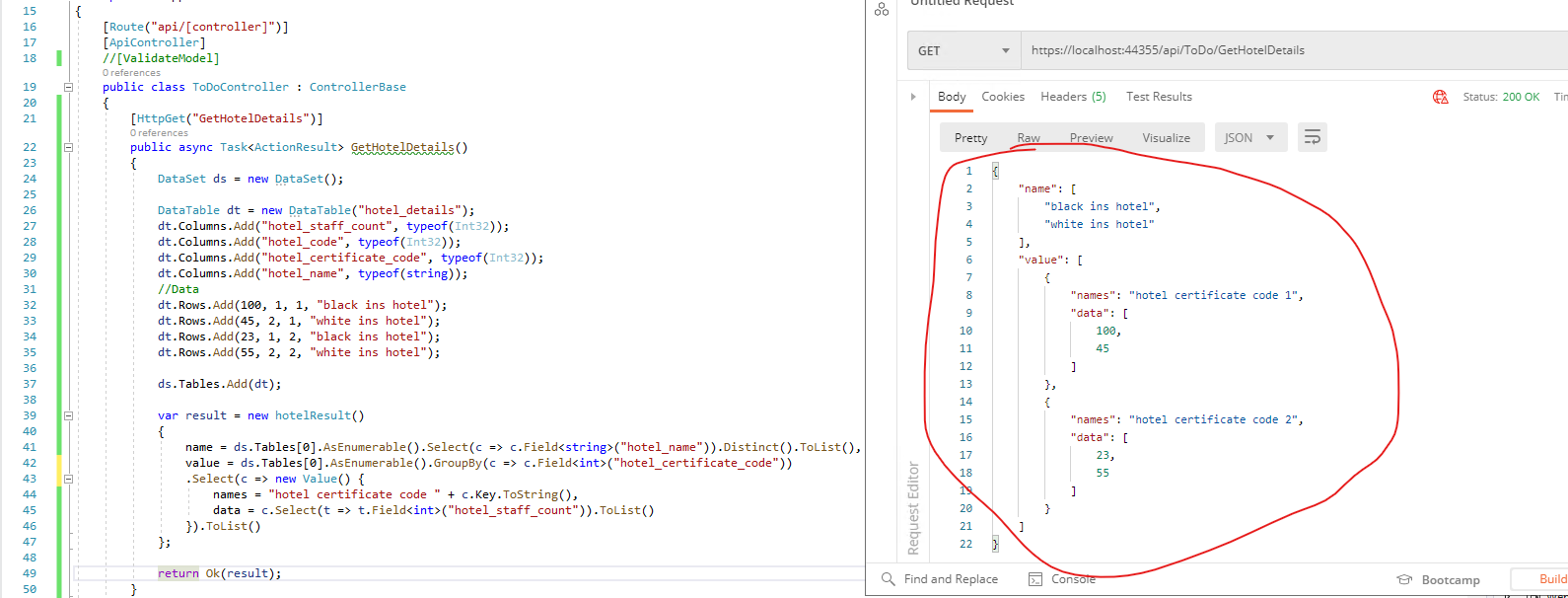
According to your code, after calling the stored produced, you will store the result in a Dataset, in this scenario, you could use LINQ to query the DataTable and get the result.
You can refer to the following steps:
public class Value
{
    public string names { get; set; }
    public List<int> data { get; set; }
}

public class hotelResult
{
    public List<string> name { get; set; }
    public List<Value> value { get; set; }
}
[HttpGet("GetHotelDetails")]
public async Task<ActionResult> GetHotelDetails()
{
    DataSet ds = new DataSet();
    //populate the dataset.
    DataTable dt = new DataTable("hotel_details");
    dt.Columns.Add("hotel_staff_count", typeof(Int32));
    dt.Columns.Add("hotel_code", typeof(Int32));
    dt.Columns.Add("hotel_certificate_code", typeof(Int32));
    dt.Columns.Add("hotel_name", typeof(string));
    //Data
    dt.Rows.Add(100, 1, 1, "black ins hotel");
    dt.Rows.Add(45, 2, 1, "white ins hotel");
    dt.Rows.Add(23, 1, 2, "black ins hotel");
    dt.Rows.Add(55, 2, 2, "white ins hotel");

    ds.Tables.Add(dt);

    //linq to datatable
    var result = new hotelResult()
    {
        name = ds.Tables[0].AsEnumerable().Select(c => c.Field<string>("hotel_name")).Distinct().ToList(),
        value = ds.Tables[0].AsEnumerable().GroupBy(c => c.Field<int>("hotel_certificate_code"))
        .Select(c => new Value() {
            names = "hotel certificate code " + c.Key.ToString(),
            data = c.Select(t => t.Field<int>("hotel_staff_count")).ToList()
        }).ToList()
    };

    return Ok(result);
}
The result is like this:
If the answer is the right solution, please click "Accept Answer" and kindly upvote it. If you have extra questions about this answer, please click "Comment".
Note: Please follow the steps in our documentation to enable e-mail notifications if you want to receive the related email notification for this thread.
Best regards,
Dillion