Azure Virtual Machines
An Azure service that is used to provision Windows and Linux virtual machines.
This browser is no longer supported.
Upgrade to Microsoft Edge to take advantage of the latest features, security updates, and technical support.
' cx='32' cy='32' r='32' /%3E%3Ctext x='50%25' y='55%25' dominant-baseline='middle' text-anchor='middle' fill='%23FFF' %3EE%3C/text%3E%3C/svg%3E)
hi team,
i want to deploy azure virtual desktop resource manager model for 10 users in a pooled scenario. can i force log off users? and not all of them by terminating the sessions
so is there any option to check who are the users connected and then remove one of them if i dont want him to connect?
thank you in advance
An Azure service that is used to provision Windows and Linux virtual machines.
A Microsoft desktop and app virtualization service that runs on Azure. Previously known as Windows Virtual Desktop.
Answer accepted by question author
' cx='32' cy='32' r='32' /%3E%3Ctext x='50%25' y='55%25' dominant-baseline='middle' text-anchor='middle' fill='%23FFF' %3EKM%3C/text%3E%3C/svg%3E)
Hello, @eg1995 !
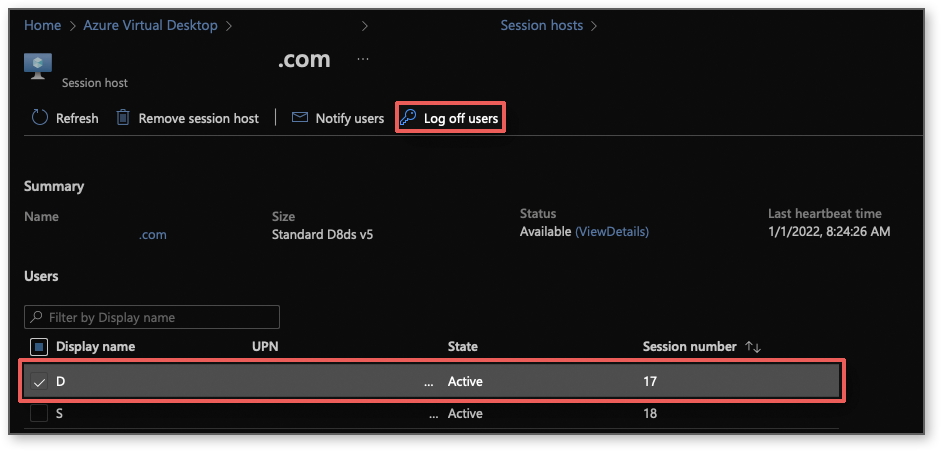
There are a couple ways to do this. From the Azure Portal, go to your host pool > session host > select the user and Log off the user:
PowerShell
Using PowerShell, you can use the following commands.
Logoff a user session
https://learn.microsoft.com/en-us/powershell/module/az.desktopvirtualization/remove-azwvdusersession?view=azps-7.1.0
Remove-AzWvdUserSession -ResourceGroupName MyResourceGroupName -HostPoolName MyHostPoolName -SessionHostName MySessionHostName -Id 2
List all active user sessions in a host pool
https://learn.microsoft.com/en-us/powershell/module/windowsvirtualdesktop/get-rdsusersession
Get-RdsUserSession -TenantName "MyTenantName" -HostPoolName "MyHostPoolName"
@Anonymous thank u for the comment. is this applicable on user basis or on the whole session? in another meaning ID parameter means the user or the session?
@eg1995 , that's a good question. This is on a per user basis.
' cx='32' cy='32' r='32' /%3E%3Ctext x='50%25' y='55%25' dominant-baseline='middle' text-anchor='middle' fill='%23FFF' %3ESS%3C/text%3E%3C/svg%3E)
i know how to create it i need to know if there is an option to froce log off a specific user instead of putting the whole session in drain mode