Developer technologies | Transact-SQL
A Microsoft extension to the ANSI SQL language that includes procedural programming, local variables, and various support functions.
This browser is no longer supported.
Upgrade to Microsoft Edge to take advantage of the latest features, security updates, and technical support.
' cx='32' cy='32' r='32' /%3E%3Ctext x='50%25' y='55%25' dominant-baseline='middle' text-anchor='middle' fill='%23FFF' %3EH%3C/text%3E%3C/svg%3E)
Hi i have one doubt in sql server .
if any field donot have values then need to provide which filed donot have value
if data not available in one filed then output field value not available.
if data not available more than one filed then output those fields value are not available.
concate multiple fileds when values not exists.
sample data :
CREATE TABLE [dbo].[EmpDetails](
[Empid] [int] NULL,
[Empname] varchar NULL,
[Location] varchar NULL,
[Deptid] [int] NULL,
[Deptname] varchar NULL
)
INSERT [dbo].[EmpDetails] ([Empid], [Empname], [Location], [Deptid], [Deptname]) VALUES (1, NULL, N'che', 10, N'hr')
INSERT [dbo].[EmpDetails] ([Empid], [Empname], [Location], [Deptid], [Deptname]) VALUES (2, N'hari', N'pune', NULL, N'pm')
INSERT [dbo].[EmpDetails] ([Empid], [Empname], [Location], [Deptid], [Deptname]) VALUES (3, N'var', NULL, 30, NULL)
INSERT [dbo].[EmpDetails] ([Empid], [Empname], [Location], [Deptid], [Deptname]) VALUES (4, NULL, NULL, NULL, N'hr')
INSERT [dbo].[EmpDetails] ([Empid], [Empname], [Location], [Deptid], [Deptname]) VALUES (NULL, N'venu', N'pune', NULL, NULL)
INSERT [dbo].[EmpDetails] ([Empid], [Empname], [Location], [Deptid], [Deptname]) VALUES (NULL, N'kumar', N'pune', 20, NULL)
INSERT [dbo].[EmpDetails] ([Empid], [Empname], [Location], [Deptid], [Deptname]) VALUES (8, 'ravi', NULL, 10, N'hr')
INSERT [dbo].[EmpDetails] ([Empid], [Empname], [Location], [Deptid], [Deptname]) VALUES (10, N'k', N'pune', 20, N'hr')
based on above data I want output like below :
empid | Empname | Location | Deptid| Deptname | Validate
1 | NULL |Che |10 | hr | Empname value is not available
2 | hari |pune |NULL | pm | Deptid value is not available
3 | var |NULL |30 | NULL | location and deptname values are not available
4 | NULL |NULL |NULL | hr | empname and location and deptid values are not available
NULL | venu |pune |NULL | NULL | empid and deptid and deptname values are not available
NULL | kumar |pune |20 | NULL | empid and deptname values are not available
8 | ravi |NULL |10 | hr | location value is not available
10 | k |pune |20 | hr |
I tried like below :
select empid,empname,location,deptid,deptname,
case when coalesce(empid,'')='' then 'Empid' else '' end + ' '+
case when coalesce(empname,'')='' then 'Empname' else '' end + ' '+
case when coalesce(Location,'')='' then 'Location' else '' end + ' '+
case when coalesce(Deptid,'')='' then 'Deptid' else '' end +' '+
case when coalesce(Deptname,'')='' then 'Deptname' else '' end +' '+

This is somewhat prettier:
; WITH CTE AS (
   select empid,empname,location,deptid,deptname,
   case when coalesce(empid,'')='' then 'Empid ' else '' end + ''+
   case when coalesce(empname,'')='' then 'Empname ' else '' end + ''+
   case when coalesce(Location,'')='' then 'Location ' else '' end + ''+
   case when coalesce(Deptid,'')='' then 'Deptid ' else '' end +''+
   case when coalesce(Deptname,'')='' then 'Deptname ' else '' end +''+
   + 'value not available' as Validate
   FROM [dbo].[EmpDetails]
)
SELECT empid,empname,location,deptid,deptname, nullif(Validate, 'value not available')
FROM   CTE
Which version of SQL Server are you on?
hi I am using 2012 version. using above query not getting exact format in validate field values. here if we take first row related validate value should be Empname value is not available .if we take 4th row then validate value should be empname and location and deptid values are not available. please help on it .
I'm tempted to say that with SQL 2012 this is good as it can get without making a mess of it. As for the verb inflexion, I have an easy way out: do it in Swedish, where verbs are not infected by grammatical person or number. :-) Or do it the Russian way and leave out is/are altogether.
But else try GlockByte's solution below. Except that... the use of concat_ws requires you to be on SQL 2017 or later.

If no solution is given by tomorrow I will login and adjust to work for 2012
Definitely not the cleanest, however if you are really picky about the different between "are" and "is" this is how I would do it without selecting a select statement...
select empid,empname,location,deptid,deptname,
[Validate] = CONCAT(CONCAT_WS(' and ',
case when coalesce(empid,'')='' then 'Empid' else NULL end,
case when coalesce(empname,'')='' then 'Empname' else NULL end,
case when coalesce(Location,'')='' then 'Location' else NULL end,
case when coalesce(Deptid,'')='' then 'Deptid' else NULL end,
case when coalesce(Deptname,'')='' then 'Deptname' else NULL end),
case
 (
 case when isnull(empid,'')='' then 1 else 0 end +
 case when isnull(empname,'')='' then 1 else 0 end +
 case when isnull(Location,'')='' then 1 else 0 end +
 case when isnull(Deptid,'')='' then 1 else 0 end +
 case when isnull(Deptname,'')='' then 1 else 0 end
 )
when 1 then ' is not available'
when 0 then NULL
else ' are not available' end)
FROM [dbo].[EmpDetails]
Output:
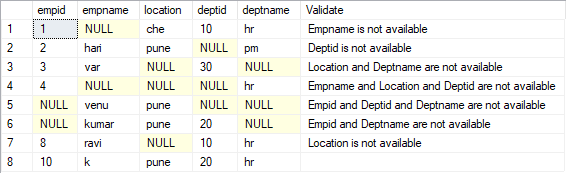
If you want to take it a step further and replace some of the 'and's with commas...
select empid,empname,location,deptid,deptname,
[Validate] = REPLACE(case when charindex(',',reverse(Validate))>0
then
reverse(replace(STUFF(reverse(Validate),charindex(',',reverse(Validate)),0,'#'),'#,',' dna '))
else Validate end,'  ',' ')
from
(
select empid,empname,location,deptid,deptname,
[Validate] = CONCAT(CONCAT_WS(', ',
case when coalesce(empid,'')='' then 'Empid' else NULL end,
case when coalesce(empname,'')='' then 'Empname' else NULL end,
case when coalesce(Location,'')='' then 'Location' else NULL end,
case when coalesce(Deptid,'')='' then 'Deptid' else NULL end,
case when coalesce(Deptname,'')='' then 'Deptname' else NULL end),
case
	(
	case when isnull(empid,'')='' then 1 else 0 end +
	case when isnull(empname,'')='' then 1 else 0 end +
	case when isnull(Location,'')='' then 1 else 0 end +
	case when isnull(Deptid,'')='' then 1 else 0 end +
	case when isnull(Deptname,'')='' then 1 else 0 end
	)
when 1 then ' is not available'
when 0 then NULL
else ' are not available' end)
FROM [dbo].[EmpDetails]
)tbl
Output:
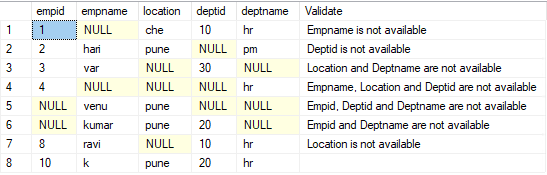
getting error Msg 195, Level 15, State 10, Line 2
'CONCAT_WS' is not a recognized built-in function name. can you please help on it.I am using sql server 2012 version
CONCAT_WS() is simply "Concat with separator". It just makes things easy and more readable. I can adjust it to make it work for 2012, I just won't be behind a computer until tomorrow. If nobody else has given you a good enough solution I will adjust mine tomorrow for you.
Here is another solution, which I consider good enough for SQL 2012 and which evades the verb problem:
; WITH CTE AS (
   select Empid,Empname,Location,Deptid,Deptname,
   case when coalesce(Empid,'')='' then 'Empid ' else '' end + ''+
   case when coalesce(Empname,'')='' then 'Empname ' else '' end + ''+
   case when coalesce(Location,'')='' then 'Location ' else '' end + ''+
   case when coalesce(Deptid,'')='' then 'Deptid ' else '' end +''+
   case when coalesce(Deptname,'')='' then 'Deptname ' else '' end  AS missing
   FROM [dbo].[EmpDetails]
)
SELECT Empid, Empname, Location, Deptid, Deptname, 'Missing value(s): ' + nullif(missing, '')
FROM   CTE
Hi, if we get multiple values empty/null then validate value should be this format Missing value(s): Location and Deptname or this format Missing value(s): Location , Deptname any format is fine for row no3 records . but its hwoing space between columns.please help on it
I used the spaces, since if you throw in commas, you will need to trim the last comma. But if you want commas:
; WITH CTE AS (
   select Empid,Empname,Location,Deptid,Deptname,
   case when coalesce(Empid,'')='' then 'Empid, ' else '' end + ''+
   case when coalesce(Empname,'')='' then 'Empname, ' else '' end + ''+
   case when coalesce(Location,'')='' then 'Location, ' else '' end + ''+
   case when coalesce(Deptid,'')='' then 'Deptid, ' else '' end +''+
   case when coalesce(Deptname,'')='' then 'Deptname, ' else '' end  AS missing
   FROM [dbo].[EmpDetails]
)
SELECT Empid, Empname, Location, Deptid, Deptname,
      'Missing value(s): ' + CASE WHEN len(missing) > 0
                                  THEN substring(missing, 1, len(missing) - 1)
                            END
FROM   CTE
' cx='32' cy='32' r='32' /%3E%3Ctext x='50%25' y='55%25' dominant-baseline='middle' text-anchor='middle' fill='%23FFF' %3ELM%3C/text%3E%3C/svg%3E)
Hi,@harinathu
Please also check this:
;WITH CTE1 AS
(SELECT Empid,Empname,Location,Deptid,Deptname,
        CASE WHEN Empid IS NULL THEN 'Empid, ' ELSE '' END +
        CASE WHEN Empname IS NULL THEN 'Empname, ' ELSE '' END +
        CASE WHEN Location IS NULL THEN 'Location, ' ELSE '' END +
        CASE WHEN Deptid IS NULL THEN 'Deptid, ' ELSE '' END +
        CASE WHEN Deptname IS NULL THEN 'Deptname, ' ELSE '' END  AS missing
 FROM [dbo].[EmpDetails]
),CTE2 AS
(SELECT Empid, Empname, Location, Deptid, Deptname,
       'Missing value(s): ' + CASE WHEN LEN(missing) > 0
                                   THEN LEFT(missing,LEN(missing) - 1)
                                   ELSE '' END AS missing
 FROM  CTE1
)
 SELECT Empid, Empname, Location, Deptid, Deptname,
 CASE WHEN CHARINDEX ( ',' , REVERSE(missing))>0
      THEN REVERSE( STUFF ( REVERSE(missing), CHARINDEX ( ',' , REVERSE(missing)) ,1 ,'dna ') )
      ELSE missing END AS [Missing Value(s)]
 FROM CTE2
Output:
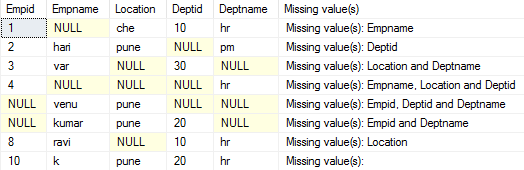
Best regards,
LiHong
If the answer is the right solution, please click "Accept Answer" and kindly upvote it. If you have extra questions about this answer, please click "Comment".
Note: Please follow the steps in our Documentation to enable e-mail notifications if you want to receive the related email notification for this thread.