Microsoft 365 and Office | SharePoint | For business | Windows
A group of Microsoft Products and technologies used for sharing and managing content, knowledge, and applications.

This browser is no longer supported.
Upgrade to Microsoft Edge to take advantage of the latest features, security updates, and technical support.
' cx='32' cy='32' r='32' /%3E%3Ctext x='50%25' y='55%25' dominant-baseline='middle' text-anchor='middle' fill='%23FFF' %3EBT%3C/text%3E%3C/svg%3E)
I have two excel workbooks, 1 for managers and 1 for employees both are excel online (SharePoint). They contain time off information. The manager portion has all kinds of manager information that each employee does not need to know about. The employee workbook has a portion of the information so that employees can plan time off. They can look at this workbook and see that there are 4 of 8 employees that already have a certain day off and will likely need to choose another day off. They can also review what the manager sees as to their proposed and past time off.
The manager puts data in on their workbook and the employee workbook has links in it to reflect the manager's information. How can I update the employee side without the user having to choose update since they do not have view only permissions.
Before these were local workbooks and I could get the manager side to use a macro to update the employee workbook. Excel online does not allow macros.
Thank you in advance for any and all help.

Hi @Brad Tostenson
Yes, Excel Online does not allow macros. You may update the excel locally then upload it to sharepoint online.
Or could you explain your requirement more exactly? How dose the local macros work? I need to know how do you want to update the excel so that I could provide further support. Thanks for your understanding.
Both of the files are the online version. Both files are stored in sharepoint. At this point our only option is to have the manager open the employee side after they make changes to the manager side so that the file can get updated and then the employee will get the file with the updated data. The employee version of the file has links to data that exist in the manager version. Since the employee has view only rights the links will not update when they open it. I am wondering if maybe I can have a scheduled task open it, update it and close but I cannot figure out the logistics on that.
Hi @Brad Tostenson
Per my research, there is no ootb method to update the link.
As a workaround, you could create a new list from excel of manager. In this case, as the excel for manager include the information of excel for employee, you format a table then create a list from that. For example, I have an excel:

Then I create a list from it:
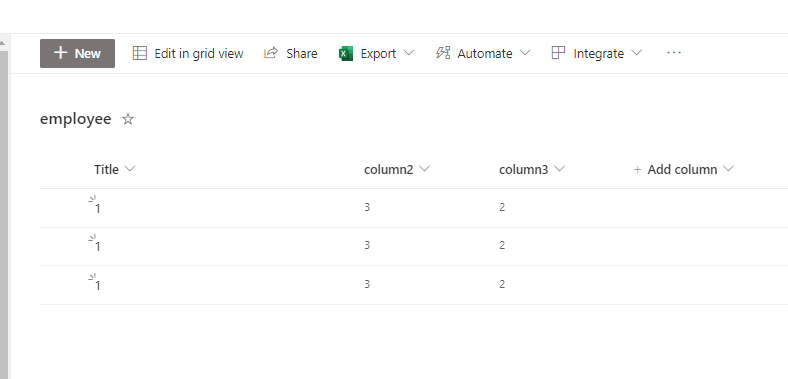
OK, the preparation have been done, then we could use power automate to update the list according to the excel, the flow is as following:
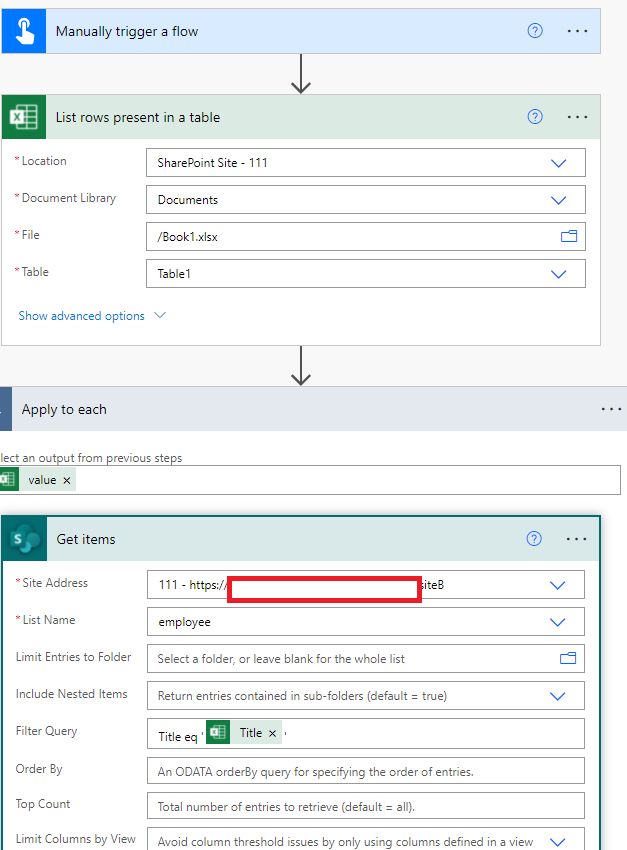
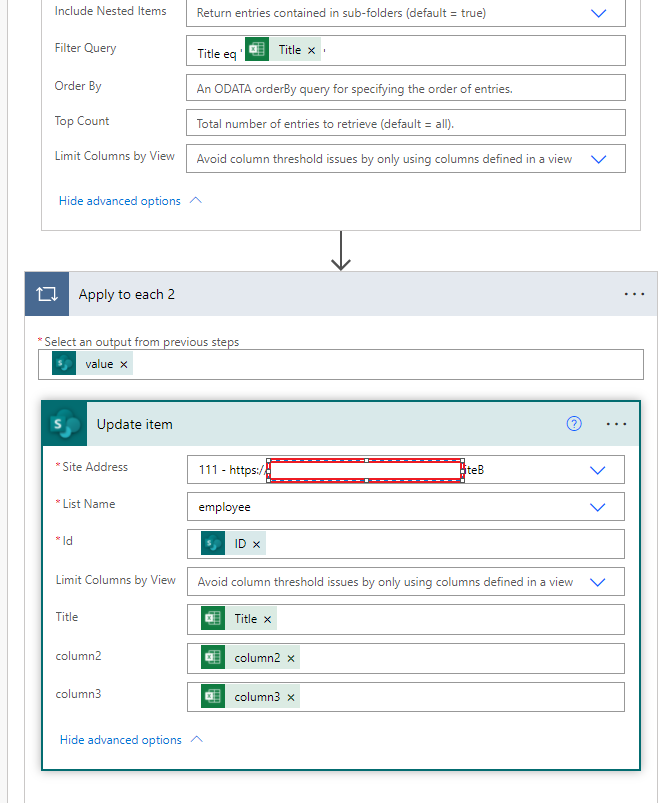
Then if the excel have been updated, you could use this flow to update the list "employee" which just need to grant the read permission for the employees.
If the answer is helpful, please click "Accept Answer" and kindly upvote it. If you have extra questions about this answer, please click "Comment".
Note: Please follow the steps in our documentation to enable e-mail notifications if you want to receive the related email notification for this thread.
Hi @Brad Tostenson
Would you please provide some update of this issue? Do you have some questions with my answer? Please feel free to reply.