Azure IoT Edge
An Azure service that is used to deploy cloud workloads to run on internet of things (IoT) edge devices via standard containers.
This browser is no longer supported.
Upgrade to Microsoft Edge to take advantage of the latest features, security updates, and technical support.
' cx='32' cy='32' r='32' /%3E%3Ctext x='50%25' y='55%25' dominant-baseline='middle' text-anchor='middle' fill='%23FFF' %3ED%3C/text%3E%3C/svg%3E)
Hi everyone,
Using Visual Studio Code I am currently trying to create a function which receives data from a Modbus-TCP module and stores it in block blobs.
Yet, I haven't really figured out how to access the data routed from the Modbus-module to my custom module.
My code is based on the offical sql-server-tutorial (https://learn.microsoft.com/en-us/azure/iot-edge/tutorial-store-data-sql-server?view=iotedge-2020-11) and the blob-storage-tutorial from Sander van de Velde (https://sandervandevelde.wordpress.com/2018/11/04/introducing-blob-storage-in-azure-iot-on-the-edge/).
Unfortunately when I try to "Build and Push the IoT Edge Solution" and Error occurs:
#12 2.407 streamToBlob.cs(46,18): error CS1061: 'CloudBlockBlob' does not contain a definition for 'UploadFromStream' and no accessible extension method 'UploadFromStream' accepting a first argument of type 'CloudBlockBlob' could be found (are you missing a using directive or an assembly reference?) [/app/streamToBlob.csproj]
I double checked and Microsoft says that 'UploadFromStream' is contained in 'CloudBlockBlob'. (https://learn.microsoft.com/en-us/dotnet/api/microsoft.azure.storage.blob.cloudblockblob.uploadfromstreamasync?view=azure-dotnet-legacy)
Sander van de Velde uses "Microsoft.WindowsAzure.Storage.Blob" in his code, but I can't find it when trying to add this package to my code via Nuget. The only packages I find are the following:
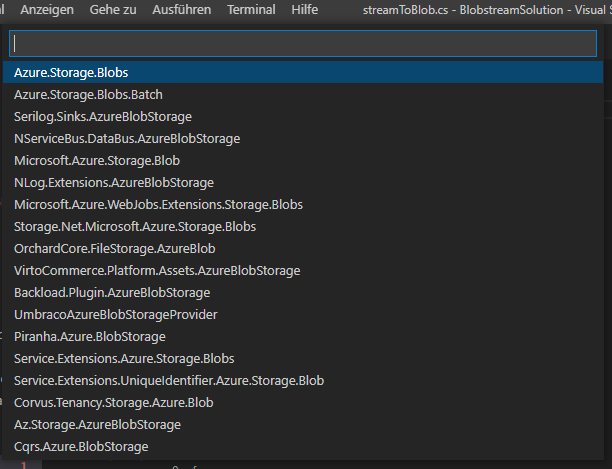
So I chose "Microsoft.Azure.Storage.Blob", but this did not solve the problem.
Here is the code I try to use without the account credentials:
using Microsoft.WindowsAzure.Storage;
using Microsoft.Azure.Storage.Blob;
using System;
using System.IO;
using System.Text;
using System.Threading.Tasks;
using Microsoft.Azure.Devices.Client;
using Microsoft.Azure.WebJobs;
using Microsoft.Azure.WebJobs.Extensions.EdgeHub;
using Microsoft.Azure.WebJobs.Host;
using Microsoft.Extensions.Logging;
using Newtonsoft.Json;

namespace Functions.Samples
{
    public static class streamToBlob
    {
        [FunctionName("streamToBlob")]
        public static async Task getMessageAndStream(
            [EdgeHubTrigger("input1")] Message messageReceived,
            ILogger logger)
        {
            logger.LogInformation("Info: message received" + messageReceived);

            // Blob container construction
            var account = CloudStorageAccount.Parse(
        "DefaultEndpointsProtocol=https;BlobEndpoint=http://<IP-address>:11002/<LOCAL BLOB STORAGE ACCOUNT>;AccountName=<LOCAL BLOB STORAGE ACCOUNT>;AccountKey=<LOCAL BLOB STORAGE KEY>");

            var client = account.CreateCloudBlobClient();

            // creates a local CloudBlobContainer object
            var container = client.GetContainerReference("<LOCAL BLOB CONTAINER NAME>");

            var now = DateTime.Now;

            var filename = "Datei_" + now.ToString("dd-MM-yyyy, HH:mm:ss");

            var blob = container.GetBlockBlobReference(filename);

            blob.UploadFromStream(messageReceived);

            // Do we already have a blob?
            var exists = blob.ExistsAsync().Result;

            if (!exists)
            {
                await blob.UploadTextAsync($"Written text at {DateTime.Now.ToLocalTime()}");
                logger.LogInformation("Info: Blob was uploaded");
            }
            else
            {
                await blob.UploadTextAsync($"Blob is already existing!");
                logger.LogInformation("Info: Blob is already existing!");
            }
        }
    }
}
Any ideas regarding this?
Best regards

Hello @DataSciencentist2021 , @Anonymous ,
yes, this blog post is more than three years old so the specific tooling somewhat is deprecated.
The solution is still valid so please refer to the new Nuget packages.
Please check out:
<PackageReference Include="Azure.Storage.Blobs" Version="12.8.3" />
This is taken from a recent project where the same blob storage on the edge was used.
As seen here, v1.4.1 supports Azure.Storage.Blobs 12.8.0 SDK.
Hello @Sander van de Velde | MVP , @Anonymous ,
First of all, many thanks for you quick replies!
I just tried using "Azure.Storage.Blobs" (Version=12.8.3) but the issue regarding "UploadFromStream" still remains. It is the correct method I am using, right? Because I don't see any similar one.
Any further ideas?
Hello @DataSciencentist2021 ,
I checked out your example. I noticed you are trying to use 'UploadFromStream'.
There is an Async version for this but it does not accept a Message class as parameter:

In my blog, I used this 'UploadTextAsync' to save a text. There is also support for saving a byte array.
Depending on your needs, you need to extract the message body and probably the property bag from the incoming message first.
Then, you have to either save this data in a desirable format in a blob. Or, you have to collect multiple messages to save them all at once.
The original sample code of the function helps you to open the incoming message:
byte[] messageBytes = messageReceived.GetBytes();
var messageString = System.Text.Encoding.UTF8.GetString(messageBytes);

if (!string.IsNullOrEmpty(messageString))
{
    logger.LogInformation("Info: Received one non-empty message: " + messageString);

    using (var pipeMessage = new Message(messageBytes))
    {
        foreach (KeyValuePair<string, string> prop in messageReceived.Properties)
        {
            // you now know the properties
        }
    }
}
Please don’t forget to "Accept the answer" and “up-vote” wherever the information provided helps you, this can be beneficial to other community members.
Hi @Sander van de Velde | MVP ,
Many thanks for your answer!
As you might have noticed I am new to all of this, and I am struggling to understand how exactly this whole message-extraction is working.
When it comes to the sqlSolution-tutorial it is kind of clear to me, because the SimulatedTemperatureSensor' messages are build like this:
[{"machine":{"temperature":102.04034563761226,"pressure":10.23244443972798},"ambient":{"temperature":21.45724287440872,"humidity":26},"timeCreated":"2022-01-04T08:59:09.4628822Z"}]
In the example provided in the official TUT the message body's schema is defined like
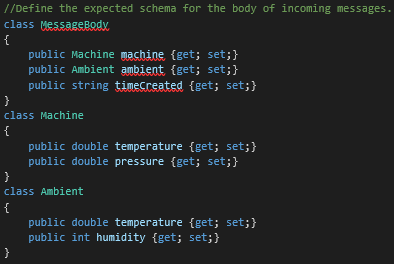
The Modbus-TCP module's messages look like this:
40001: 40

40002: 226

40003: 0
I just don't know how to extract them and work with the properties you mentioned in the code above:
foreach (KeyValuePair<string, string> prop in messageReceived.Properties)
         {
             // you now know the properties
         }
I would really appreciate if you could give me another hint how to work this out.
Best regards
Hello @DataSciencentist2021 ,
Which modbus module are you using? The one from Microsoft?
I'm expecting some json message from that Modbus module. It seems you copied the modbus message from the logging?
You can find out the outputted format using this module: https://github.com/iot-edge-foundation/iot-edge-echo (which peeks in the local route).
From there it's just C# code to transform a json message.
Hi @Sander van de Velde | MVP ,
Yes, I am using the modbus module from Microsoft (mcr.microsoft.com/azureiotedge/modbus:1.0) and copied the message from logging.
Many thanks for your quick reply and the link to your echo-module! This should help me make my code work.
I really appreciate the time you invested to help me so far!
Best regards
' cx='32' cy='32' r='32' /%3E%3Ctext x='50%25' y='55%25' dominant-baseline='middle' text-anchor='middle' fill='%23FFF' %3EA%3C/text%3E%3C/svg%3E)
@DataSciencentist2021
Microsoft.Azure.Storage.Blob and Microsoft.WindowsAzure.Storage.Blob are both legacy and you should consider using the latest SDK which is Azure.Storage.Blobs. Please see this StackOverflow post which gives good detail on the differences and suggestions on upgrading.
You might consider adding Microsoft.Azure.Storage to see if that resolves your issue. Though we recommend upgrading to the latest SDK. Quickstart and samples can be found on this page.
Hope this helps. Let us know if you run into any issues or need further assistance.
-------------------------------
Please don’t forget to "Accept the answer" and “up-vote” wherever the information provided helps you, this can be beneficial to other community members.