Azure Automation
An Azure service that is used to automate, configure, and install updates across hybrid environments.
1,196 questions
This browser is no longer supported.
Upgrade to Microsoft Edge to take advantage of the latest features, security updates, and technical support.
' cx='32' cy='32' r='32' /%3E%3Ctext x='50%25' y='55%25' dominant-baseline='middle' text-anchor='middle' fill='%23FFF' %3EJC%3C/text%3E%3C/svg%3E)
I have been trying to get Connect-ExchangeOnline cmdlet to work in Azure Automation using the System Managed Identity. Does anyone have any idea if this works? I would rather use the Managed ID to connect to Exchange Online instead of using certificates or a saved credential. I do have this bit of code working but I am afraid it is using Basic Auth which is going away soon. Using this code does not give me access to ExchangeOnline specific cmdlets like Get-EXOMailbox.
Connect-ExchangeOnline Reference
https://o365reports.com/2020/07/04/modern-auth-and-unattended-scripts-in-exchange-online-powershell-v2/
"Connect Exchange"
function makeMSIOAuthCred () {
    $accessToken = Get-AzAccessToken -ResourceUrl "https://outlook.office365.com/"
    $authorization = "Bearer {0}" -f $accessToken.Token
    $Password = ConvertTo-SecureString -AsPlainText $authorization -Force
    $username = "OAuthUser@" + ((Get-AzTenant).Id)
    $MSIcred = New-Object System.Management.Automation.PSCredential -ArgumentList ($username,$Password)
    return $MSICred
}
$cred = makeMSIOAuthCred

#This works using PSSESSION
$Session = New-PSSession -ConfigurationName Microsoft.Exchange -ConnectionUri https://outlook.office365.com/PowerShell-LiveId?BasicAuthToOAuthConversion=true -Credential $cred -Authentication Basic -AllowRedirection -Verbose
Import-PSSession $Session

#using Connect-ExchangeOnline
Connect-ExchangeOnline -Credential $cred
The error returned when using Connect-ExchangeOnline is:
Authentication Failure. The password entered exceeds the maximum length. Please reach out to your admin to reset the password.

Ok, heard back from the product group. At this time, Exo V2 Module does not support managed identities. So, this won't work for you, sorry.
' cx='32' cy='32' r='32' /%3E%3Ctext x='50%25' y='55%25' dominant-baseline='middle' text-anchor='middle' fill='%23FFF' %3EA%3C/text%3E%3C/svg%3E)
I just upvoted this because you took the time to follow up, but I want to also downvote somebody because I just wasted I dont know how many hours trying to get this to work!!! Can they at least update the docs?
' cx='32' cy='32' r='32' /%3E%3Ctext x='50%25' y='55%25' dominant-baseline='middle' text-anchor='middle' fill='%23FFF' %3E4%3C/text%3E%3C/svg%3E)
Hi, does anyone know if there is any update on Exchange Online V2 PowerShell to support Managed Identities for Azure Automation? I'd really like to set up Azure Automation to automate some of my mailbox processes but have run into this blocker considering Microsoft is strongly recommending Managed Identities over Run As accounts in Azure Automation.
' cx='32' cy='32' r='32' /%3E%3Ctext x='50%25' y='55%25' dominant-baseline='middle' text-anchor='middle' fill='%23FFF' %3EP2%3C/text%3E%3C/svg%3E)
I know it's highly unsupported, but we managed to get it working:
Credits to Vasil for the inspiration:
https://www.michev.info/Blog/Post/2869/abusing-the-rest-api-endpoints-behind-the-new-exo-cmdlets
Hope it is useful for others
Thanks but what are the parameter values that you are using in Azure Automation to get connect-exchangeonline to work with the managed ID?
None. The commands above completely bypass connect-exchangeonline.
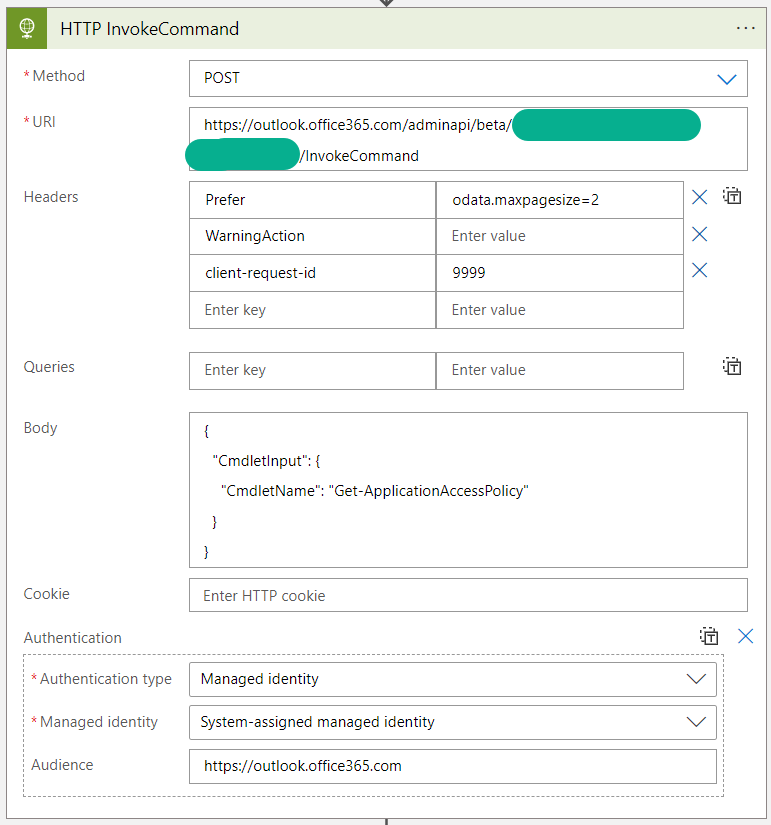
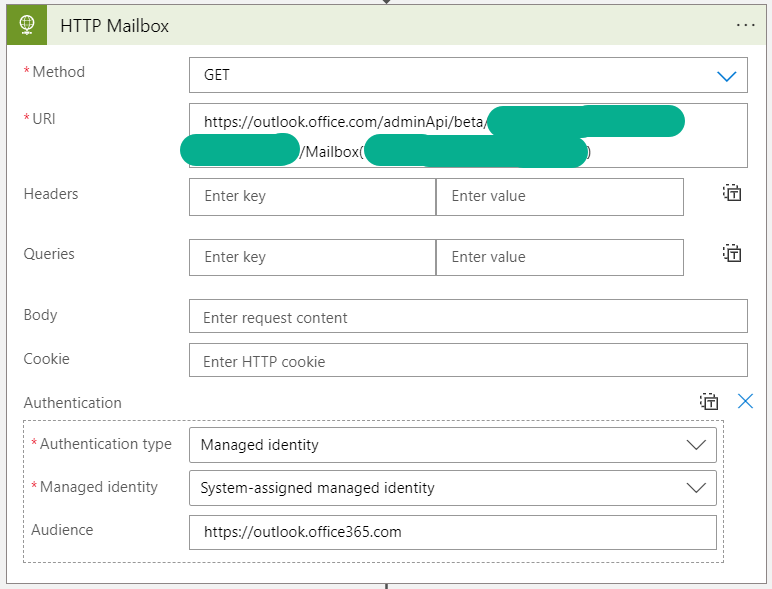
The managed identity just gets a token for the Exchange REST endpoint from Azure AD behind the actual commands that you normally use use AFTER connecting and calls the REST endpoint with the token. It is able to get a token because of the consent grant Exchange.ManageAsApp that we did for the managed identity and gets the permissions from the Exchange admin role membership.
It's similar to how you would use the MS Graph API.
How did I find the Exchange REST endpoint behind the cmdlets?
Enable "verbose and debug" mode in a PowerShell session after connecting with "connect-exchangeonline" and execute your desired command.
Then study the output carefully and also have a look at the psm modules that get downloaded in the background (those include the commands that become available after connecting).
There you find that the commands are actually just a sort of wrapper that calls the REST endpoint mentioned above.
Check out this screenshot for clarification.
Or for already migrated commands (step 7 in original reply)
 ]1
]1
It appears that EXO V2 Module 2.0.6 preview 7 has support for managed identities now. To connect, make sure you are running the latest preview module and that the session is running in the context of the managed identity (Azure Automation Runbook)
connect-exchangeonline -managedidentity -Organization "<Name of your org>"
Our organization formation was <domainname>.onmicrosoft.com
Andy can you confirm that this has been added.
ALSO note that it appears that the connect-ippssession cmdlet does NOT support managed identities which I find rather odd. The cmdlet has not been updated to pass the parameters to the connect-exchangonline cmdlet within the module. It would be nice to know how to use connect-ippssession for connecting to the Security and Compliance console with two different auth types? I can only assume that if you use connect-ippssesion after connecting to EXO with a managed identity, it will override that connection with whatever auth type you use for connect-ippssession?
Thanks

Yes it in the release notes:
v2.0.6-Preview7 :
1. Support for system-assigned and user-assigned Managed Identity from Azure VMs and Virtual Machine Scale Sets.
- The -ManagedIdentity switch parameter, and the -Organization parameters need to be provided to indicate that a managed identity should be used. This will by default attempt to use a system-assigned managed identity.
- For specifying a user-assigned managed identity, in addition to the parameters specified above, the AppID of the service principal corresponding to the user-assigned identity needs to be passed to the -ManagedIdentityAccountId.
Have you seen this?
https://github.com/mardahl/ExchangeOnlineScripts/blob/main/AzureAutomation/ConnectEXOwithMSIRunbookExample.ps1
Full Disclosure: I have not tested this myself.
Thanks David - yes I have. In fact I am using a bit of the code within this PS1 (the function in my post) to make the token and then connect using PSSession. That seems to work great but if you notice - and I could be wrong about this - it is using Basic Auth and it does not allow you to use the Exchange Online powershell commands like Get-EXOMailbox.
yea, it might be worth pinging the author of that. Perhaps he has something that uses Modern Auth
Perhaps. I was hopeful that I could get an official answer through this forum as to whether or not Connect-ExchangeOnline will ever support Managed Identities for authentication. Connect-AzureAD is working.
I honestly do not know. Let me see if I can find out.
Great - Thanks Andy. I am sure this will help the community. Any chance you know if they are working on adding this in the future and if there is a time table? I believe Basic Auth will be gone later this year and Microsoft is heavily recommending the use of managed identities in Azure Automation.
Thanks again.
I believe they are working on it, yes. I was told its not supported yet :)
' cx='32' cy='32' r='32' /%3E%3Ctext x='50%25' y='55%25' dominant-baseline='middle' text-anchor='middle' fill='%23FFF' %3EDB%3C/text%3E%3C/svg%3E)
It is now officially supported in v3.0
https://learn.microsoft.com/en-us/powershell/exchange/app-only-auth-powershell-v2?view=exchange-ps