Network Shared Shared Folder "Recognized" Issue After Format - *automatic translation*

Süheyl Kahraman 6 Reputation points
2022-01-11T15:35:56.023+00:00

automatic translation

Hi;

After resetting the company computer, I cannot access the shared folder on the network. I can access the other server shared folder without any problems. I have reset the computer before and I have not encountered such a problem. Normally I could access the folder by typing " \mybookworld " in the folder path. But now it gives error "windows cannot access \mybookworld" and there is only "diagnose" button. I've been dealing with this for a long time, I couldn't solve it, I would love if you could help.

Note: The device appears in the storage section in the network and sharing center. I can access the interface via ip. I can't access it as a folder.

Windows for business | Windows Client for IT Pros | Networking | Network connectivity and file sharing
0 comments No comments
{count} votes

2 answers

Sort by: Most helpful
  1. Süheyl Kahraman 6 Reputation points
    2022-01-13T06:20:14.63+00:00

    Hello, thank you for your help,

    Unfortunately my problem is not solved. The computer sees the device but when I type the folder path I get the following "diagnose" error.

    I can access other shares over the network.

    I had reset a few times before, I could access the network I wanted with "\filepath", but I did not encounter such a problem. There is no article that I haven't tried for weeks, I haven't read the method, I couldn't find the solution to the problem. This is a very serious problem for me, thanks in advance for your support.

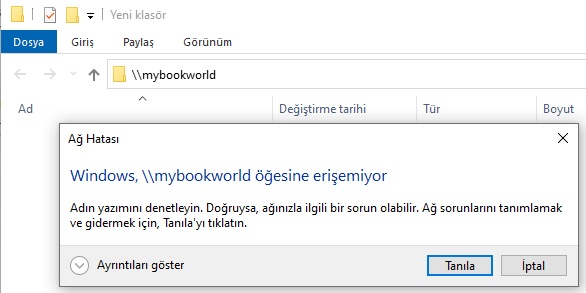
    164641-server.jpg

    164539-hata.jpg

    1 person found this answer helpful.
    0 comments No comments

  2. Limitless Technology 40,076 Reputation points
    2022-01-12T10:30:27.607+00:00

    Hello SheylKahraman

    Have you tried to access using the full domain name of the resource? If that works it may indicate some DNS issue.

    I would suggest the next. From an elevated command prompt run:

    ipconfig /flushdns
    ipconfig /registerdns


    --If the reply is helpful, please Upvote and Accept as answer--

    0 comments No comments

Your answer

Answers can be marked as 'Accepted' by the question author and 'Recommended' by moderators, which helps users know the answer solved the author's problem.

